

Update Chrome Now: Google Fixes Actively Exploited Zero-Day CVE-2026-125350
Google fixed an actively exploited Chrome zero-day, CVE-2026-125350. Which versions fix it, how to update Chrome on every device, and Edge and Brave fixes.

If you haven’t restarted Chrome in a while, now’s the time. Google patched a high-severity zero-day, CVE-2026-125350, on November 9, and its Chrome release notes say: “Google is aware that an exploit for CVE-2026-125350 exists in the wild.” The US Cybersecurity and Infrastructure Security Agency added it to its Known Exploited Vulnerabilities catalog on November 10 and gave federal agencies until November 24 to patch. BleepingComputer counts it as the eighth Chrome zero-day exploited this year. Microsoft Edge, Opera and Brave run on the same engine and needed the fix too.
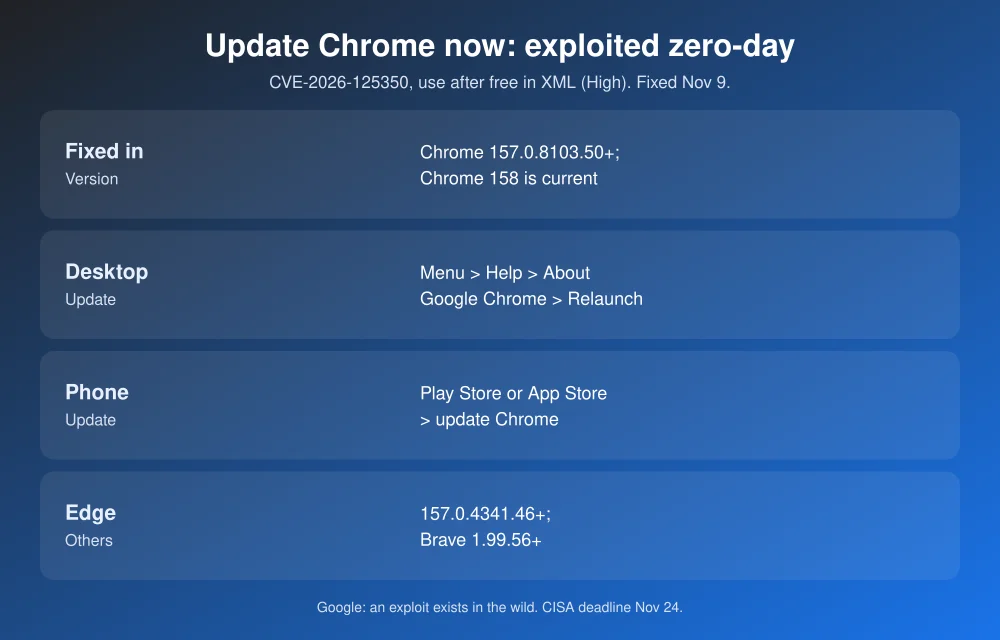
Quick answer: Update Chrome to 157.0.8103.50 or later. Chrome 158 is now the current version. On a computer, open Menu (⋮) > Help > About Google Chrome, let it download, and click Relaunch. On Android, update Chrome in the Play Store. On iPhone, update it in the App Store. Edge users need 157.0.4341.46 or later. The flaw is a “use after free in XML” bug that attackers are already exploiting, so don’t wait.
What Google fixed
- Flaw: CVE-2026-125350, a high-severity “use after free in XML” bug. Use-after-free bugs can let a malicious web page run code on your device.
- Exploited: Google says an exploit “exists in the wild.” It hasn’t said who used it or against whom.
- Reported by: Arni Hardarson of Neonix Security on October 12, and an anonymous researcher on November 6.
- Fixed in: Chrome 157.0.8103.50/.51 for Windows and Mac, 157.0.8103.50 for Linux and Android, released November 9. Extended Stable 156.0.8078.96 also has the fix.
Google has shipped more updates since: Chrome 157.0.8103.78 on November 11 with 83 security fixes, and Chrome 158 on November 17 with 204 security fixes. Being on 158 covers you.
How to update Chrome
On Windows, Mac or Linux
- Open Chrome and click the three-dot menu in the top right.
- Go to Help > About Google Chrome.
- Chrome checks for and downloads the update.
- Click Relaunch. Your open tabs come back.
- Confirm the version is 157.0.8103.50 or later.
On Android
Open the Play Store, tap your profile icon, then Manage apps & device > Updates available, and update Chrome. You can also search for Chrome and tap Update.
On iPhone and iPad
Open the App Store, tap your profile icon, and update Chrome, or search for Chrome and tap Update. Google’s iOS release notes don’t list this CVE, but staying current is still the safest move.
Edge, Brave and Opera
- Microsoft Edge: fixed in 157.0.4341.46 (November 9) and Extended Stable 156.0.4314.80, per Microsoft’s Edge security notes. Update at Settings > About Microsoft Edge.
- Brave: version 1.99.56 (November 10) moved to the patched Chromium engine.
- Opera: CISA lists Opera as affected. Update from its menu under Update & Recovery.
Chrome showing other errors? See our fixes for the “Not secure” warning and “server IP address could not be found”. If you think you were hacked, follow our data breach checklist.
FAQs
What is CVE-2026-125350?
It’s a high-severity use-after-free bug in Chrome’s XML handling. Google says attackers are already exploiting it, and it fixed it on November 9, 2026.
Which Chrome version fixes the zero-day?
Chrome 157.0.8103.50 and later on Windows, Mac, Linux and Android. Chrome 158 also includes the fix.
Is Microsoft Edge affected?
Yes, Edge uses the same engine. Microsoft fixed it in Edge 157.0.4341.46. Update in Settings > About Microsoft Edge.
How do I know if Chrome is up to date?
Go to Menu > Help > About Google Chrome. It shows your version and says “Chrome is up to date” once you’ve relaunched.
Featured image: Google.
Disclosure: TheTechHacker has no paid relationship with Google, Microsoft or any company mentioned here.
More in News
November 2026 Patch Tuesday: Outlook Zero-Day Fixed, USB Audio Code 10 Bug Finally Solved
Patch Tuesday landed on November 10 this month, and for once the Outlook part of the release matters more than the Windows part. Microsoft fixed a spoofing bug in Outlook (CVE-2026-124194) that it says was already being exploited before the patch was ready, and that fix doesn’t come through Windows Update at all, it comes…
Android November 2026 Security Update Fixes 216 Flaws, but Android 12 and 13 Miss the SMS of Death Fix
Google's November 2026 Android security update fixes 216 flaws, but the SMS of Death crash bug stays unpatched on Android 12 and 13. Here's how to check.
Samsung November 2026 Security Patch: 155 Android Fixes Plus 24 Galaxy Fixes
Samsung's November 2026 security patch brings 155 Android fixes and 24 Galaxy fixes. See what's fixed, which phones get it first and how to install it now.
The week in tech, minus the noise.
New reviews, fixes and the stories that matter — once a week, straight to your inbox.
We only use your email to send the newsletter. Unsubscribe any time. See our privacy policy.
Comments