

Best Video Conversion Software: Handbrake Review (Windows)
In the era of DVDs, Blu-Ray discs, and high-quality videos, a robust video conversion program becomes essential for transforming videos into formats compatible with handheld devices like smartphones and tablets. Understanding Handbrake: Handbrake stands out as an open-source video encoder compatible with Windows, Mac, and Linux systems. Designed to both rip and convert video files,…


Handbrake
In the era of DVDs, Blu-Ray discs, and high-quality videos, a robust video conversion program becomes essential for transforming videos into formats compatible with handheld devices like smartphones and tablets.
Understanding Handbrake:
Handbrake stands out as an open-source video encoder compatible with Windows, Mac, and Linux systems. Designed to both rip and convert video files, Handbrake facilitates playback on a range of supported devices.
Simple Installation:
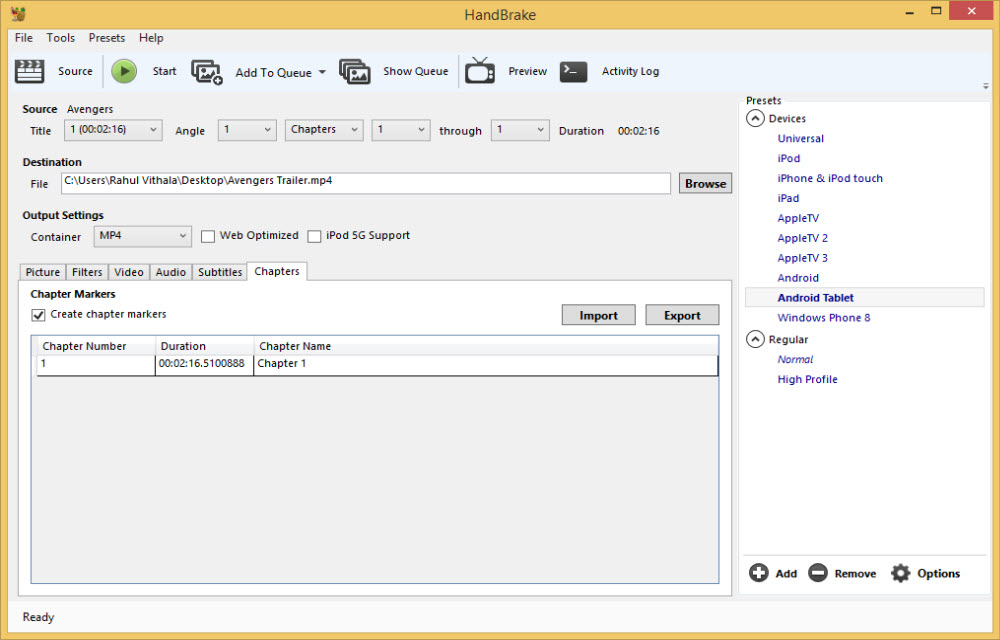
Installation is pretty simple. Download the program and install it on your machine. Upon opening the program, a user-friendly interface awaits, offering various options for high-quality video conversion. The GUI presents presets for different devices, allowing users to easily switch between file formats like MP4 or MKV. Additionally, users can adjust the size of the resulting video for optimal picture quality.
Versatility with Presets:
Handbrake caters to diverse user needs with its array of presets. Whether you’re a casual user or a pro, the program offers flexibility. For advanced users, the settings window provides options to tweak height, width, cropping, deinterlacing, and deblock settings. Presets are conveniently available for encoding videos for popular devices like the PSP, PS3, and Xbox 360.
Efficient Handling of Multiple Videos:
When dealing with a sizable list of videos, Handbrake simplifies the process with its “Add to Queue” mode. Users can customize picture size, cropping, denoise filters, video quality, frames per second (FPS), subtitles, and chapters.
Performance Insights:
Video size, system RAM, and graphics card performance are just a few examples of the variables that affect conversion time. In a real-world scenario, a 2GB video file took approximately 24 minutes to convert on a machine equipped with a Core i3 processor, 8GB RAM, and a 1GB DDR3 256Bit graphics card.
Verdict:
In conclusion, Handbrake emerges as an exceptional program for swiftly converting videos, catering to both small and large files for various devices. Its simplicity, paired with powerful features, makes it accessible to users of all proficiency levels. To put it simply, Handbrake stands as one of the best video conversion programs, offering a seamless and efficient experience.
More in Windows

Best Free Alternatives To Camtasia Studio
Camtasia Studio is a well-known screen recording or screencasting software for Windows. After checking the price, only some people can afford it. Screen recording one such task which requires a quality program. A dedicated solution for screen recording will simplify your screen recording job. Remember the best always comes with a price tag. If you…

How to Download Zoom on Windows
Zoom is one of the most popular video conferencing applications today. If you mostly make use of your computer instead of your smartphone for video conferencing, you might want to install it on your Windows PC. This makes it much convenient to make video calls without having to depend on your smartphone even while sitting…

Able2Extract Professional 8 Is A Decent PDF Converter For Windows, Mac And Linux
Looking for a PDF converter tool that can quickly convert PDF Documents into Word, Image and other formats? Able2Extract Professional 8 is a best example of a decent PDF converter, this application is extremely simple and easy to use. Able2Extract PDF Professional 8 file converter is a best cross-platform application works on Windows, Mac and Linux. Able2Extract…
The week in tech, minus the noise.
New reviews, fixes and the stories that matter — once a week, straight to your inbox.
We only use your email to send the newsletter. Unsubscribe any time. See our privacy policy.
Comments