

Chocolatey Brings Linux-Style Package Management to Windows
There are many ways to install software on Windows. Chocolatey Brings Linux-Style Package Management to Windows: If you are a diehard fan of Linux and its package management feature and are missing this feature in the Windows OS,? No problem; Chocolatey brings that convenience to Windows. It uses a PowerShell system to install software using…

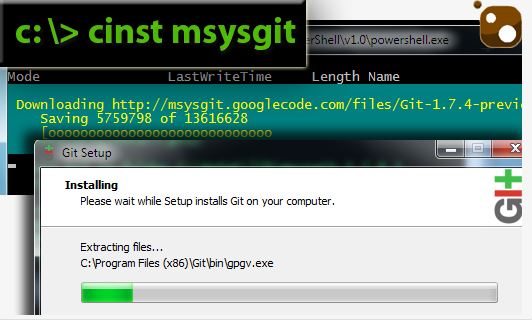
There are many ways to install software on Windows. Chocolatey Brings Linux-Style Package Management to Windows: If you are a diehard fan of Linux and its package management feature and are missing this feature in the Windows OS,? No problem; Chocolatey brings that convenience to Windows. It uses a PowerShell system to install software using commands. It has over 300 popular programs in its database. Famous programs like 7Zip, Filezilla, VLC, Notepad++, and Google Chrome are there. With just a few keystrokes, you can have a program up and running on your system without ever needing to open a browser.
What is Chocolatey?
Easily manage all aspects of Windows software (installation, configuration, upgrade, and uninstallation). Chocolatey is the most reliable when software is included in the package, but can also easily download resources.

To install Chocolatey open your Command prompt copy and paste the given code below.
@powershell -NoProfile -ExecutionPolicy unrestricted -Command "iex ((new-object net.webclient).DownloadString('http://bit.ly/psChocInstall'))" && SET PATH=%PATH%;%systemdrive%\chocolatey\bin


After entering the code in the command box, the program will install. After successful installation of Chocolatey, if you want to install a program using Chocolatey and check for an app’s availability, you can run the clist command with the app name, like thiFileZillacinst. If the program is available in the Chocolatey database it will automatically start downloading and install it withing the Command prompt. Chocolately offers shortcuts here is the list. It feels like a breeze to install a program with a single command.
Chocolatey Shortcodes:
cinst: chocolatey install
cuninst: chocolatey uninstall
cup: chocolatey update
cinstm: chocolatey installmissing
clist: chocolatey list
cver: chocolatey version
cwebpi: chocolatey webpi
cwindowsfeatures: chocolatey windowsfeatures
ccygwinL chocolatey cygwin
Verdict
The app is not good for regular users; only a techie with Linux knowledge can understand the simplicity of the program. It is a very good app for everyone who wants to install their programs in Linux style. Are you interested in using Chocolatey? Share your views and opinions in the comment box.
More in Windows
How To Create A Bootable Windows 11 USB On Linux
WoeUSB is the most reliable and popular method for making a Linux-compatible USB flash drive that can boot Windows 11. WoeUSB handles the formatting, the flashing, and any other configuration settings that may be necessary. The WoeUSB application is not pre-loaded on any of the Linux distributions’ base operating systems by default. We can easily…
Bring Tile Styled And Customizable Start Menu In Windows 8 Using Start Menu Reviver
A significant number of Windows 8 users are without a very helpful function, which is the start menu. Without a button, it might be quite challenging for certain individuals to operate and to become used to traditionally doing things. One of the most helpful features of Windows is the Start menu, which allows users to…

5 Best Download Managers for Windows
When it comes to web browsers, we have many options today. However, everyone has probably experienced this that even some of the most famous web browsers such as Mozilla or Google Chrome cannot fully satisfy the management of downloads. These web browsers are often lacking the resume download feature. And for this reason, you can…
The week in tech, minus the noise.
New reviews, fixes and the stories that matter — once a week, straight to your inbox.
We only use your email to send the newsletter. Unsubscribe any time. See our privacy policy.
Comments