

VSDC Video Editor Is A Free, Simple & Professional Video Editing Tool For Windows
Almost all operating systems offers some basic video editing features. In recent months we have covered various video editing tools for Windows & Mac.


Almost all operating systems offers some basic video editing features. In recent months we have covered various video editing tools for Windows & Mac. Today we are bringing a free must have video editing tool with a ton of professional features for thetechhacker followers. VSDC Video Editor Is a free and simple video editing tool for Windows by Flash-Integro LLC .
VSDC Free Video Editor Review
The user interface itself is a biggest asset for the program. It is built with a simple and intuitive user interface. Creating or opening an existing project, editing and saving the output is very simple. When you launch the application you can start different types of projects to edit your video.
If you want to create a new project from scratch simply click on the New Project button on the top of the UI. After clicking it pop up a new window to create project settings like title, resolution, frame rate and frequency.
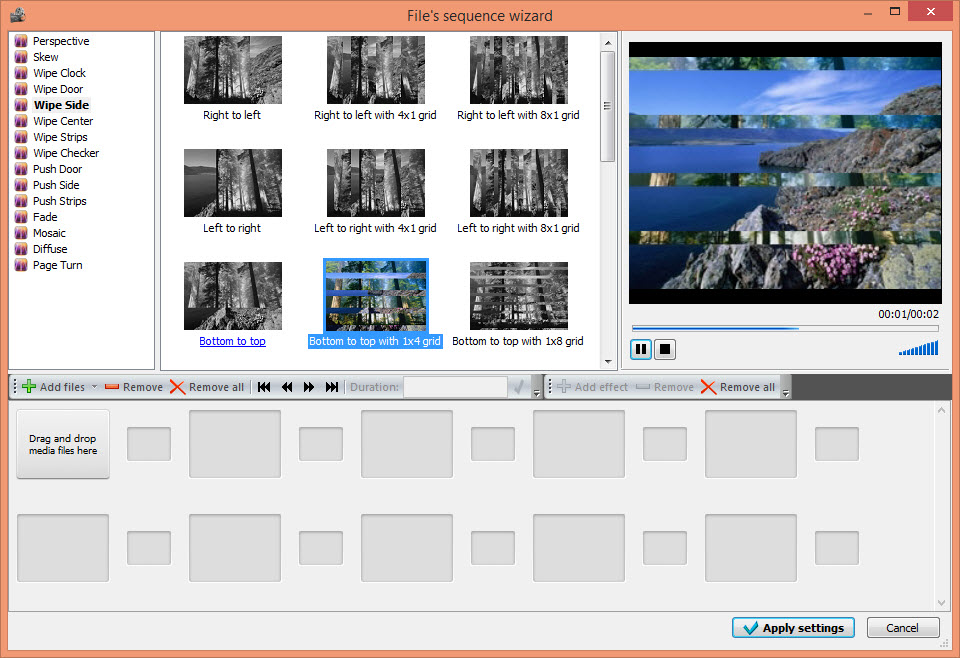
After creating project you can add your desired videos to the program interface by simply drag and drop method. The program offers fifteen types of transition effects like Perspective, Skew, Wipe Clock and Page Turn etc.
To select a desired video effect select a video and choose an effect and click the apply effect to preview the effect on the right panel preview window.
After adding effects you will be proceed to main application user interface. The main user interface carries several options to edit your video in professional manor. You can add different objects, zoom effects and much more. Like in Adobe Photoshop the applied effects are listed on the left side panel.

For the quick view of editing file you can change the view option of various type on the top of the toolbar. Even you can load and delete the scenes using Scenes option on the top of the program.
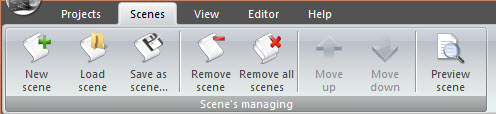
The editor option beside the view option lets you cut, copy, paste, delete and select all the video. It also includes options like Run Wizard for the transitions, Add object for the various types of object to the video, video effects for brightness adjustment and Special FX and ultimately Audio effect option for add amplitude, delay and filters to the audio.
The best part of the program is its non-linear tool, it lets you to add any object to be placed in any position on the video timeline. Apart from the video editing option the program also sports a killer feature which is desktop video capture. It can capture the entire desktop video and you can directly add the effects using the editor. You can download this awesome program for free at http://www.videosoftdev.com/free-video-editor
Conclusion
The VSDC Free Video Editor is a highly convenient tool for video editing. It has almost all options to make a video into a professional looking video.
Features of VSDC Free Video Editor
- Merging and splitting videos
- Removing unwashed fragments and borders
- Various transition effects
- Non-linear video editor
- Visual and audio effects
- Support of popular formats
- Creation of videos for specific multimedia devices
- Built-in DVD burning tool
- Desktop video capture
- Video capturing
More in Windows
Ashampoo Snap 7 Review & Giveaway
Taking screen shots in Windows is performed by Snipping tool or Win+Print Sc. But the snipping not so user friendly and Win+Print Sc captures the entire Window. Ashampoo Snap 7 is a wonderful program to take screen shots easily on Windows. Snap 7 is a brand new version of Snap series in Ashampoo. It is…
Best Free Alternatives To Camtasia Studio
Camtasia Studio is a well-known screen recording or screencasting software for Windows. After checking the price, only some people can afford it. Screen recording one such task which requires a quality program. A dedicated solution for screen recording will simplify your screen recording job. Remember the best always comes with a price tag. If you…
30 Must Have Basic Windows Software For Every PC User
When you reset, format, refresh or bought new PC you should install new software and there are some important or more precisely some ought to install software’s that every user should use doesn’t matter who he is and what he is doing. These are must-have basic apps for every Personal Computer. These software are necessary…
The week in tech, minus the noise.
New reviews, fixes and the stories that matter — once a week, straight to your inbox.
We only use your email to send the newsletter. Unsubscribe any time. See our privacy policy.
Comments