

How to Enable AdSense Direct Bank Transfer Payment Option in India
Recently Google changed the Adsense payment option in India. EFT (Electronic Fund Transfer) is enabled for AdSense users for easy money transfer. This option will directly deposit your Adsense money into your bank account. What is Adsense by the Way? Google Adsense is a very popular monetization system in the world, it runs by Google…


Recently Google changed the Adsense payment option in India. EFT (Electronic Fund Transfer) is enabled for AdSense users for easy money transfer. This option will directly deposit your Adsense money into your bank account.
What is Adsense by the Way?
Google Adsense is a very popular monetization system in the world, it runs by Google and trusted by many bloggers. As per many experts, it is one of the best ways to monetize the blog traffic and make money from it. Adsense provides display ads to the publishers which they can place on their creations like Apps, Websites, Youtube videos, etc. The ads will be created by the Advertisers using another Google service called AdWords. In short, Adsense is a monetization option provided by Google that pays publishers for displaying ads on their websites based on a Number of clicks, or Number of impression basis.
Must read:
- Reasons Why Bloggers Fail To Make Money
- Google Released Google Adsense App For Android
- 3 Ways Content Writers Can Generate Income From
How to enable Adsense Direct Bank Transfer Payment option
Today I will explain to you how to enable AdSense direct transfer payment option in India. Before getting started, you might need to know your Bank IFSC code and Swift code. You can check your IFSC code on cheque book if it is absent call your bank customer care to get the IFSC and Swift code.
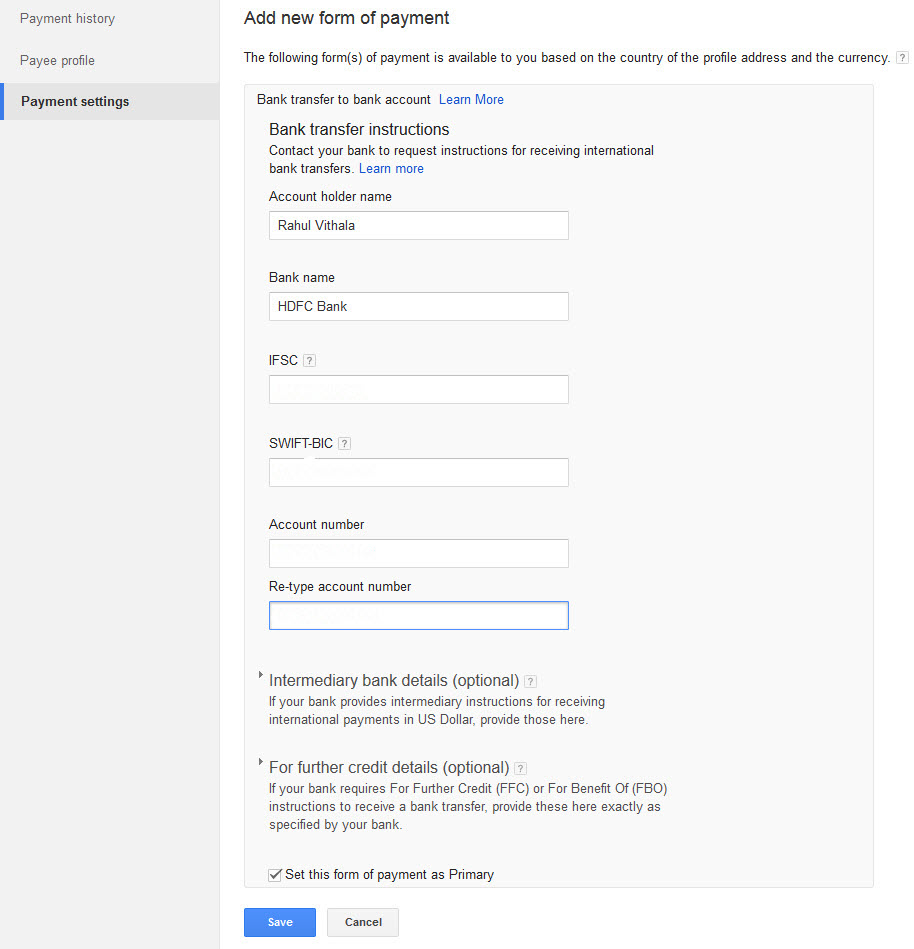
After identifying the IFSC code and Swift code of your bank now open your Google Adsense page and log into your account.
Now click on the gear icon in the top-right corner of the webpage and click on payments. Here click on add a new form of payment, next you need to enter your bank account details, for example, my bank is HDFC and Swift code will look something like HDFCINBBAHM. After entering your details click on save option. From now onward you will receive money directly into your bank account. The process is simple, and anyone can link the bank account to Google Adsense. The process makes the money transfer to bloggers very easy.
Before getting started, please read all the terms and conditions mentioned by Google in AdSense policies.
More in Internet

How To Save Internet Files Directly To Cloud With Ballloon Chrome Extension
Nowadays everyone using cloud services to store files. Typically when we want to save a file from the internet, first we download it to a computer and then upload it to cloud services like Google Drive or Dropbox. You can simplify this process by using Ballloon for Google Chrome extension. If it is a regular…

13 Reasons to Use a VPN for Private Web Browsing
We recently realized that using a VPN is the best method to hide your IP address. But, how exactly a VPN helps to facilitate private web browsing? Why should you use a VPN in the first place? How does a VPN protect you? Fret not, we will take a look at the reasons why we…

How To Access Facebook Chat Without Opening Facebook Site
For example, you can access Facebook chat without opening the Facebook website. The easiest way to communicate with your friends on Facebook is through this method. On the internet, there are only a few alternatives to Facebook chat that are available. You will be able to rapidly share your thoughts, photographs, and videos with others…
The week in tech, minus the noise.
New reviews, fixes and the stories that matter — once a week, straight to your inbox.
We only use your email to send the newsletter. Unsubscribe any time. See our privacy policy.
Comments