

Windows 10 ESU 2027: Free Consumer Security Updates Did Not End in October 2026
Windows 10 ESU 2027: Microsoft now says consumer security updates run to October 12, 2027. Here's how to enroll, check Windows 11 support and plan ahead.

If you’ve heard that free Windows 10 security updates ended on October 13, 2026, you can relax a little. That was the original end date for consumer Extended Security Updates (ESU), but it no longer applies.
Microsoft’s own pages now say enrolled Windows 10 PCs keep getting security updates until October 12, 2027. Here’s what that means and what I’d do with the extra time.
Quick answer: Consumer ESU for Windows 10 did not end in October 2026. Microsoft now says enrolled PCs get critical and important security updates through October 12, 2027, and you can still enroll any time before then. If your PC isn’t enrolled, it hasn’t had routine security updates since October 14, 2025, so enroll now or move to Windows 11.
What happened
Windows 10 support ended on October 14, 2025. Since then, PCs outside ESU get no feature updates, no routine security updates and no technical support, according to Microsoft’s Windows 10 end of support page.
ESU is the safety net. It originally ran until October 13, 2026, but both that page and Microsoft’s Windows 10 Extended Security Updates page now list October 12, 2027 as the end date. Microsoft hasn’t said whether it will extend consumer ESU again, so I’d treat 2027 as the real deadline.
Why it matters
Microsoft says plainly that until you enroll, your PC is more exposed to viruses and malware. That risk only grows as new security holes are found and not patched.
The good news is that enrolling late doesn’t leave you behind. Once enrolled, your PC gets every critical and important update released since October 14, 2025. Just keep in mind that ESU covers security only. You get no new features, no other fixes and no technical support.
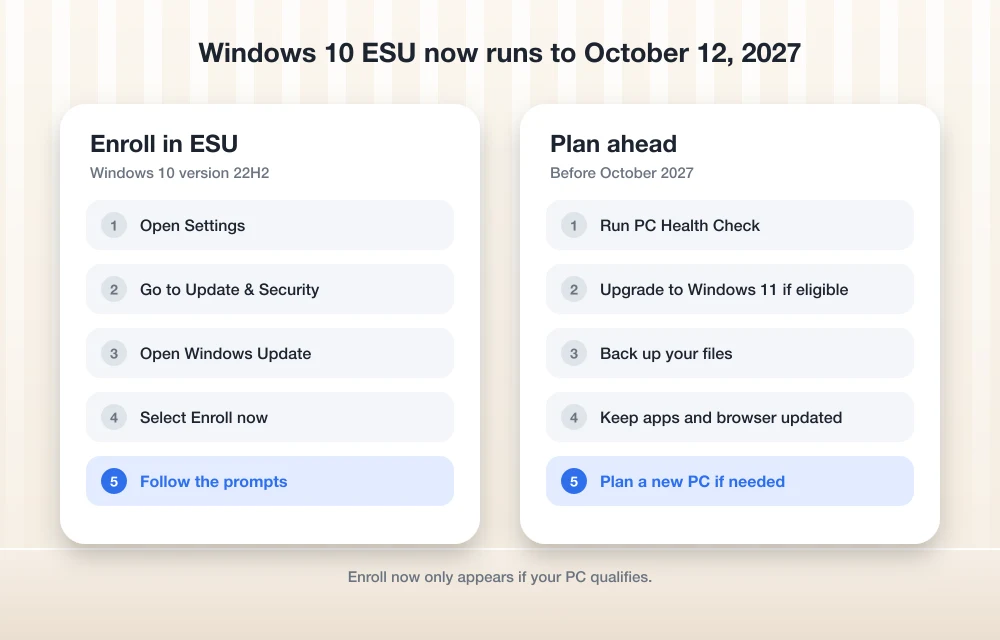
How to enroll in Windows 10 ESU
Your PC needs Windows 10 version 22H2 and a Microsoft account. If you use a local account, Windows will ask you to sign in with a Microsoft account. Microsoft’s page currently lists three ways to enroll:
- Free: sync your PC settings with Windows Backup.
- Microsoft Rewards: redeem 1,000 points.
- Paid: a one-time $30 USD purchase (or local equivalent) plus tax.
One license covers up to 10 devices. To sign up:
- Open Settings and go to Update & Security > Windows Update.
- Select Enroll now. It only appears if your PC qualifies.
- Follow the prompts. Use the same path to add more PCs.
Can your PC run Windows 11?
The free route out of all this is Windows 11, which is a free upgrade on eligible PCs. Microsoft’s PC Health Check app tells you if yours qualifies. Download it from Microsoft, open it and select Check now under the Windows 11 section.
The usual blockers are the processor (it must be on Microsoft’s supported list), TPM 2.0 (a security chip) and Secure Boot. Microsoft also lists at least 4 GB of RAM and 64 GB of storage. I couldn’t recheck Microsoft’s spec page while writing this, so trust the Health Check result over my summary.
If your PC passes, go to Settings > Update & Security > Windows Update and select Check for updates. After upgrading, a couple of hiccups are common, like a missing Wi-Fi option in Windows 11 or a black screen after sign-in, and both are usually fixable.
What if your PC can’t upgrade?
Enroll in ESU. That’s the confirmed option, and it keeps you protected until October 2027. Use that year to plan a move to a Windows 11 PC instead of waiting for the deadline. Meanwhile, these tips to speed up your Windows 10 PC can keep an older machine usable.
For Office users, Microsoft has said Microsoft 365 apps will keep getting security updates on Windows 10 until October 10, 2028. I couldn’t reconfirm that date this time, so don’t plan around it until you’ve checked Microsoft’s Microsoft 365 support page.
What’s next
My advice is simple. If you’re still on Windows 10, enroll in ESU today, then run PC Health Check. If it says yes, upgrade. If it says no, you have until October 12, 2027 to replace the PC, and I wouldn’t count on another extension.
Frequently Asked Questions
Did free Windows 10 ESU end on October 13, 2026?
No. October 13, 2026 was the original date, but Microsoft’s official pages now say consumer ESU runs until October 12, 2027. You can still enroll any time before then and you’ll get all critical and important updates released since October 14, 2025.
Is Windows 10 ESU free?
It can be. Microsoft lists a free option if you sync your PC settings with Windows Backup. You can also redeem 1,000 Microsoft Rewards points or pay a one-time $30 USD (or local equivalent) plus tax, covering up to 10 devices. Your PC needs Windows 10 version 22H2 and a Microsoft account.
Will Microsoft extend Windows 10 ESU beyond 2027?
Microsoft hasn’t said. Treat October 12, 2027 as the deadline and plan to move to Windows 11 before then.
More in News
Pixel 6 and Pixel 6 Pro Reach End of Support: October 2026 Was Their Last Update
Google's October 2026 Pixel update was the last for the Pixel 6 and 6 Pro. Here's what it means, how to check, and why the Pixel 6a isn't affected.
GTA 6 Preload Starts November 10 on PS5 and Xbox Series X|S
GTA 6 preload opens November 10 on PS5 and Xbox Series X|S, ahead of the November 19 launch. See the reported 212GB size, unlock time and preload steps.
Samsung November 2026 Security Patch: 155 Android Fixes Plus 24 Galaxy Fixes
Samsung's November 2026 security patch brings 155 Android fixes and 24 Galaxy fixes. See what's fixed, which phones get it first and how to install it now.
The week in tech, minus the noise.
New reviews, fixes and the stories that matter — once a week, straight to your inbox.
We only use your email to send the newsletter. Unsubscribe any time. See our privacy policy.
Comments