

How to Fix ‘SIM Not Provisioned’ After Switching Carriers on iPhone and Android
Seeing “SIM Not Provisioned” or MM#2 after switching carriers? Here’s what the message means and the fixes I’d try, in order, on iPhone and Android.

SIM-Not-Provisioned-Featured
You picked a new carrier, got the new SIM or eSIM, and maybe even sat through the number transfer. Then your phone flashes “SIM Not Provisioned” and you can’t call, text or get online. Frustrating, especially when you were excited about a cheaper plan.
The good news is that this message usually doesn’t mean your phone is broken. In most cases your new carrier hasn’t finished setting up the line, or something on the phone is still tied to your old carrier.
In this guide I’ll explain what the message and its cousins (“SIM not provisioned MM#2”, “No SIM” and “SIM not supported”) usually point to. Then I’ll go through the fixes in the order I’d try them on iPhone and Android. The steps apply to AT&T, Verizon, T-Mobile and the prepaid brands that run on their networks.
Quick answer: “SIM Not Provisioned” means your new carrier hasn’t fully activated your SIM or eSIM yet. Give the number port time to finish, restart the phone and reseat a physical SIM. If the error stays, install any carrier settings update, confirm the phone isn’t still locked to your old carrier, and reset network settings. If none of that works, your new carrier has to activate or reissue the SIM on their end.
What “SIM Not Provisioned” Actually Means
“Provisioning” is carrier jargon for setting up a SIM on the network so it’s linked to your account, your plan and your phone number. When your phone says the SIM isn’t provisioned, it sees a SIM, but the network isn’t treating it as an active line yet.
After a carrier switch, that usually comes down to timing or paperwork on the carrier’s side rather than a hardware fault. Your phone can’t fix the carrier’s records, which is why some of the fixes below end with a call to support.
SIM Not Provisioned vs MM#2, No SIM and SIM Not Supported
The exact wording depends on your phone and carrier. Here’s how I’d read each one.
| Message | What it usually points to | Where I’d start |
|---|---|---|
| SIM Not Provisioned | The SIM or eSIM isn’t active on the new carrier yet, often because the port is still in progress | Fix 1 and Fix 4 |
| SIM not provisioned MM#2 | Commonly described as the SIM not being activated yet, or being deactivated by the carrier (not officially confirmed) | Fix 4, then Fix 10 |
| No SIM / Invalid SIM | The phone can’t read the SIM properly, or there’s no active plan | Fix 2 to Fix 4 |
| SIM not supported | Often a sign the phone is still locked to your old carrier | Fix 6 |
I want to be upfront about MM#2. I couldn’t find an Apple, Google or carrier support page that officially explains that code. The common explanation is that the SIM hasn’t been activated yet or has been deactivated by the carrier. That fits with everything else here, but treat it as the likely meaning, not an official definition.
Why It Happens After Switching Carriers
The most common reason is simple. Your number port is still going through. Until your old carrier releases the number and your new one finishes taking it over, the new SIM can sit in a half-ready state.
Sometimes the SIM or eSIM itself was never activated. This can happen with SIM kits bought in a store or online, where activation is a separate step you finish in the carrier’s app or on its website.
The phone can be the problem too. If it’s still locked to your old carrier, it won’t work properly with a SIM from a new one. Outdated carrier settings on an iPhone, or a wrong APN (the Access Point Name, basically the address your phone uses to reach the carrier’s data network), can add to the confusion.
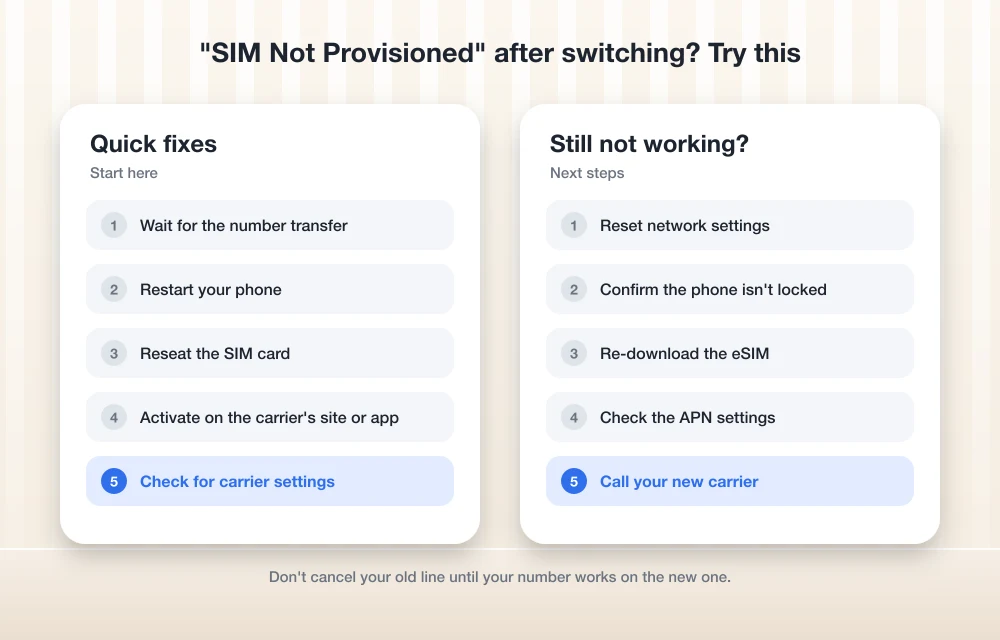
Fix 1: Give the Number Port Time to Finish
If you only just switched, wait before doing anything drastic. I couldn’t confirm an official port timeline from AT&T, Verizon or T-Mobile. Ports often finish within minutes to a few hours, but some take a day or longer.
Check your new carrier’s app or your online account for the status of your order. If the number still shows as transferring, the error is probably just the port catching up. If you haven’t started the move yet, or want to double-check the details you gave, my guide on how to switch carriers and keep your phone number walks through the whole process.
Fix 2: Restart Your Phone
Apple lists a restart as one of its first steps for SIM errors, and it’s worth doing on Android too. A restart makes the phone connect to the network fresh, which can be all it takes once the carrier finishes its side.
Do a full power off and power on, not just a screen lock. If the port finished while your phone was on, this can be the moment the bars come back.
Fix 3: Take Out the SIM and Put It Back
For a physical SIM, eject the tray, check the card sits flat, put it back and make sure the tray closes fully. That’s straight from Apple’s guide for invalid or missing SIM errors, and the same idea applies to Android phones.
One detail people miss: Apple says a SIM tray from a different iPhone model, or from another phone maker, may not fit properly. If you’ve swapped trays at some point, put the original back.
If the error sticks around after the other steps, Apple suggests trying a different physical SIM. Your new carrier can swap yours for a replacement.
Fix 4: Make Sure the SIM or eSIM Is Activated
Apple’s very first check is whether you have an active plan. It sounds obvious. After a switch, though, it’s easy to assume the line is live when it isn’t.
Log in to your new carrier’s app or website and look at the line. If the SIM or eSIM shows as pending, inactive or not set up, finish the activation there or ask the carrier to push it through. This is the step I’d lean on hardest if you’re seeing the MM#2 version of the error.
Fix 5: Install a Carrier Settings Update (iPhone)
Carrier settings are small files that tell your iPhone how to work with a specific network. Apple says you might need to download your new carrier’s settings after you set up a new eSIM or put in a new SIM, so this one matters right after a switch.
- Connect to Wi-Fi or cellular data.
- Open Settings > General > About.
- If an update is available, you’ll see a prompt. Follow it to install.
Apple says the update installs in under a minute. If the prompt has an “OK” button instead of “Update”, it’s a mandatory update. You can also see your current carrier settings version next to “Carrier” on the same About screen, and tapping it shows more detail. Apple’s advice is to ask your carrier to confirm you have the latest version.
I couldn’t confirm an equivalent pop-up that works the same way across Android brands. The closest thing I’d do there is install any pending system update while you’re on Wi-Fi.
Fix 6: Check Whether Your Phone Is Still Carrier-Locked
A carrier lock ties a phone to the network that sold it. If you bought your phone from your old carrier and it’s still locked, a SIM from your new carrier won’t work properly, and you may see “SIM not supported” or a similar message. I’d check this before resetting anything, since no setting on your phone can remove the lock.
On iPhone
- Go to Settings > General > About.
- Find Carrier Lock.
- If it says “No SIM restrictions”, your iPhone isn’t locked. If you see anything else, contact the carrier that sold you the phone.
On Android
Menus differ by brand, and I couldn’t confirm a single official path. On a Pixel, look under Settings > About phone > SIM status, or for a lock-related option under Settings > Network & internet. On other phones, the most reliable answer comes from the carrier that sold you the device.
What the big three carriers require
If your phone is locked, your old carrier has to lift the lock. Here’s what their own policy pages say.
| Carrier | Main requirements | Timing |
|---|---|---|
| Verizon (postpaid) | Phone’s full balance paid with a secure payment method | Lock removed immediately once paid; 35-day delay if a Verizon Gift Card was used |
| Verizon (prepaid) | 365 days of paid, active service | Stays locked until then |
| AT&T | Not reported lost, stolen or involved in fraud; contract or installment plan paid off; not active on another AT&T account; at least 60 days of active service with no past-due balance; AT&T PREPAID needs at least 6 months of active service | If you pay off early, request again after 24 hours; wait 14 days after an early upgrade (30 for business) |
| T-Mobile | Sold by T-Mobile; not reported lost, stolen or blocked; account in good standing; paid in full if financed or leased | Eligible phones are cleared remotely within 2 business days if the phone supports it; otherwise you get a notification with next steps |
Verizon’s device lock policy also says it never re-locks a phone. One warning on the same page caught my eye: a Verizon phone that’s free of the lock “may have limited functionality or may not work at all” on another carrier’s network. So even with the lock gone, ask your new carrier to confirm your exact model works on their network.
T-Mobile customers can check the lock status in their My T-Mobile account. If you’re coming from a prepaid brand, its rules may differ from the parent carrier’s, so check that brand’s own policy page. I couldn’t confirm the current rules for every budget brand.
Fix 7: Reset Network Settings
If the line is active and the phone isn’t locked but the error won’t budge, a network reset clears out old cellular and Wi-Fi settings that may still point at your previous carrier. Have your Wi-Fi password handy, because you’ll need to rejoin your network afterward.
On iPhone
- Open Settings > General > Transfer or Reset iPhone.
- Tap Reset, then Reset Network Settings.
- Confirm when asked.
That’s the path Verizon’s own support page lists for iPhone.
On Android
On a Pixel, it’s usually Settings > System > Reset options > Reset mobile network settings. On a Samsung Galaxy, try Settings > General management > Reset > Reset network settings. Menu names shift between software versions, so if you don’t see these, type “reset network” into the search bar in Settings.
Fix 8: Check the APN
The APN tells your phone how to connect to the carrier’s data network. A wrong APN is more likely to break mobile data than to cause the SIM error itself, but it can show up as part of the same mess after a switch.
On iPhone, carrier settings usually take care of this, and I wouldn’t touch it unless your carrier tells you to. On Android, APN settings sit in the mobile network settings. Either way, get the exact values from your new carrier’s support site or support team rather than copying them from a random forum post.
Fix 9: Re-download or Reissue the eSIM
For eSIM, Apple’s advice is short: contact your carrier. An eSIM is a digital SIM built into the phone, so you can’t pull it out and reseat it. If the profile didn’t install properly, or the line wasn’t ready when you set it up, the fix is usually a fresh eSIM from the carrier.
Ask your new carrier to reissue the eSIM so you can download it again. I’d hold off on deleting the existing eSIM from your phone until they tell you to, so you’re not left with nothing while you wait for the new one.
Fix 10: Contact Your New Carrier
If you’ve worked through everything above, the problem is very likely on the carrier’s side, and only they can fix it. Reach out to your new carrier, not your old one, unless your question is about the carrier lock.
Tell them the exact wording of the error (including MM#2 if you see it), whether your port finished, and which steps you’ve already tried. That saves you from being walked through a restart for the third time. Ask them to confirm the SIM or eSIM is active on your account and that your phone is compatible with their network.
If you’re on AT&T with a new iPhone and the error has turned into No Service or SOS, my guide on fixing iPhone 18 Pro Max No Service or SOS on AT&T covers that specific situation.
My Take: What to Try First
If I had just switched carriers and saw this message, I’d give it a few hours, restart, and check the line in the carrier’s app before touching anything else. Usually it’s the carrier catching up, not you doing something wrong.
If it’s still there the next day, go straight to the carrier lock check and then contact your new carrier. Those two cover the problems you can’t fix from your phone’s settings. And once you’re back online, take a few minutes to read up on how to protect your SIM card from hackers. A fresh SIM on a new account is a good moment to lock things down.
Frequently Asked Questions
What does SIM Not Provisioned mean?
It means your phone can see a SIM or eSIM, but your carrier’s network isn’t treating it as an active line yet. After a carrier switch, that’s usually because activation or the number port hasn’t finished.
What does SIM not provisioned MM#2 mean?
I couldn’t find an official Apple, Google or carrier explanation of the MM#2 code. It’s commonly described as the SIM not being activated yet or being deactivated by the carrier, so the best move is to confirm activation with your new carrier.
How long does a number port take when switching carriers?
I couldn’t confirm an official timeline from AT&T, Verizon or T-Mobile. Ports often finish within minutes to a few hours, but some take a day or longer. Your new carrier can tell you the exact status of yours.
How do I check if my iPhone is carrier-locked?
Go to Settings > General > About and look next to Carrier Lock. If it says “No SIM restrictions”, your iPhone isn’t locked to a carrier.
When does Verizon remove the carrier lock?
For postpaid phones, Verizon says it removes the lock immediately once the full device balance is paid with a secure payment method, with a 35-day delay if a Verizon Gift Card was used. Verizon prepaid phones stay locked until 365 days of paid, active service.
More in How-to
How To Resolve iPhone 17 Stuck in SOS Service
Learn how to fix your iPhone 17 when it’s stuck in SOS mode, preventing normal cellular connection.
How to Switch Carriers and Keep Your Phone Number (AT&T, Verizon, T-Mobile)
Thinking about leaving AT&T, Verizon or T-Mobile? Here’s how to switch carriers in the US without losing your phone number, from getting your transfer PIN to handling a port that fails.
How to Fix iPhone 18 Pro Max No Service or SOS on AT&T
Is your iPhone 18 Pro Max stuck on SOS or No Service on AT&T? Here’s how to tell if it’s the issue Apple has acknowledged, what to try first, and how to get a replacement.
The week in tech, minus the noise.
New reviews, fixes and the stories that matter — once a week, straight to your inbox.
We only use your email to send the newsletter. Unsubscribe any time. See our privacy policy.
Comments