

How to Fix iPhone 18 Pro Max No Service or SOS on AT&T
Is your iPhone 18 Pro Max stuck on SOS or No Service on AT&T? Here’s how to tell if it’s the issue Apple has acknowledged, what to try first, and how to get a replacement.

Fix-iPhone-18-Pro-Max-No-Service-ATT
If your iPhone 18 Pro Max suddenly shows SOS or No Service on AT&T and you can’t call, text or use mobile data, you’re not alone. People in the US have been reporting this since the phone launched, and Apple has now acknowledged the problem.
This isn’t a normal glitch. With most phones, I’d tell you to restart, reset a couple of settings and get on with your day. Here, Apple says phones that have already lost service need a hardware replacement. So the real job is working out quickly whether you have this specific issue or something more ordinary.
I’ll walk you through how to tell the difference, which quick checks are worth doing first, and how to get a replacement through Apple or AT&T.
Quick answer: Apple said in a statement to media outlets that a small number of iPhone 18 Pro Max units on AT&T can lose service and be unable to make calls. If your phone has already lost service, Apple says a software update won’t bring it back and you need a hardware replacement through Apple Support, AT&T, an Apple Store or an AT&T store. If your phone still works, update to iOS 27.0.1 or later and install the AT&T carrier settings update to protect it.
What Apple and AT&T Have Said
Apple hasn’t published a support page about this issue. Everything official so far comes from a statement Apple gave to media outlets on October 2, 2026. In it, Apple said: “We have identified an issue affecting a small number of iPhone 18 Pro Max users on the AT&T network that may cause a device to lose service and be unable to make calls.”
Here’s what else Apple said in that statement, as reported:
- It has only seen the issue on the iPhone 18 Pro Max on the AT&T network.
- It released iOS 27.0.1 and urged all iPhone 18 Pro Max users to update now.
- On October 2, it started pushing an AT&T carrier settings update to stop more phones from being affected. That update downloads automatically for AT&T users over 14 days.
- Phones that have already lost service can’t get it back with a software update and need a hardware replacement.
- Affected users should contact Apple Support or AT&T, or go to an Apple Store or AT&T store.
An AT&T spokesperson also told media outlets: “we are working with Apple to make it right.” AT&T has reportedly been texting customers to update right away. I couldn’t confirm that on AT&T’s own pages, so treat it as reported only.
What nobody has explained yet is the cause. As of early October, neither Apple nor AT&T had said why this happens.
What the Symptoms Look Like
Affected phones reportedly can’t make calls, send texts or use cellular data on AT&T, and they show SOS in the status bar (the strip of icons at the top of your screen). Not every iPhone 18 Pro Max on AT&T is affected, so don’t panic just because you own one.
It helps to know what those status bar messages actually mean. Apple explains them in its guide on what to do if you see No Service, Searching or SOS on your iPhone:
| Status bar shows | What Apple says it means |
|---|---|
| SOS or SOS only | Your iPhone isn’t connected to your carrier’s network, but it can still make emergency calls through other carriers’ networks. |
| No Service or Searching | Your iPhone isn’t connected to any cellular network. |
So SOS means the phone can still reach emergency services. It just can’t get onto AT&T. That matches what affected owners describe.
How to Confirm It’s This Issue
Apple hasn’t shared a cause or an official test for this problem, so there’s no single check that proves it. But a few things point strongly one way or the other.
Check your model and carrier
This is the biggest clue. Apple says it has only seen the issue on the iPhone 18 Pro Max on AT&T. If you have an iPhone 18 Pro, or a Pro Max on another carrier, your problem is most likely something else.
There are reports that US iPhone 18 Pro Max models use a Qualcomm modem (the chip that connects your phone to the cellular network), while the iPhone 18 Pro uses Apple’s own C2 modem and hasn’t been affected. That might explain the Pro vs Pro Max split, but Apple hasn’t confirmed it. Reports also say Pro Max phones on Verizon or T-Mobile are fine. Again, Apple’s own wording is simply that it has only observed the issue on AT&T.
If your phone isn’t a Pro Max on AT&T, our guide on how to resolve an iPhone stuck in SOS covers the more common causes.
Try another carrier’s SIM or eSIM
If you can borrow a SIM card or set up an eSIM from a different carrier, it’s a classic troubleshooting test. To be clear, this is general advice, not a method Apple has published for this issue.
If the phone connects fine on another carrier but stays on SOS with AT&T, that fits the pattern Apple described. One thing to know: Apple says that when you insert a new SIM or set up a new eSIM, you may need to download the carrier settings for that new carrier before it works properly.
Run Apple’s diagnostics
Apple says that on iOS 18 or later, the latest Apple Support app can run extra diagnostics. It won’t necessarily name this exact problem, but it’s worth running before you contact support so you have something to show them.
Quick Checks to Try First
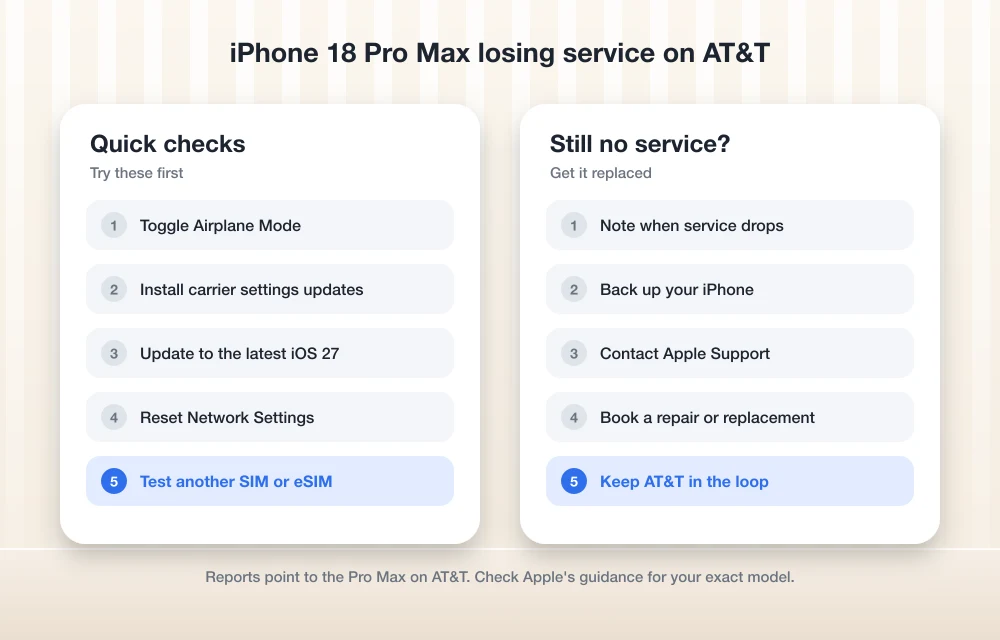
Let me be honest here. According to Apple, none of these will fix a phone that already has this fault. But they rule out simpler problems, and I’d always want those out of the way before handing over a phone. They’re also close to the steps Apple lists in its own SOS guide.
Since your cellular connection is down, connect to Wi-Fi before you start. Some of these steps need an internet connection.
- Restart your iPhone. It’s basic, but it’s one of the steps Apple lists in its own troubleshooting.
- Turn Airplane Mode on and off. Leave it on for a few seconds, then turn it off. This makes the phone try to reconnect to the network from scratch.
- Check for a carrier settings update. Go to Settings > General > About. If an update is available, you’ll see an onscreen prompt, so follow it. You can see your current version next to “Carrier” on that same screen, and tap it for more details. Apple explains this in its guide to updating carrier settings on your iPhone. This step matters more than usual here because of the AT&T update Apple started pushing on October 2.
- Check your AT&T line and eSIM. If you use Dual SIM, Apple’s troubleshooting includes checking your lines and SIM or eSIM setup, plus your Cellular Data Options. Make sure your AT&T line is turned on and is the one selected for data.
- Update to the latest iOS 27. At minimum you want iOS 27.0.1, the update Apple pointed to in its statement, but any newer version is better. If you’ve run into other iOS 27 bugs along the way, such as the iPhone freezing when you move widgets in iOS 27, we have a separate guide for that.
- Reset Network Settings. Go to Settings > General > Transfer or Reset iPhone > Reset > Reset Network Settings. This clears saved Wi-Fi networks and passwords, cellular settings, and VPN and APN settings, so you’ll need to rejoin your Wi-Fi afterwards. I’d do this one last.
If service comes back and stays back, you probably had a different, simpler problem. If you’re still stuck on SOS after all of this, and you have a Pro Max on AT&T, it’s time to go for the replacement.
Phone Still Working? Protect It Now
If your iPhone 18 Pro Max on AT&T still has service, don’t wait. Apple urged all iPhone 18 Pro Max users to update to iOS 27.0.1, and the AT&T carrier settings update is meant to stop more phones from being affected.
Apple said that carrier update would download automatically over 14 days. I couldn’t confirm whether the rollout has reached everyone yet, so I’d check manually anyway. Open Settings > General > About and see if a prompt appears. It takes less than a minute, and it’s a lot less hassle than a trip to the store.
How to Get a Replacement From Apple or AT&T
Apple said affected users should contact Apple Support or AT&T, or go to an Apple Store or AT&T store. So you have four routes, and you can pick whichever is easiest for you.
Before you go
Back up your iPhone over Wi-Fi first. You’re handing over the phone and getting a different one back, so you want all your photos, messages and app data safe. Our checklist on what to do before selling an iPhone walks through backing up and getting a phone ready to hand over, and most of it applies here too. Make sure you know your Apple Account password as well, since you’ll need it to restore your backup on the new phone.
Things I couldn’t confirm
Apple’s statement doesn’t say whether the replacement is free or covered under warranty. It also doesn’t mention loaner phones or whether you need an appointment. I’d ask all three questions when you contact Apple Support or AT&T, and I’d check before turning up at a store rather than just walking in.
After the swap
It’s been reported that you’ll need to activate your AT&T line on the replacement phone. Apple hasn’t confirmed this, but it makes sense to ask the staff to check that your line works before you leave. Make a quick test call right there. Then restore your backup and you’re good to go.
My Take
This is one of those rare cases where the usual fixes won’t save you. If you have an iPhone 18 Pro Max on AT&T and it’s stuck on SOS even after the quick checks, don’t spend hours resetting things. Apple has said it needs a hardware replacement, so back up your phone and contact Apple or AT&T.
And if your Pro Max is still working, take two minutes today to update iOS and check for the carrier settings update. That’s the best protection Apple has offered so far. I’ll update this guide if Apple or AT&T share the cause or more details about the replacement process.
Frequently Asked Questions
Will a software update fix my iPhone 18 Pro Max if it already shows SOS on AT&T?
No. Apple said in a statement to media outlets that phones that have already lost service can’t get it back with a software update and need a hardware replacement.
Is the iPhone 18 Pro affected by the AT&T No Service issue?
Apple said it has only seen the issue on the iPhone 18 Pro Max on the AT&T network. Reports say the iPhone 18 Pro hasn’t been affected, but Apple hasn’t explained why.
Are iPhone 18 Pro Max phones on Verizon or T-Mobile affected?
Apple’s statement says it has only observed the issue on AT&T. Reports say Verizon and T-Mobile users aren’t affected, but Apple hasn’t said that directly.
How do I get my iPhone 18 Pro Max replaced, and is it free?
Apple said affected users should contact Apple Support or AT&T, or go to an Apple Store or AT&T store. Its statement doesn’t say whether the replacement is free, covered under warranty, or comes with a loaner phone, so ask when you get in touch.
What should I do if my iPhone 18 Pro Max on AT&T still works?
Update to iOS 27.0.1 or later, then go to Settings > General > About to check for the AT&T carrier settings update. Apple said these steps are meant to stop more phones from being affected.
More in How-to
How to Fix iPhone 18 Pro and Pro Max Overheating
Is your iPhone 18 Pro or Pro Max running hot? Here’s how to tell normal warmth from a real problem, what Apple’s temperature guidance says, and the checks to try before you book a repair.
How to Fix iPhone 18 Pro Restarting When Face ID Fails or During Apple Pay
If your iPhone 18 Pro restarts when Face ID fails, Apple has fixed that bug in iOS 27.0.1. This guide covers how to update, what to try next, and what is still unknown about the Apple Pay shutdowns.
How to Fix iPhone 18 Pro and Pro Max Speaker Crackling and Popping
Hearing crackles, pops or ticks from your iPhone 18 Pro or Pro Max earpiece? Here’s how to tell software from hardware, which settings to check, and when to take it to Apple.
The week in tech, minus the noise.
New reviews, fixes and the stories that matter — once a week, straight to your inbox.
We only use your email to send the newsletter. Unsubscribe any time. See our privacy policy.
Comments