

Best Managed WordPress Hosting in 2026: WP Engine vs Kinsta vs Cloudways vs SiteGround vs Pressable
I compare WP Engine, Kinsta, Cloudways, SiteGround and Pressable on caching, staging, backups, CDN, visit limits and pricing. I only use figures confirmed on official pages and flag anything I couldn’t verify.


Photo by Domenico Loia on Unsplash
Every managed WordPress host says it’s fast. But the number that actually moves your bill, the visit allowance, usually sits on a support page instead of the pricing page. Not ideal. This guide compares the five hosts US site owners ask about most: WP Engine, Kinsta, Cloudways, SiteGround and Pressable.
I’m covering caching, staging, backups, CDN, support, visit limits and pricing. WP Engine and Pressable publish solid official figures. For Kinsta, Cloudways and SiteGround you get a list of what to check instead, because I won’t print numbers I can’t back up. And it’s a spec and pricing comparison, not a speed test. So no benchmark charts.
Quick answer: If you want published limits and a low entry price, Pressable is the easiest to size up. Its Signature 1 plan is $20.83/mo billed annually ($250/yr) with up to 30K visits, and SSL, CDN and backups come with every plan. WP Engine is the stronger pick if you want one-click staging, daily backups and a growth path up to Core at $400/mo for up to 150 sites. Kinsta, Cloudways and SiteGround might suit you too, but I couldn’t confirm their current prices or limits on their official pages, so check those directly before you buy.
What managed WordPress hosting actually does for you
On regular shared hosting, you rent space on a server and look after WordPress yourself. Managed WordPress hosting hands that work to the host: updating WordPress and PHP (the language WordPress runs on), taking backups, and tuning the server so WordPress loads quickly.
You’ll see four terms over and over. Caching keeps prebuilt copies of your pages, so the server doesn’t rebuild them for every visitor. Staging gives you a private copy of your site where you can try a plugin or theme before it goes anywhere near production. A CDN (content delivery network) is a set of servers in different regions that hand your images and files to each visitor from somewhere closer to them. And visit limits set how much traffic your plan covers before you have to upgrade or pay overage.
None of this is cheap compared to basic hosting. Running a low-traffic brochure site? You may not need it at all, and the roundup of the best web hosting for small business websites covers cheaper options.
Managed WordPress hosting compared
Every figure here comes from the hosts’ own websites. Where you see “Not confirmed,” I couldn’t verify it there; it doesn’t mean the feature is missing.
| Feature | Pressable | WP Engine | Kinsta | Cloudways | SiteGround |
|---|---|---|---|---|---|
| Starting price (official) | $20.83/mo billed annually; $25/mo monthly | $28/mo on plans page (other pages show $27 and $30) | Not confirmed | Not confirmed | Not confirmed |
| Published visit limits | 30K to 2M per Signature plan | Metered on shared plans; per-tier numbers not confirmed | Not confirmed | Not confirmed | Not confirmed |
| Staging | Not confirmed | One-click staging | Not confirmed | Not confirmed | Not confirmed |
| Backups | Included; frequency not confirmed | Daily | Not confirmed | Not confirmed | Not confirmed |
| CDN | Included on every plan | Not confirmed | Not confirmed | Not confirmed | Not confirmed |
| Uptime promise | 100% uptime guarantee (Premium) | 99.99% uptime SLA (Core) | Not confirmed | Not confirmed | Not confirmed |
The 5 best managed WordPress hosts
I ranked them by how much each host confirms on its official pages, then by value. So the two with published pricing land at the top.
1. Pressable
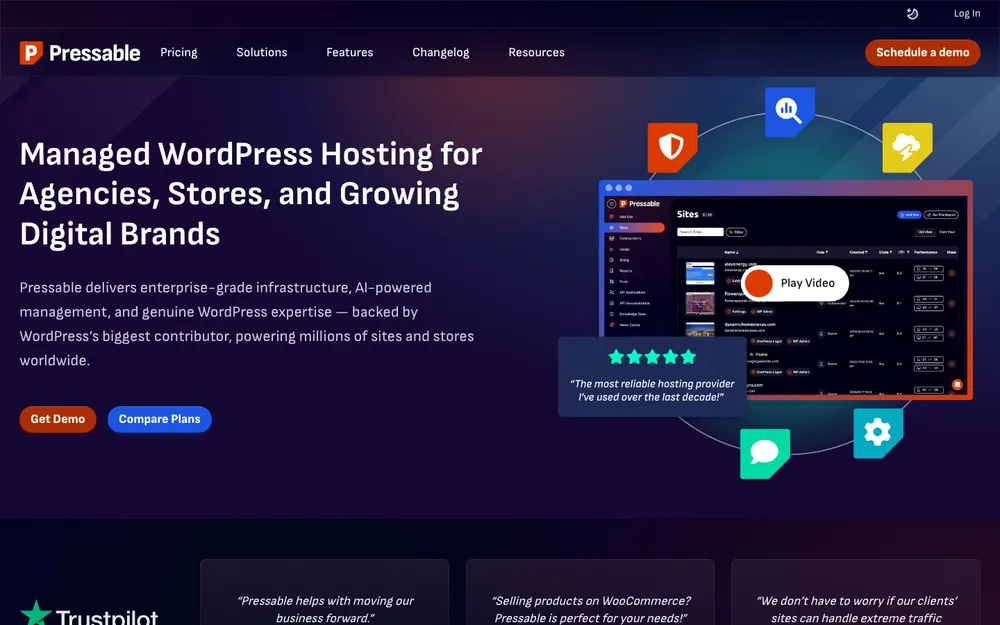
Of the five, Pressable is the easiest to size up. Its official pricing page lists WordPress installs, monthly visits and storage for every Signature plan, so matching a plan to your traffic takes about a minute.
Signature 1, the entry plan, is $20.83/mo on annual billing ($250/yr). Monthly billing starts at $25/mo. Pressable says it doesn’t use teaser pricing, and that SSL, CDN, backups and security come with every plan at no extra cost. That’s worth more than it sounds, because add-on fees are exactly where cheap-looking hosting turns expensive.
Migration’s covered too. Pressable lists unlimited WordPress site migrations, plus DupliKits, a site template feature for cloning sites. Handy if you build similar sites for clients.
Bigger sites get Premium Site plans, starting at $350/mo. According to Pressable, you get a 10 base vCPU starting point per site that can burst to 100+ cores, a geo-redundant high-availability cloud, a 100% uptime guarantee, overage protection, a Jetpack Complete license and something it calls “Enterprise-Level Caching.” (A vCPU is a virtual processor core, and more of them lets the server handle more work at once.)
Where Pressable is strong
- Visits, installs and storage are published for every single Signature plan
- SSL, CDN, backups and security are included on every plan, no extra cost
- Says it doesn’t do teaser pricing
- Unlimited site migrations, plus DupliKits templates for cloning sites
Where Pressable falls short
- Signature 1 only allows one WordPress install
- I couldn’t confirm staging, backup frequency, the CDN provider or support hours on its official pages
- The price jump between Signature 5 and Signature 8 is a big one
Signature 1
Billed annually at $250/yr; monthly billing from $25/mo
- 1 WordPress install
- Up to 30K visits
- 20GB storage
Signature 3
Billed annually at $600/yr
- 5 WordPress installs
- Up to 75K visits
- 35GB storage
Signature 5
Billed annually at $1,550/yr
- 20 WordPress installs
- Up to 400K visits
- 80GB storage
Signature 8
Billed annually at $6,750/yr
- 100 WordPress installs
- Up to 2M visits
- 325GB storage
Prices come from Pressable’s official pricing page (annual billing). Hosting prices change a lot, so re-check before you buy.
2. WP Engine
Care most about workflow? Start with WP Engine. Its entry plan, Essential, sits under what it calls the “Managed Hosting Platform” and comes with daily backups, one-click staging, automatic WordPress and PHP updates, managed migration services and “WordPress-optimized caching.” It’s on shared resources, so your site splits server capacity with other sites.
Two extras stand out. WP Engine says Essential includes a pre-launch review of Core Web Vitals and performance (Google’s metrics for how fast and stable a page loads), plus a managed vector database for AI tools. That second one’s niche. But if you’re adding AI search or a chatbot to a site, it’s relevant.
The upgrade path is easy to follow. Core starts at $400/mo for up to 150 sites, with isolated resources (server capacity that’s yours alone) and a 99.99% uptime SLA, which is a written uptime commitment. Above that sits Enterprise, priced to order. The WP Engine plans page offers monthly or annual billing and says annual saves 20% on Essential.
Where WP Engine is strong
- Daily backups and one-click staging right on the entry plan
- Automatic WordPress and PHP updates, plus a pre-launch Core Web Vitals review
- A clear way up to Core, with isolated resources and a 99.99% uptime SLA
- The Usage page lets you break down usage by environment
Where WP Engine falls short
- The starting price isn’t the same across its own pages ($27, $28 and $30)
- Per-tier visit, storage and bandwidth numbers weren’t in the official text I went through
- I couldn’t confirm the CDN provider or support channels
Essential
Plans page price; annual example shows $336 paid today ($28 x 12)
- Daily backups
- One-click staging
- WordPress-optimized caching
- Managed migration services
Core
Starting price on WP Engine’s managed hosting page
- Up to 150 sites
- Isolated resources
- 99.99% uptime SLA
Enterprise
Quoted by WP Engine
- Custom pricing
Prices come from WP Engine’s official plans and managed hosting pages, which don’t fully agree with each other. Prices change, so confirm at checkout.
3. Kinsta
Kinsta shows up in almost every managed WordPress discussion, so it’s here. For this update, though, I couldn’t confirm its current entry price, per-tier visit limits or overage fees on its official pricing page.
People often link Kinsta with Google Cloud servers and Cloudflare’s CDN and edge caching (pages cached on CDN nodes near your visitors). Is that how its current plans are set up? I couldn’t confirm it. So before you buy, go to Kinsta’s official pricing page and check the entry price on monthly and annual billing, visits per tier, overage cost, and which CDN and caching your plan actually gets.
4. Cloudways
Cloudways is built around cloud servers, DigitalOcean being one option, and sells plan types called Flexible and Autonomous. I couldn’t confirm current prices, how those two plan types differ, or add-on costs on its official pricing page.
The caching stack includes the Breeze plugin, Varnish and Object Cache Pro. An object cache keeps database query results in memory, so WordPress isn’t running the same queries again and again. Find out which plans get which tools, and whether any of them cost extra, before anything else. If you want some control over the server, this kind of hosting fits; if you’d rather never touch a server setting, I’d go with one of the other four.
5. SiteGround

SiteGround sells WordPress hosting in StartUp, GrowBig and GoGeek tiers and pushes Ultrafast PHP and SuperCacher, along with staging, CDN and backups. For this update I couldn’t confirm the current details of those features, or any prices, on its official WordPress hosting page.
Look at the gap between the intro price and the renewal price, and check whether a setup fee applies to your billing term. Write down the renewal price before you pay. That’s the number you’ll actually be billed once the intro period runs out.
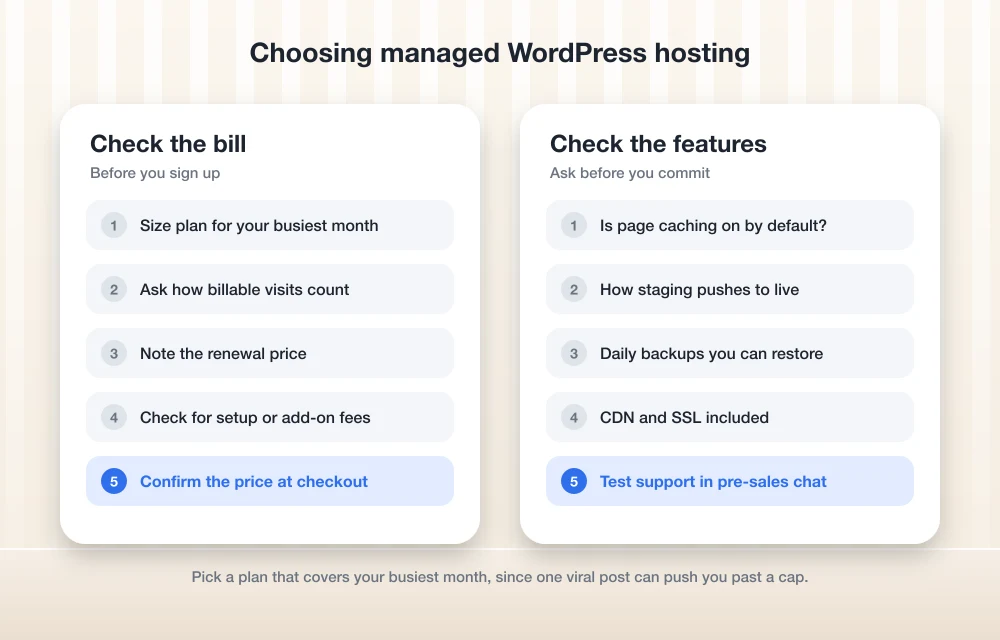
Visit limits: the fine print that changes your bill
Know how a host counts traffic before you sign up. The number in your analytics and the billable visits your host counts can be far apart.
WP Engine meters storage, sites, bandwidth and billable visits. It says visit limits only apply to its shared plans (Lite, Startup, Professional, Growth and Scale), and that not every hit counts as a billable visit. I couldn’t confirm the exact visit allowance per tier, so verify it for your plan before you commit. Once you’re a customer, here’s how you check usage:
Sign in to the User Portal
You’ll need to be an Owner or a Full (with Billing) user to see the Usage page.
Open the Usage page
That’s where WP Engine shows your account’s usage.
Break it down by environment
Click “View usage by environment” at the top right of the Usage page to get stats for each environment, like your live site or a staging copy.
Pressable puts this out in the open. Every Signature plan lists its visit cap, from up to 30K on Signature 1 to 2M on Signature 8. And Premium Site plans add overage protection, which helps when traffic spikes.
Caching, staging, backups and CDN: what to check
Caching. WP Engine calls Essential’s caching “WordPress-optimized,” and Pressable advertises “Enterprise-Level Caching” on Premium. Neither phrase tells you much on its own. Ask whether page caching is on by default, whether there’s an object cache, and how logged-in users and WooCommerce carts are handled (those pages usually can’t be cached the same way).
Staging. WP Engine confirms one-click staging on Essential. For the others I couldn’t confirm it, and I’ve left out step-by-step staging instructions because I didn’t verify each host’s current menus. Ask how changes get from staging to live, and whether a push overwrites the live database. On a site that takes orders, that decides whether you lose transactions. This is the one I’d ask about first.
Backups. WP Engine lists daily backups. Pressable includes backups on every plan, but I couldn’t confirm how often they run. If your site changes often, treat daily as the floor. Check retention too, and whether you can restore without opening a ticket.
CDN and SSL. Pressable includes a CDN and SSL on every plan. I couldn’t confirm the CDN provider for WP Engine or Pressable. SSL is the certificate behind the browser padlock, and if it’s missing or misconfigured after a migration, Chrome flags your site. Annoying, but fixable: here’s how to fix Chrome’s “Not secure” warning.
Support channels and hours: unverified for all five
This is where the research is thinnest. I couldn’t confirm support channels or hours for any of the five on the official pages I reviewed, and that includes WP Engine’s support channels and Pressable’s support hours.
So test it yourself. Before you buy, open a pre-sales chat and ask something specific about your site, like how they’d deal with a traffic spike or a plugin update that breaks things. How fast and how clearly they answer is a fair proxy for what support looks like at 2 a.m. during an outage.
Pressable vs WP Engine, and when to look at the rest
Want a predictable bill and a low entry price? Start with Pressable. The limits are published, the extras are included, and you can move up one plan at a time as traffic grows.
If built-in staging and daily backups matter most, and you expect to run dozens of sites eventually, I’d pick WP Engine. Just confirm the real starting price and your visit allowance at checkout.
Kinsta, Cloudways and SiteGround are still worth a look. Until their numbers show up confirmed on official pages, run the checks from each section above, and compare renewal prices, not intro deals.
Pressable Signature 1
$20.83/mo billed annually ($250/yr) gets you 1 install, up to 30K visits and 20GB storage, with SSL, CDN and backups included.
WP Engine Core
From $400/mo for up to 150 sites, with isolated resources and a 99.99% uptime SLA.
Cloudways
Worth checking out if you like picking your own cloud server. Confirm current pricing and add-on costs on its official page first.
And if running WordPress at all is more than you want to deal with, a hosted builder may suit you better. The guide to the best website builders for small business compares Wix, Squarespace, Shopify and WordPress.
Frequently Asked Questions
What is the cheapest managed WordPress hosting in this comparison?
Of the prices I could confirm on official pages, Pressable’s Signature 1 is the lowest: $20.83/mo billed annually ($250/yr), or from $25/mo if you pay monthly. You get 1 WordPress install, up to 30K visits and 20GB storage. I couldn’t confirm current prices for Kinsta, Cloudways or SiteGround, so check their official pricing pages.
How much does WP Engine cost?
WP Engine’s plans page says “Starting at $28.00/month,” with an annual example of $336 paid upfront. But its managed hosting page shows $27 and $30 in different places. Core starts at $400/mo for up to 150 sites, and Enterprise is custom-priced. Confirm the price at checkout.
Does every visit count toward WP Engine’s visit limits?
No. WP Engine says not every hit counts as a billable visit, and visit limits only apply to its shared plans (Lite, Startup, Professional, Growth and Scale). If you’re an Owner or a Full (with Billing) user, you can check usage on the Usage page in the User Portal.
Does Pressable include a CDN and backups?
Yes. Pressable says SSL, CDN, backups and security come with every plan at no extra cost. I couldn’t confirm how often backups run or which CDN provider it uses, though.
Do I need managed WordPress hosting for a small website?
Not always. A small site with modest traffic often runs fine on regular shared hosting. Managed hosting makes more sense when you’d rather the host handle WordPress and PHP updates, backups, staging and caching for you.
Featured image: Domenico Loia on Unsplash.
Disclosure: TheTechHacker has no paid relationship with the companies in this article.
You might also like
Top 5 Managed WordPress Hosting Services for Maximum Speed in 2026
There is more to a website’s speed than speed itself—it affects the user experience, search engines and how well or poorly your visitors convert. Research has shown that as little as a second delay in loading a web page can reduce conversion rates and increase the number of bounce visitors. One of the most effective…

Best Web Hosting for Small Business Websites (2026)
How to choose web hosting for a US small business site, from shared and managed WordPress plans to cloud servers and website builders, plus the renewal-price traps to avoid and how to migrate safely.

Best WordPress Hosting services for your WordPress website
WordPress is quite popular among bloggers and website owners. It is one of the CMS available which offers plenty of free themes and plugins to the users. As we all know WordPress a completely free content management service. However, it needs a good hosting service to handle its requirements. There are plenty of factors are…
The week in tech, minus the noise.
New reviews, fixes and the stories that matter — once a week, straight to your inbox.
We only use your email to send the newsletter. Unsubscribe any time. See our privacy policy.
Comments