

Premiere vs DaVinci Resolve vs Final Cut Pro in 2026: Pricing, Platforms and Features Compared
Adobe Premiere, DaVinci Resolve and Final Cut Pro compared on pricing model, platforms, editing, color, audio and system requirements, using only official sources. Where something couldn’t be confirmed, I say so.

Photo by Peter Stumpf on Unsplash
Choosing a video editor feels like a small decision. It isn’t. Your fingers learn the shortcuts, your old projects pile up inside one app, and moving all of that somewhere else later turns into a proper chore that eats a whole weekend. So a few minutes of thinking now saves a lot of grumbling down the road.
I’m lining up the three big names here: Adobe Premiere (you probably still know it as Premiere Pro), DaVinci Resolve from Blackmagic Design, and Apple’s Final Cut Pro. Final Cut Pro was the hardest of the three to pin down for 2026. And prices for all of them keep shifting, so I’ll point you to where you can check as we go.
Quick answer: If you want a capable editor without paying anything, start with DaVinci Resolve. The free version costs nothing, and the paid Studio version is a one-time purchase, no subscription. If you’re on Windows (including the new Snapdragon laptops) or you bounce between Windows and Mac, Adobe Premiere is the cross-platform subscription pick. If you live entirely on a Mac or iPad, Final Cut Pro is Apple’s own editor, but confirm its current price and requirements on Apple’s site before you buy.
First, a name change: Premiere Pro is now “Premiere”
Searching for Premiere Pro and landing on pages that just say “Adobe Premiere”? Don’t worry, you’re in the right place. Adobe dropped the “Pro” with version 26.0, which came out January 20, 2026. Same app. New label. That’s really all there is to it.
Adobe’s requirements page currently covers versions 26.0 through 26.5.2, so 26.5.2 looks like the newest desktop release as I write this. There’s also a separate Adobe Premiere app for iPhone (it picked up Adobe Fonts in its October 2026 update).
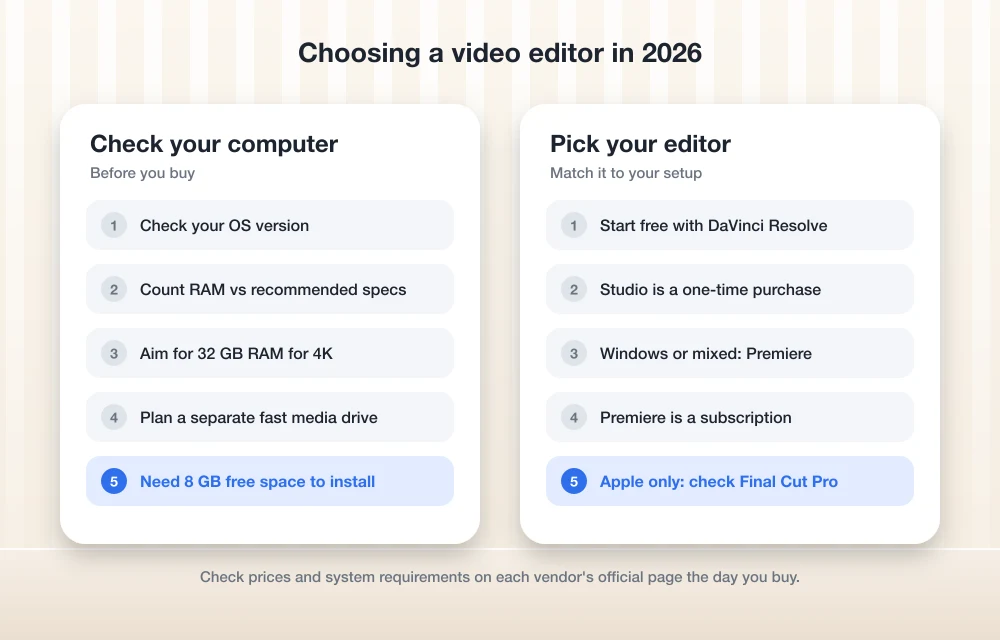
Premiere vs DaVinci Resolve vs Final Cut Pro at a glance
Everything in this table comes from Adobe’s, Blackmagic’s and Apple’s own pages. Where you see “Not confirmed”, that just means I couldn’t find it there this time. It doesn’t mean the feature’s missing.
| Feature | Adobe Premiere | DaVinci Resolve | Final Cut Pro |
|---|---|---|---|
| Maker | Adobe | Blackmagic Design | Apple |
| Latest version I could confirm | 26.x (requirements page lists up to 26.5.2) | 21.1 (announced September 2026) | Not confirmed |
| Pricing model | Subscription | Free version, or one-time Studio purchase | Not confirmed for 2026 |
| Computers | Windows 11 (including Windows on Arm) and macOS | Not confirmed here | Mac only |
| Phone or tablet | Separate iPhone app | Not covered here | iPad |
| Grading still photos | Not covered here | Yes, Photo page (new in 21) | Not covered here |
| Audio tools | Not covered here | Fairlight page, folder tracks added in 21 | Not covered here |
| AI assistant integration | Not verified | Claude, Claude Code, ChatGPT Codex (21.1) | Not confirmed |
| Minimum RAM | 8 GB (16 GB on Windows on Arm) | Not confirmed | Not confirmed |
Premiere, Resolve and Final Cut Pro up close
1. Adobe Premiere (formerly Premiere Pro)
Premiere is the one I’d send most Windows users toward. As long as a subscription doesn’t bug you, that is. It runs on Windows and macOS, so you’re not locked into one kind of computer.
The big 2026 story for Windows people is Arm support. Since version 26.2.2 (May 2026), Premiere runs natively on Windows on Arm, though you’ll need a Snapdragon X series chip and at least 16 GB of RAM on those machines. Then version 26.3 (June 2026) started warning you when your graphics card (GPU) or operating system falls below Adobe’s minimum. Small thing. But a warning beats chasing random crashes, if you ask me.
The catch? Adobe keeps raising the bar. From 26.0 on, macOS Sonoma 14 is the minimum on Mac, and Adobe’s release notes say Windows 10 support is going away in a future release. So if your computer’s a few years old, check before you subscribe.
You might’ve seen people talking about new AI tools in recent versions. I couldn’t match those up with Adobe’s official release notes yet, so I’m leaving them out rather than guessing what they do.
What I liked
- Works on Windows and macOS, and there’s a separate iPhone app too
- Native Windows on Arm support since version 26.2.2
- Version 26.3 tells you if your GPU or OS is below the minimum
- Adobe actually publishes clear minimum and recommended specs
What could be better
- It’s a subscription, so the bill never really stops
- Needs Windows 11 version 24H2 or macOS Sonoma 14 or newer
- You can’t install it on removable flash storage
- I couldn’t verify current prices on Adobe’s own page
2. DaVinci Resolve 21

When money’s tight, Resolve is the easy call. Blackmagic has a free version, and even the DaVinci Resolve 21.1 update came out as a free download. Outgrow the free one? Resolve Studio is a one-time purchase. No monthly bill hanging over your head.
Resolve 21 was announced at NAB on April 14, 2026, with a public beta at launch. The headline addition is a Photo page for color grading still photos, which is pretty handy if you shoot both video and photos and want one grading tool for the lot. It also added folder tracks to Fairlight (Resolve’s audio page), more AI tools, and over 70 new Krokodove graphics tools inside Fusion. That’s the visual effects and motion graphics page.
Then 21.1 showed up, announced September 8, 2026 at IBC. According to Blackmagic’s DaVinci Resolve 21.1 announcement, it hooks into AI assistants (Claude, Claude Code and ChatGPT Codex) for jobs like organizing media and batch rendering, which is just exporting a bunch of clips in one go. It also handles more camera formats on the Photo page and throws in over 25 more Krokodove tools.
Resolve is really several apps stuffed into one, with separate pages for editing, color, audio and effects. Powerful? Sure. It’s also a lot to take in at first (so many buttons), so go easy on yourself for the first few sessions.
What I liked
- The free version is literally free
- Studio is a one-time purchase, no subscription
- New Photo page for grading still photos
- Its own Fairlight audio and Fusion effects pages, and both got bigger in 2026
What could be better
- So many separate pages to learn
- I couldn’t confirm Resolve 21’s system requirements on an official page
- I couldn’t confirm which features are Studio-only
3. Final Cut Pro
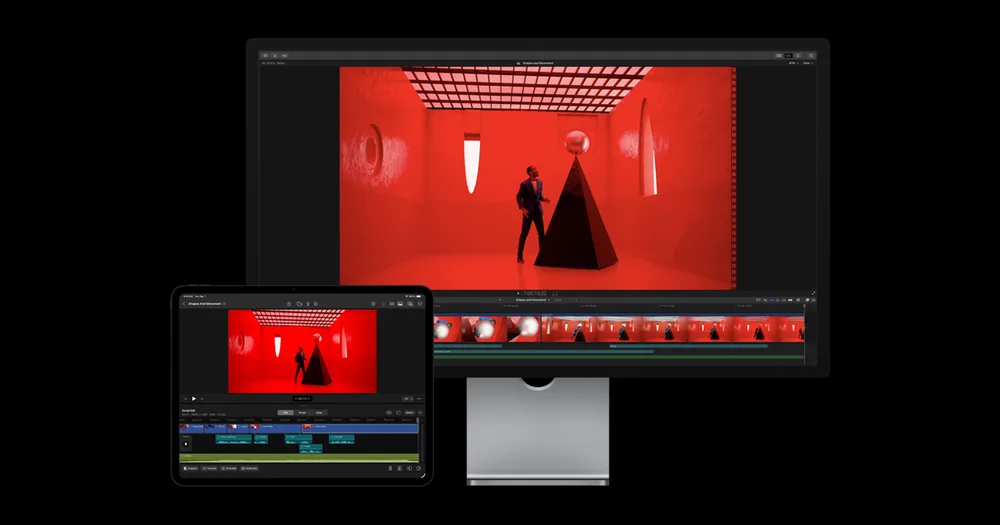
Final Cut Pro is Apple’s editor, and it only runs on Apple hardware: Mac and iPad. Use Windows at all? Well, that kind of settles it.
This is where I come up short. For this update I couldn’t confirm Final Cut Pro’s current version, price, pricing model or system requirements from Apple’s pages. Not ideal. Apple has historically sold the Mac version as a one-time purchase, but I can’t verify that’s still the deal in 2026, so please check Apple’s Final Cut Pro page and its specs page before you decide anything.
What I can say is this. If your whole setup is Apple and you never go near a Windows PC, it’s earned a spot on your shortlist next to the other two.
What I liked
- Built by Apple for Mac
- There’s an iPad version too
What could be better
- No Windows version, period
- I couldn’t confirm current pricing and requirements here
Pricing models: subscription, free and one-time
This is where the three really go their own ways. And for a lot of people, it’s what decides it.
Adobe Premiere is a subscription. I’ve seen a few different monthly numbers floating around, but none of them showed up on Adobe’s own pricing page, so they’re not going in here. When you check Adobe’s Premiere plans page, look closely at whether a price assumes a yearly commitment billed monthly or a true month-to-month plan. Not the same thing at all.
DaVinci Resolve is the friendliest of the bunch. The free version costs $0, and Studio is a one-time purchase with no subscription. I couldn’t confirm Studio’s current price on Blackmagic’s product page, though. Blackmagic also announced limited-time special pricing on Studio this fall, so check the product page for the current number and when any deal ends.
Final Cut Pro pricing for 2026, Mac or iPad, is something I just couldn’t verify. Go straight to Apple on this one.
Editing, color and audio
All three are full video editors. But the differences I can actually back up with official info tilt toward Resolve, mostly because Blackmagic spelled out its new 2026 tools in a lot of detail.
Editing
The newest editing-adjacent changes I could confirm for Premiere are practical ones: native Windows on Arm support and that low-spec warning in 26.3. And if your PC uses OpenCL for graphics acceleration, Adobe’s release notes say OpenCL 2.0 has been the minimum since version 25.6. Resolve 21.1’s AI assistant integration goes after the chores around editing, like organizing media and batch rendering. Final Cut Pro? No confirmed 2026 changes I can share.
Color
Resolve’s new Photo page is the standout here, since it brings color grading to still photos, and 21.1 widened the camera formats it’ll take. I didn’t confirm specific 2026 color updates for Premiere or Final Cut Pro. So I’m not going to pretend I know.
Audio and motion graphics
Resolve gives audio its own Fairlight page, and version 21 added folder tracks. Think of them as a way to group tracks together so a crowded timeline stops being such a mess. Motion graphics live in Fusion, which got over 70 Krokodove tools in Resolve 21 and over 25 more in 21.1. I couldn’t confirm similar 2026 audio or graphics changes for the other two.
Collaboration and sharing projects
I really wanted to compare team features properly. Couldn’t do it. I wasn’t able to confirm current collaboration details for any of the three from official pages this time, including whether Blackmagic’s cloud collaboration service costs extra and which multi-user features need Resolve Studio. If teamwork is a big part of how you edit, read each vendor’s current docs first.
One thing works no matter which editor you pick: getting footage and project files to the right people. Small teams usually just use a shared cloud folder, and I compared the main options in my guide to the best cloud storage for business. Video files are huge (like, really huge), so when you’re picking cloud storage for video projects, keep an eye on the storage limits and on how fast big uploads actually go over your connection.
System requirements: will your computer cope?
Adobe’s the only one of the three whose 2026 requirements I could confirm in full (minus the GPU details). Everything below comes from Adobe’s Premiere technical requirements page. Adobe’s minimum specs are for HD editing, while the recommended ones cover HD, 4K and up.
Adobe Premiere on Windows
- Minimum OS: Windows 11 version 24H2
- Minimum processor: Intel 6th Gen or newer, or AMD Ryzen 1000 series or newer, with AVX2 support
- Windows on Arm: you’ll need a Snapdragon X series chip
- Minimum RAM: 8 GB (16 GB on Windows on Arm)
- Recommended processor: Intel 11th Gen or newer with Quick Sync, or AMD Ryzen or Threadripper 3000 series or newer
- Recommended RAM: 16 GB for HD, 32 GB or more for 4K and higher
I couldn’t confirm the GPU minimum and recommended specs for the 26.x versions. So check that bit on Adobe’s page yourself.
Adobe Premiere on Mac
- Minimum OS: macOS Sonoma 14
- Minimum processor: Intel 8th Gen or newer with AVX2, or Apple silicon (Adobe’s page has the exact chip floor)
- Minimum RAM: 8 GB
- Recommended: M1 Pro, M1 Max, M1 Ultra or newer with 16 GB unified memory, on macOS 14 or later
Storage for Premiere
You need 8 GB of free space, plus extra room while it installs, and Premiere won’t go on removable flash storage. Adobe recommends a separate high-speed drive for your media. A fast external SSD for video editing is a pretty common way to handle that. And if your drive ever refuses to show up (it happens), I’ve got a guide on fixing an external drive not detected on Windows or Mac.
DaVinci Resolve and Final Cut Pro
I couldn’t confirm Resolve 21’s requirements (operating systems, minimum RAM or GPU) or Final Cut Pro’s current macOS, chip and RAM requirements from official pages. Annoying, I know. Check Blackmagic’s DaVinci Resolve page and Apple’s Final Cut Pro specs page before you buy hardware for either one.
Shopping for a new machine anyway? My roundup of the best laptops for small business has Windows and Mac options. If you’re hunting for the best laptop for video editing, RAM matters a lot, and going by Adobe’s numbers I’d aim for 32 GB or more if you’ll be cutting a lot of 4K in Premiere.
Matching the editor to your computer and budget
Don’t worry so much about which one is “best” overall. The better question is which one fits the computer you already own. And how you feel about paying every month.
DaVinci Resolve
The free version costs nothing, and Studio is a one-time purchase if you want more. Nice fit if you’d like to grade photos on the new Photo page too.
Adobe Premiere
Works on Windows and macOS, now natively on Snapdragon X laptops, and there’s a companion iPhone app. You pay by subscription.
Final Cut Pro
Apple’s own editor for Mac and iPad. Check current pricing and requirements on Apple’s site first.
Four checks before you spend anything
Check your operating system
Premiere needs Windows 11 version 24H2 or macOS Sonoma 14 or newer, so check what you’re running first.
Count your RAM
Hold your memory up against the vendor’s recommended specs for whatever resolution you shoot, not just the minimum.
Plan a media drive
Keep your footage on a separate fast drive like Adobe recommends, not on your system drive.
Start free where you can
Grab Resolve’s free version and get a feel for it before you spend a cent on any editor.
Where I’d start: zero budget, Windows laptop or all-Apple
Starting from scratch with zero budget? I’d download DaVinci Resolve and spend a weekend messing around with it. Free is hard to argue with. And the 2026 updates gave it even more to dig into.
If you’re on Windows, especially one of those new Arm laptops, or you hop between Windows and Mac, Premiere makes a lot of sense, assuming you’re fine with a subscription and your machine clears Adobe’s newer minimums. All-in on Apple? Put Final Cut Pro on your shortlist. Just get its current price and specs straight from Apple.
Whichever one you go with, the hardware around it matters almost as much. Enough RAM. A fast media drive. Some sane way to share files. Sort those out and any of these three can take you pretty far.
Frequently Asked Questions
Is Premiere Pro still called Premiere Pro?
No. Adobe renamed Premiere Pro to just “Premiere” with version 26.0, released January 20, 2026. It’s the same app, so you’ll often see it listed as Adobe Premiere (formerly Premiere Pro).
Is DaVinci Resolve really free?
Yes. Blackmagic offers a free version of DaVinci Resolve, and the 21.1 update came out as a free download. The paid Studio version is a one-time purchase, no subscription. Check Blackmagic’s product page for the current Studio price.
Can I use Final Cut Pro on Windows?
No. Final Cut Pro is Apple’s editor and only runs on Mac and iPad. If you’re on Windows, Adobe Premiere or DaVinci Resolve are the ones to look at.
Does Adobe Premiere run on Windows on Arm laptops?
Yes. Premiere runs natively on Windows on Arm from version 26.2.2, released in May 2026. You’ll need a Snapdragon X series chip and at least 16 GB of RAM on those machines.
How much RAM do I need to edit 4K video in Premiere?
On Windows, Adobe recommends 32 GB or more for 4K and higher, and 16 GB for HD. On Mac, it recommends M1 Pro, M1 Max, M1 Ultra or newer with 16 GB of unified memory. The 8 GB minimum is really only meant for HD editing.
Featured image: Peter Stumpf on Unsplash.
Disclosure: TheTechHacker has no paid relationship with the companies in this article.
You might also like

Best Video Editing Software in 2026 for Windows and Mac: 6 Picks Compared
I compare Adobe Premiere, DaVinci Resolve, Final Cut Pro, PowerDirector, Filmora and CapCut desktop on features, learning curve and how each one is sold, so you can pick the right editor for Windows or Mac.
Top 5 Pro Video Editors for Windows 2026
Are you sick of slow timelines and frustrating export times? Here are the top professional video editors for Windows that will provide you with professional speed and artificial intelligence to maximize the quality of your footage. Why Should I Upgrade Now? Professional video editors are demanding innovations from their software. These video editors need 4K…
10 Best Video Editing Software for YouTube
One of the most sought after social media network of the 21st century is, without doubt, the one and only one ‘YouTube’. The number of videos uploaded to this video sharing platform is truly unlimited. In fact, people are of the belief that YouTube is the answer to most of their queries and it gives…
The week in tech, minus the noise.
New reviews, fixes and the stories that matter — once a week, straight to your inbox.
We only use your email to send the newsletter. Unsubscribe any time. See our privacy policy.
Comments