

Windows 11 Cloud Rebuild vs Reset This PC: Which One Keeps Your Files?
Windows 11 now has two different “start over” buttons in the same Settings page, and picking the wrong one can cost you your files. Reset this PC has been around for years and can keep your personal files. Cloud rebuild, added with the October 2026 update, downloads a completely fresh copy of Windows and drivers…

Image: Microsoft
Windows 11 now has two different “start over” buttons in the same Settings page, and picking the wrong one can cost you your files. Reset this PC has been around for years and can keep your personal files. Cloud rebuild, added with the October 2026 update, downloads a completely fresh copy of Windows and drivers from Windows Update, and it always wipes your files. This guide explains the difference, when to use each, and how to run them safely.
Quick answer: Reset this PC with Keep my files reinstalls Windows and keeps your personal files, but removes apps and settings. Cloud rebuild reinstalls Windows and drivers from Windows Update and removes all personal files, accounts, apps and settings, with no option to keep files. Both are in Settings > System > Recovery. If you only need to fix Windows without losing anything, try Reinstall Windows using Windows Update first, which keeps your files, apps and settings.
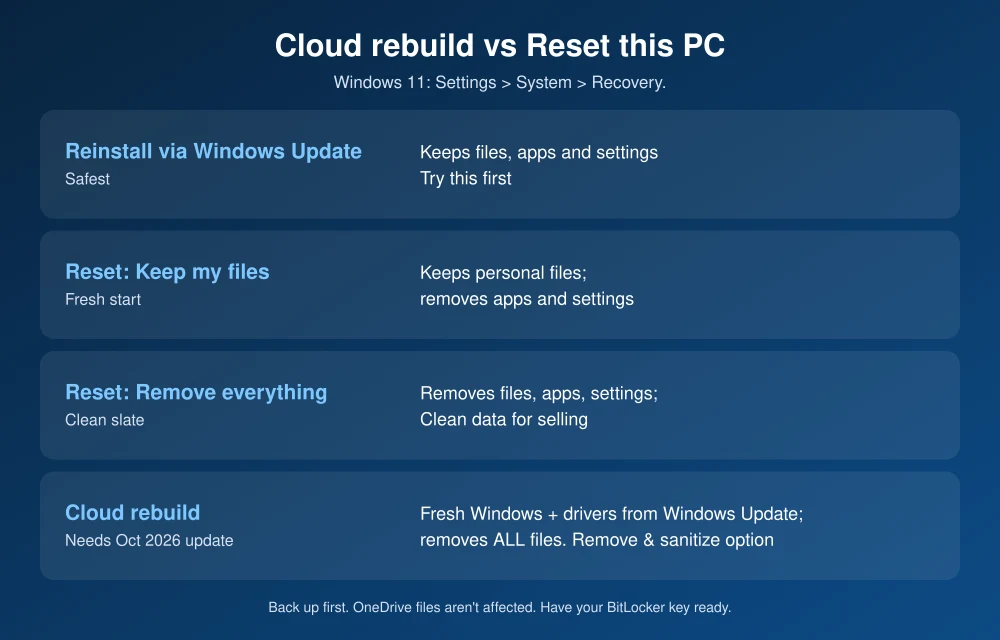
Cloud rebuild vs Reset this PC at a glance
| Option | Keeps files? | Keeps apps and settings? | Best for |
|---|---|---|---|
| Reinstall Windows using Windows Update | Yes | Yes | Fixing a broken Windows install |
| Reset this PC: Keep my files | Yes | No | Fresh start without losing documents |
| Reset this PC: Remove everything | No | No | Clean slate, or selling the PC (with Clean data) |
| Cloud rebuild | No | No | When Windows is badly broken, or before giving the PC away (with sanitize) |
What is Cloud rebuild?
According to Microsoft’s Cloud rebuild page, it reinstalls Windows with a fresh copy of Windows and drivers from Windows Update. Because it doesn’t rely on files already on your PC, it can help when your local recovery files are damaged. It needs the October 2026 non-security update (KB5127936) or later for Windows 11, which Microsoft is rolling out gradually, so not every PC has it yet.
Microsoft’s IT documentation says it’s available on personal PCs with no setup required. On work or school PCs, IT can block it or trigger it remotely.
How to use Cloud rebuild
- Back up your files first. Cloud rebuild removes everything stored on the PC. Files already in OneDrive or another cloud service aren’t affected, but make sure they’ve finished syncing.
- Plug in your PC and connect to the internet. An Ethernet cable is the most reliable.
- Go to Settings > System > Recovery.
- Next to Rebuild this PC, select Rebuild PC. Your PC restarts into the Windows Recovery Environment.
- If you’re on Wi-Fi, select your network and enter the password.
- Choose Remove files if you’re keeping the PC, or Remove & sanitize if you’re recycling, returning or giving it away. Sanitize lets you pick Windows disk only or All disks, then Sanitize and install.
If Windows won’t start, you can also reach it from the recovery screen under Troubleshoot > Cloud rebuild. Microsoft says it can take a while depending on your internet speed and PC, and sanitizing can take much longer.
Common Cloud rebuild errors
- 0x8007027F: the PC isn’t plugged in.
- 0x800704C6: no internet connection.
- 0xc1900200: the PC doesn’t meet Windows 11 requirements, often because TPM is turned off.
- 0xc1900224: a needed driver isn’t available from Windows Update.
How to use Reset this PC
From Microsoft’s reset guide:
- Back up important files, and have your BitLocker recovery key handy if your drive is encrypted.
- Go to Settings > System > Recovery and select Reset PC.
- Choose Keep my files or Remove everything.
- Choose Cloud download for a fresh copy of Windows with the latest updates, or Local reinstall to use files already on your PC.
- Review the summary and start. The screen may go black for 15 minutes or more. Don’t restart it.
Note that “Cloud download” inside Reset this PC isn’t the same as Cloud rebuild. Cloud download only changes where the Windows files come from. Whether your files are kept still depends on Keep my files or Remove everything.
Which one should you use?
- Windows is acting up, but you want everything kept: start with Reinstall Windows using Windows Update, also in Recovery.
- You want a fresh start but need your documents: Reset this PC with Keep my files.
- Windows is badly broken and reset fails: Cloud rebuild, after backing up.
- Selling or giving away the PC: Cloud rebuild with Remove & sanitize, or Reset this PC with Remove everything and Clean data. Microsoft notes its consumer reset erasure doesn’t meet government data-erasure standards. Our guide to permanently deleting files has more on wiping drives.
Before any of these, back up with our best backup software picks. If an update itself is the problem, see how to fix updates not installing.
FAQs
Does Cloud rebuild keep my files?
No. Microsoft says Cloud rebuild removes all personal files, accounts, apps and settings. Files stored in OneDrive or other cloud services aren’t affected.
What’s the difference between Cloud rebuild and Reset this PC Cloud download?
Cloud rebuild always wipes the PC and reinstalls Windows and drivers from Windows Update. Reset this PC with Cloud download can still keep your files if you choose Keep my files.
Why don’t I see Rebuild this PC in Settings?
Cloud rebuild requires the October 2026 Windows 11 update (KB5127936) or later and is rolling out gradually. On work or school PCs, IT may have turned it off.
How long does Cloud rebuild take?
Microsoft doesn’t give a fixed time. It depends on your internet speed and PC, and the sanitize option takes much longer. Keep the PC plugged in throughout.
Featured image: Microsoft.
Disclosure: TheTechHacker has no paid relationship with Microsoft or any company mentioned here.
More in How-to

How to Permanently Delete Already Deleted Files in Windows 11 and 10
Deleting a file in Windows, even emptying the Recycle Bin, doesn’t immediately erase it. Windows just marks that space as free, so recovery tools can often bring the file back until something new overwrites it. If you’re selling a PC, handing it to someone else, or just want old files truly gone, you need one…

How to Fix Outlook Not Syncing Email in Microsoft 365 (Windows, Mac, iPhone and Android)
Outlook stuck on old mail? Here’s how I’d fix Microsoft 365 sync problems in new and classic Outlook on Windows, Outlook for Mac, and the Outlook app on iPhone and Android.

How to Recover Deleted Files from Cloud Drives
How to Recover deleted files from Cloud drives: Cloud drives are very important in today’s life. We keep our important files and data on cloud drives.

The week in tech, minus the noise.
New reviews, fixes and the stories that matter — once a week, straight to your inbox.
We only use your email to send the newsletter. Unsubscribe any time. See our privacy policy.
Comments