

Fake Microsoft 365 “Restore Messages” Emails: How to Spot the Outage Phishing Scam
If you got an email after this month’s Microsoft 365 outage saying your messages were “held” and will be deleted unless you click Restore Messages, don’t click it. Microsoft Threat Intelligence says it’s a high-volume phishing campaign first seen on November 13, 2026, the day after Outlook and Teams went down. The emails pose as…

Image: Microsoft
If you got an email after this month’s Microsoft 365 outage saying your messages were “held” and will be deleted unless you click Restore Messages, don’t click it. Microsoft Threat Intelligence says it’s a high-volume phishing campaign first seen on November 13, 2026, the day after Outlook and Teams went down. The emails pose as Microsoft 365 service-health notices and send you to a site that isn’t Microsoft’s. This guide shows what the fake emails look like, the other outage scams going around, how to report them, and what to do if you already clicked.
Quick answer: The fake emails come from senders named things like “MSF Outage Notification” or “Service Health,” with subjects starting “Outage,” “Strengthen – Security” or “Restore” plus random characters. They claim messages were held during the outage and will be deleted within 24 hours, and push a RESTORE MESSAGES or TAKE ACTION button. Microsoft says real service-health notices don’t send you to non-Microsoft websites. Report the email with Report > Report phishing in Outlook and delete it. If you entered your password, change it at account.microsoft.com/security, review recent sign-in activity, and turn on two-step verification.
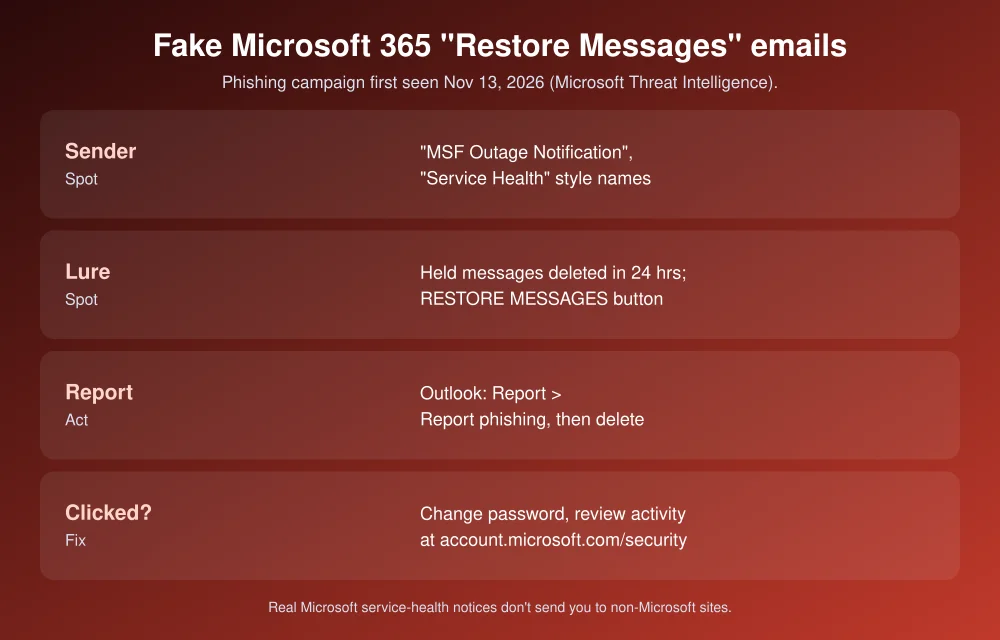
What the fake “held messages” email looks like
From Microsoft’s November 16 security blog post:
- Sender name: a three-letter, company-style prefix plus “Outage Notification” or “Service Health,” such as “MSF Outage Notification” or “AMZ Service Health.”
- Subject: starts with “Outage,” “Strengthen – Security” or “Restore,” followed by random letters and numbers, such as “Outage – aF7vG6.” Your email provider may add an [External] tag in front.
- The message: it looks like a Microsoft 365 service-health notice, mentions Exchange Online, Outlook, Teams, SharePoint and Copilot, and says messages held during the outage will be deleted within 24 hours.
- The button: RESTORE MESSAGES or TAKE ACTION. It goes through a tracking link to a site that isn’t Microsoft’s.
Security firms Mimecast and Field Effect report that some versions quoted Microsoft’s real outage incident number, EX1550543, and claimed “4 messages” were waiting. That makes them look convincing, but a real incident number doesn’t make the email real.
Microsoft says the campaign most likely aims to steal sign-in details. It hasn’t confirmed malware, and it hasn’t named who is behind it. Microsoft Defender for Office 365 blocks and quarantines these messages for business customers, but personal and unprotected inboxes may still get them.
Domains Microsoft linked to the campaign
Shown “defanged” with [.] so they can’t be clicked. Don’t visit them.
- Senders: moments-notice[.]com, planetmaison[.]com, newbooker[.]com
- Landing pages: reallifeaccounting[.]com, outagefixed[.]sbs, outagerestored[.]sbs
Other scams riding on the outage
- “Outlook is disconnected” code emails: Kaspersky reports emails with an unrequested code and a “reconnect” link. Entering that code on the fake page can link the scammer’s device to your account. Never enter a code you didn’t ask for.
- Fake Microsoft or IT support: Field Effect reports calls and external Teams messages offering password resets or refunds, then asking you to read out a code, approve a sign-in prompt, or allow remote access through Quick Assist.
- “Email is down, pay this account instead”: texts pretending to be a manager or supplier, asking for payment to new bank details. Confirm by phone using a number you already have.
Microsoft says its real error and warning messages never include phone numbers, and it never asks for support payment in gift cards or cryptocurrency. See its tech support scam guide, and our guide to getting rid of tech support scam pop-ups.
How to tell if a Microsoft outage email is real
- Hover over the button or link. A real notice links to a Microsoft address. Anything else is a red flag.
- Look at the sender’s actual address, not just the name. In Outlook, a “?” in the sender photo means Outlook couldn’t verify the sender, and a “via” tag means it came from a different address.
- Be wary of deadlines. “Deleted within 24 hours” is pressure, not a policy.
- Check status yourself. Go to status.cloud.microsoft or, for work accounts, ask IT to check Service health in the Microsoft 365 admin center. Our Microsoft 365 outage checker guide explains how.
During the real outage, Microsoft extended the email timeout so delayed mail wouldn’t expire, as BetaNews reported. Delayed mail arrives in your inbox on its own. You don’t need to “restore” it through a link.
How to report the phishing email
Steps are from Microsoft’s Outlook phishing help page:
- Outlook.com and Outlook on the web: select the message, then Report > Report phishing. Reporting doesn’t block the sender, so add them to blocked senders too.
- Classic Outlook on Windows: click Report message on the ribbon, then Phishing.
- Outlook on iPhone and Android: tap the three-dot menu > Report Junk > Phishing.
- Work or school account: report it the same way and tell your IT team.
The FTC also asks people to forward phishing emails to [email protected], forward scam texts to 7726, and report scams at ReportFraud.ftc.gov.
If you clicked or entered your password
- Go to account.microsoft.com/security, select Review activity, and mark anything you don’t recognize as “This wasn’t me.”
- Change your password from the same page, and change it anywhere else you reused it.
- Turn on two-step verification.
- Check Outlook for new inbox or forwarding rules you didn’t create.
- Locked out? Use Forgot my password and choose “I think someone else is using my Microsoft account.”
- On a work account, tell IT right away so they can reset sessions. If you shared financial or personal details, contact your bank and visit IdentityTheft.gov.
Still having trouble with Outlook itself? See our Outlook not working fix. Shopping online this week? Learn how to check if an online store is legit too.
FAQs
Is the Microsoft 365 “Restore Messages” email real?
No. Microsoft Threat Intelligence says emails claiming messages were held during the November 2026 outage, with Restore Messages or Take Action buttons, are part of a phishing campaign that sends people to non-Microsoft sites.
Did Microsoft delete emails during the outage?
No such deletion was announced. BetaNews reported that Microsoft extended the email timeout during the outage so delayed messages wouldn’t expire. Delayed mail arrives without you clicking anything.
How do I report a Microsoft phishing email in Outlook?
In Outlook.com or Outlook on the web, select the message and choose Report, then Report phishing. In classic Outlook, use Report message on the ribbon. In the mobile app, use Report Junk, then Phishing.
What should I do if I entered my Microsoft password on a fake site?
Change your password at account.microsoft.com/security, review recent activity, turn on two-step verification, and check for inbox rules you didn’t make. Tell IT if it’s a work account.
Featured image: Microsoft Security.
Disclosure: TheTechHacker has no paid relationship with Microsoft or any security company mentioned here.
More in Guides

Best Email Security Software for Small Businesses on Microsoft 365 and Google Workspace (2026)
A huge share of small business security incidents start in the same place: an inbox. Someone gets a convincing invoice from a “vendor” with new bank details, or a Microsoft sign-in page that looks right but isn’t, and by the time anyone notices, money or a password is gone. Microsoft 365 and Google Workspace both…

How to Fix Outlook Not Working After the Microsoft 365 Outage
If Outlook has been spinning, refusing to send, or showing an empty inbox since Thursday, November 12, you’re not alone and it probably isn’t your computer. Microsoft has been dealing with a large Microsoft 365 incident that hit Exchange Online, the service behind work and school Outlook mailboxes, and features in Teams and other apps…

How to Spot Fake Flight Cancellation Texts Before Thanksgiving Travel
Thanksgiving week is the busiest stretch of the year for travel scams, and fake flight cancellation messages are one of the nastiest. A text arrives saying your flight was canceled, it uses your airline’s name and sometimes a real-looking flight number, and it gives you a number to call or a link to “rebook.” The…
The week in tech, minus the noise.
New reviews, fixes and the stories that matter — once a week, straight to your inbox.
We only use your email to send the newsletter. Unsubscribe any time. See our privacy policy.
Comments