

How to Set Up X Parental Controls for Your Teen (and What You Can’t See)
X now has parental controls for the first time. Parents and guardians of teens aged 13 to 17 can set a daily time limit, approve new followers, filter words and see who their teen chats with. There’s one catch: the teen has to agree before any of it works. Quick answer: To set up X…


X Parental Controls Teens
X now has parental controls for the first time. Parents and guardians of teens aged 13 to 17 can set a daily time limit, approve new followers, filter words and see who their teen chats with. There’s one catch: the teen has to agree before any of it works.
Quick answer: To set up X parental controls, start from your own X account (the parent or guardian) and send a supervision link to your teen’s account. Your teen must accept, since X says both sides have to agree. Once linked, you can see weekly time spent, set a daily limit, require follower approval, limit For You to accounts they follow, filter words, turn off sensitive media, control who can send DMs and see who they’ve chatted with. You can’t read their messages or see their searches. Supervision ends automatically at 18.
What X Parental Controls Can and Can’t Do
X announced the controls through its Safety account, and its Help Center has the linking steps. Teen accounts now default to protected mode, with sensitive media restricted and targeted ads blocked, Engadget reports.
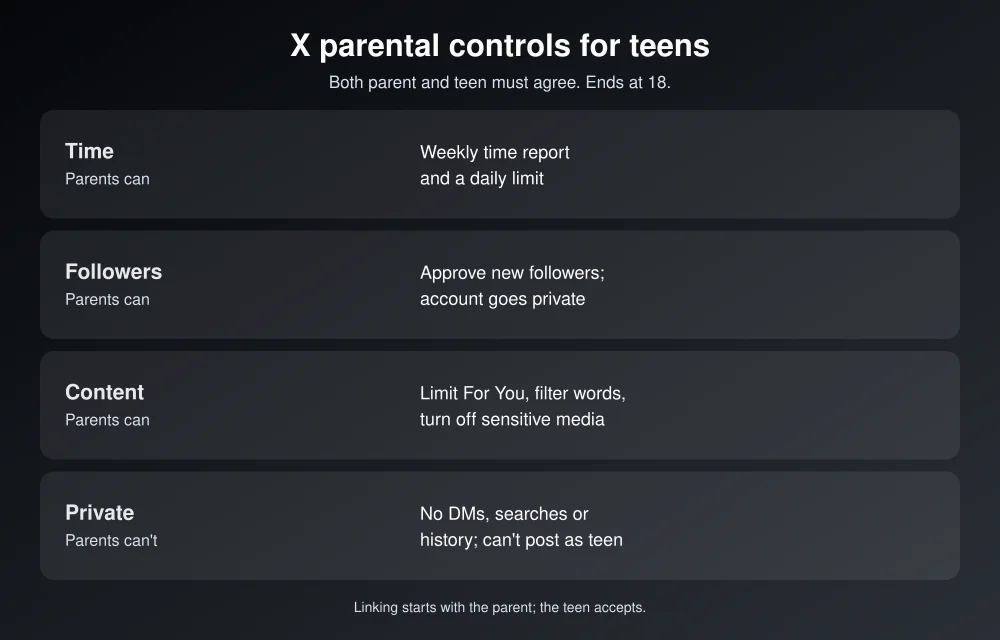
| Parents can | Parents can’t |
|---|---|
| See time spent on X in the past week and set a daily limit | Read private messages |
| Require approval for new followers (this makes the account private) | See searches or viewing history |
| Limit For You and videos to accounts the teen follows | Post as the teen |
| Filter words and turn off sensitive media | Sign in to the teen’s account |
| Control who can send DMs and see who the teen chatted with one-on-one | Supervise without the teen agreeing |
How to Set Up X Parental Controls
- Update the X app on your phone and your teen’s phone, since the feature is rolling out now.
- Start from your account. X says linking starts with the parent or guardian. Follow the steps in X’s Help Center to invite your teen’s account.
- Ask your teen to accept. The teen finishes the link from their account. Nothing changes until they agree.
- Pick your settings: daily limit, follower approval, For You limits, word filters and DM controls.
- Check the weekly time report together and adjust the limit if needed.
One parent can supervise up to five teen accounts, according to Engadget.
What If Your Teen Says No?
Because supervision needs consent, talk first. Explain what you’ll see and what stays private. If they still refuse, phone-level controls work on every app:
- iPhone: use Screen Time to set app limits and content ratings. Apple explains it in its parental controls guide.
- Android: use Google Family Link to set app time limits and approve downloads.
Is X Safe for Teens?
X says it isn’t designed for children and that users must be at least 13 where required by law. The platform has faced criticism over hate speech, deepfakes and AI-generated abuse images. Our coverage of Virginia and Oregon suing over Grok images explains one case. Parents may want controls on X and on the phone itself.
More for parents: best parental control apps for iPhone and Android, Apple pulls the Talkie AI chatbot and what Meta’s Muse AI can see on Instagram.
FAQs
Does X have parental controls?
Yes. Since late November 2026, parents and guardians can supervise teen accounts aged 13 to 17.
Can parents read their teen’s X messages?
No. X says parents can’t read private messages, see searches or viewing history, or post as their teen.
Does my teen have to agree?
Yes. Linking starts with the parent and the teen must accept.
When does supervision end?
Automatically when the teen turns 18.
Featured image: X logo via Wikimedia Commons (public domain).
Disclosure: TheTechHacker has no paid relationship with X.
More in How-to

Top Popular Apps That Can Block On Your Child’s Phone
Nowadays, the use of mobile phones is no longer restricted to children. Mobile or cell phone is now an important means of communication among parents and their children. If you are getting your child his or her cell phone, you might then want to consider some parental controls available these days that are being widely…

Can You Play Fortnite on a School or College Network? What’s Allowed
If you have ever tried to launch Fortnite on a school or college network and found it blocked, you are not alone. Lots of students search for ways to unblock Fortnite at school. But before you try anything, it helps to understand why the game is blocked and what is actually allowed. In this guide,…

Why Is a Website Blocked in My Region? Legit Ways to Access It
You type in a website address and instead of the page, you see a message like “This content is not available in your country” or the page just won’t load. It is frustrating, but there is usually a clear reason behind it, and often a legitimate fix. In this guide, we explain the most common…

The week in tech, minus the noise.
New reviews, fixes and the stories that matter — once a week, straight to your inbox.
We only use your email to send the newsletter. Unsubscribe any time. See our privacy policy.
Comments