

OnePlus ColorOS 17 Update: Missing Features and What Owners Can Do
OnePlus phones are switching from OxygenOS to Oppo’s ColorOS 17, and many long-time OnePlus fans aren’t happy. Some favorite features are missing or only available in certain regions, and the rollout is slower than expected. If you own a OnePlus phone in the US, here’s what’s changing and what you can do. Quick answer: With…

OnePlus ColorOS 17
OnePlus phones are switching from OxygenOS to Oppo’s ColorOS 17, and many long-time OnePlus fans aren’t happy. Some favorite features are missing or only available in certain regions, and the rollout is slower than expected. If you own a OnePlus phone in the US, here’s what’s changing and what you can do.
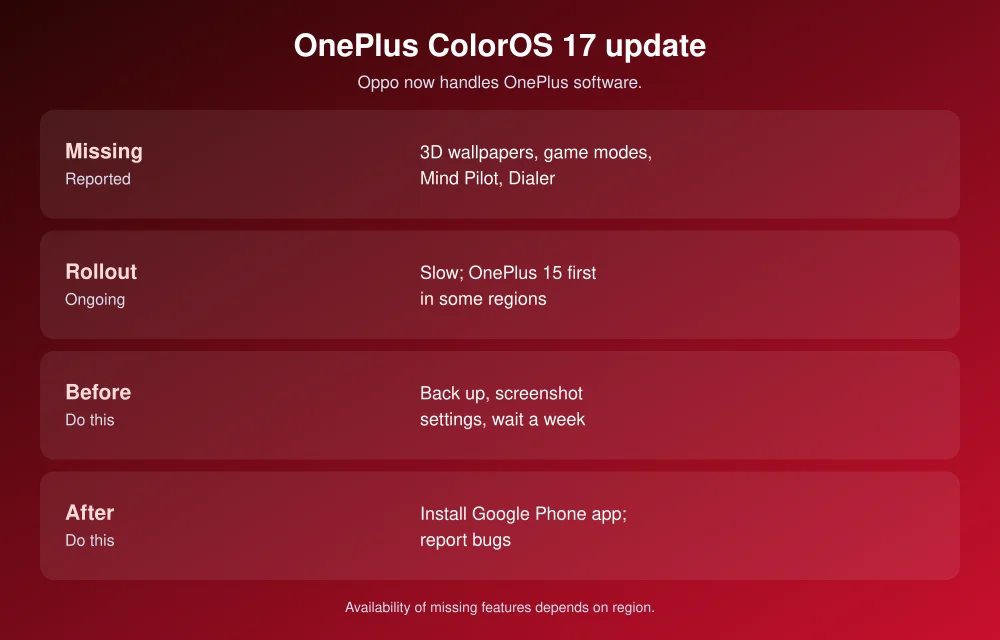
Quick answer: With ColorOS 17, OnePlus phones may lose features like 3D and AI Motion wallpapers, per-game performance modes, Mind Pilot, AI Photo Agent, the OnePlus Dialer and lock screen lyrics, 9to5Google reports. OnePlus says availability depends on your region. OnePlus shut down its North America and Europe operations in July, and Oppo now handles software updates. Before updating, back up your phone; after updating, use alternatives from Google Play for missing apps like the dialer.
What’s Missing in ColorOS 17
- 3D Wallpaper and AI Motion Wallpaper.
- Per-game performance modes.
- Mind Pilot and AI Photo Agent.
- The OnePlus Dialer.
- Lock screen music lyrics.
- Even the OnePlus calculator Easter egg.
At a November 23 community AMA, OnePlus mostly answered that it’s “working on it” and that availability depends on region.
Which OnePlus Phones Get ColorOS 17?
The Android 17-based update is rolling out slowly. The OnePlus 15 is getting updated builds in Europe and other regions, while some phones, like the OnePlus 13, are still waiting, 9to5Google reports. Check the OnePlus Community for your model’s status.
What to Do Before You Update
- Back up photos, messages and app data to Google.
- Screenshot your settings for any features you rely on, so you can find replacements.
- Charge to at least 50% and use Wi-Fi.
- Wait a week if you can. Early builds often get quick fixes.
What to Do After You Update
- Dialer missing: install Google’s Phone app from Google Play and set it as the default.
- Battery or Wi-Fi issues: restart, then reset network settings if problems continue.
- Games feel slower: check the Game Assistant or performance settings in ColorOS, since per-game modes may have moved or been removed.
- Report problems in the OnePlus Community so they reach Oppo’s software team.
What About Support and Repairs?
OnePlus has turned its US website into a support-only site. Our guide on what OnePlus owners should do covers warranty and repairs, and OnePlus US support is still online. If you’re thinking about switching, see our Pixel 11 and Galaxy Black Friday deals and our One UI 9 Wi-Fi fix for Samsung.
That’s all for now. Please do share your views and feedback in the comment box below.
FAQs
Is OnePlus switching to ColorOS?
Yes. Oppo now handles OnePlus software and is replacing OxygenOS with ColorOS 17.
What features are missing in ColorOS 17?
Reported missing features include 3D wallpapers, per-game modes, Mind Pilot, AI Photo Agent, the OnePlus Dialer and lock screen lyrics.
Will the missing features come back?
OnePlus says it’s working on it and availability depends on region.
Should I update to ColorOS 17?
Back up first, and consider waiting a week for early fixes.
Featured image: OnePlus.
Disclosure: TheTechHacker has no paid relationship with OnePlus or Oppo.
More in How-to
How to AirDrop Between a Samsung Galaxy and an iPhone with Quick Share (Galaxy A Included)
Samsung Galaxy phones can now share files directly with iPhones over AirDrop, using Quick Share. Samsung started with the Galaxy S26 in March 2026, saying the feature is “provided by Google.” Since then it has spread to more Galaxy S and Z phones, and with One UI 9.0 owners report it working on cheaper Galaxy…
How To Manual Update OnePlus One To Official OxygenOS
The Long wait is over for OnePlus One owner, now finally company released official Android Lollipop build custom Android Lollipop build OxygenOS. This tutorial involves all steps to install OxygenOS on your OnePlus One device. Disclaimer: Please follow this guide at your own risk. Thetechhacker will not be responsible if your device gets damaged or…
How to Fix Gemini Not Showing on Apple CarPlay: 8 Fixes That Work
Google started rolling out the Gemini app to Apple CarPlay on November 11, and plenty of iPhone owners got into their cars this week expecting a new icon that simply wasn’t there. If that’s you, the fix is usually quick. Google’s setup has a couple of steps that are easy to miss, and CarPlay itself…
The week in tech, minus the noise.
New reviews, fixes and the stories that matter — once a week, straight to your inbox.
We only use your email to send the newsletter. Unsubscribe any time. See our privacy policy.
Comments