

Snapchat Memories Deadline: How to Save Your Memories for Free Before They’re Locked
Snapchat now limits free Memories storage to 5GB. If you’ve used Snapchat for years, your Memories are probably over that, and many users are worried that their old Snaps will be deleted. Snapchat says they won’t be deleted automatically, but Memories over the limit can end up locked unless you pay. The safest move is…


Snapchat Memories Free Download
Snapchat now limits free Memories storage to 5GB. If you’ve used Snapchat for years, your Memories are probably over that, and many users are worried that their old Snaps will be deleted. Snapchat says they won’t be deleted automatically, but Memories over the limit can end up locked unless you pay. The safest move is to download your Memories while you still can. It’s free.
Now in this article, I will show how to save all your Snapchat Memories for free, and how to stop relying on Snapchat’s storage from now on.
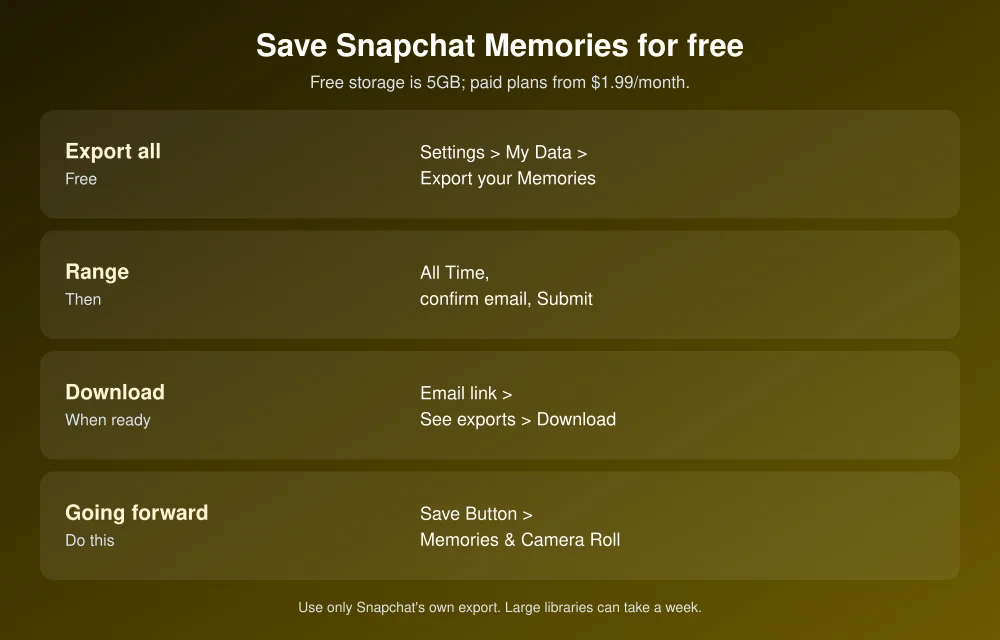
Quick answer: Free accounts get 5GB of Memories. Paid plans start at $1.99 a month for 100GB, Engadget reports. To save everything for free, open Settings > My Data in Snapchat (or go to accounts.snapchat.com), turn on Export your Memories, choose All Time and tap Submit. Snapchat emails you a download link when the export is ready, which can take days for large libraries.
Getting Started
- Check how much you have: swipe up from the camera to open Memories. Your storage use appears in Memories settings.
- Make room for the download: a big Memories library can be many gigabytes. Use a computer or external drive if your phone is low on space.
- Use only Snapchat’s own tool. Ignore “Memories rescue” sites or apps that ask for your Snapchat password.
Will Snapchat Delete My Memories?
Not automatically, according to Snap. In its Memories Storage Plans announcement, Snap said that nothing changes for people with less than 5GB, and that it gives 12 months of temporary storage for Memories over the limit. After that, Memories above 5GB may be locked in the app unless you upgrade, Engadget reports. Snap says you can always download your Memories to your device.
So the “deadline” you may have seen online isn’t a deletion date. But if you’re over 5GB and don’t want to pay, download your Memories now.
How to Download All Your Snapchat Memories (Phone)
- Open Snapchat and tap your profile icon, then the gear icon.
- Scroll down and tap My Data.
- Turn on Export your Memories. Choose to request only Memories if you don’t need your chats and other data.
- Set the date range to All Time.
- Confirm your email address and tap Submit.
How to Download Them From a Computer
- Go to accounts.snapchat.com and sign in.
- Open My Data and choose your Memories, as above.
- When Snapchat’s email arrives, go back, select See exports, then Download.
- Unzip the files and open index.html in your browser to view and save your Memories.
Snapchat explains the export in its My Data help page.
Problems With the Export
- It takes a while. Large libraries can take a week or longer to prepare.
- Odd file names and dates. Files are named by timestamp, and some dates may be wrong.
- Captions and stickers are separate files. They aren’t always merged into the photo or video.
- Download links expire. Download as soon as the email arrives.
Save Only a Few Snaps
Open Memories, press and hold a Snap, then tap Export. You can select up to 100 Snaps at once, which is fine for favorites but slow for a large library.
Stop Relying on Snapchat Storage
-
Go to Settings
- Go to Settings > Memories > Save Button.
- Go to Settings > Memories > Save Button.
- Go to Settings > Memories > Save Button.
- Choose Memories & Camera Roll.
gt; My App
gt; Memories
gt; Save Button.
New Snaps you save will also go to your phone’s photo library. Turn on iCloud Photos or Google Photos backup so they’re stored in the cloud too. Once you’ve checked that your downloaded files open, you can delete older Memories in Snapchat to stay under 5GB.
Also see the iCloud security settings to turn on, WhatsApp backup without iCloud and ways to reuse an old iPad as a photo frame.
That’s all for now. Please do share your views and feedback in the comment box below.
FAQs
Is Snapchat deleting my Memories?
Snap says Memories aren’t deleted automatically. Memories over 5GB may be locked after the temporary storage period unless you upgrade.
How much free Snapchat Memories storage do I get?
5GB. Paid plans start at $1.99 a month for 100GB.
How do I download all my Snapchat Memories for free?
Go to Settings > My Data, turn on Export your Memories, choose All Time and submit. Snapchat emails you a download link.
How long does a Snapchat Memories export take?
It depends on size. Large libraries can take a week or more.
Featured image: Snap Inc.
Disclosure: TheTechHacker has no paid relationship with Snap Inc.
More in How-to
How to Fix DaVinci Resolve ‘GPU Memory Full’ Error
DaVinci Resolve stopped with a ‘GPU memory is full’ message? Here’s how I’d fix it, from a quick restart and timeline proxies to driver updates and GPU settings.

GTA 6 Standard vs Ultimate Edition: What You Get and Which to Buy
GTA 6 is three days out, and if you still haven’t bought it, there’s one decision left: Standard Edition at $79.99 or Ultimate Edition at $99.99. That $20 gap gets you a long list of extra cars, weapons, shops and hideouts, but none of it is a new story chapter, and you can upgrade later…

How to Fix GTA 6 Locked or Not Starting on PS5 on Launch Day
GTA 6 is four days away, and if you pre-loaded it on PS5 you’ve probably already noticed the little padlock on the game tile. That’s normal before launch. What isn’t normal is still seeing that padlock after midnight on November 19, or getting an error when you hit Play. With millions of people trying to…
The week in tech, minus the noise.
New reviews, fixes and the stories that matter — once a week, straight to your inbox.
We only use your email to send the newsletter. Unsubscribe any time. See our privacy policy.
Comments