

How to Fix GTA 6 Locked or Not Starting on PS5 on Launch Day
GTA 6 is four days away, and if you pre-loaded it on PS5 you’ve probably already noticed the little padlock on the game tile. That’s normal before launch. What isn’t normal is still seeing that padlock after midnight on November 19, or getting an error when you hit Play. With millions of people trying to…

Image: PlayStation Blog (official)
GTA 6 is four days away, and if you pre-loaded it on PS5 you’ve probably already noticed the little padlock on the game tile. That’s normal before launch. What isn’t normal is still seeing that padlock after midnight on November 19, or getting an error when you hit Play. With millions of people trying to start the game at the same moment, I expect plenty of people to run into exactly that.
So I put together the checks I’d run, in order, if GTA 6 won’t start on my PS5 on launch night. Most of them take a minute or two, and none of them delete your pre-load.
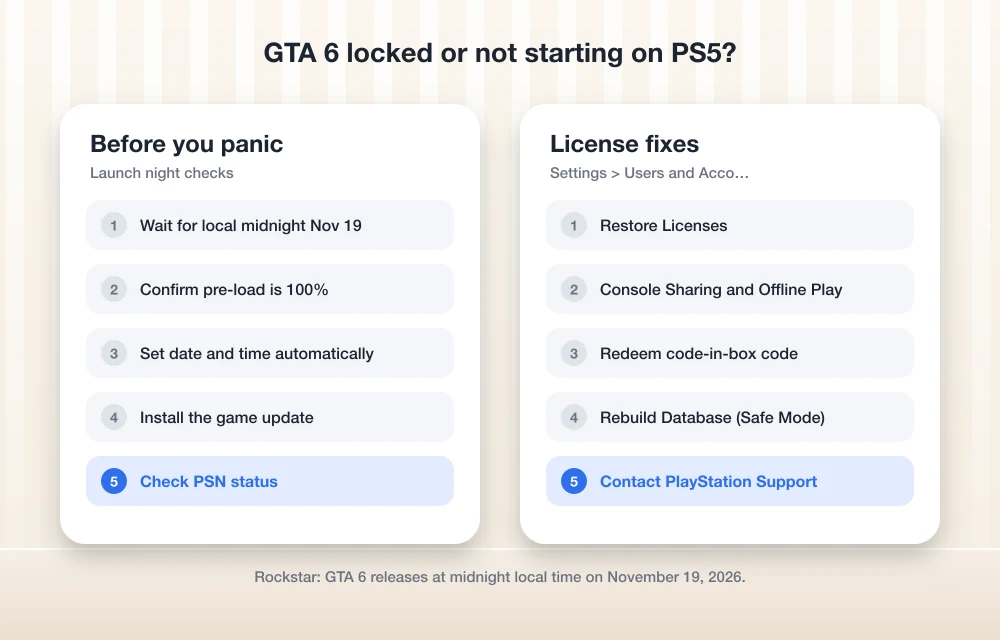
Quick answer: GTA 6 unlocks at midnight local time on November 19, 2026, according to Rockstar, so a padlock before then is expected. After midnight, check that your PS5’s date and time are set automatically, install any game update, and check PlayStation Network status. If the game still says you can’t play it, go to Settings > Users and Accounts > Other > Restore Licenses, and turn on Console Sharing and Offline Play. As a last resort, rebuild the database in Safe Mode.
When GTA 6 actually unlocks on PS5
Rockstar’s support page on regional pre-load and release times says Grand Theft Auto VI releases at midnight local time on November 19, 2026, in all regions on PS5 and Xbox Series X|S. PlayStation’s blog describes it as a rolling midnight launch by country, starting in New Zealand. In the US, plan on midnight where you live, and check Rockstar’s page for your exact region before you start troubleshooting.
Until that moment, a pre-loaded copy shows as locked. That isn’t a fault, and there’s nothing to fix yet.
1. Make sure the pre-load actually finished
The pre-load needs up to 212 GB, depending on your console, and it won’t unlock if it’s still downloading. Press the PS button, open Downloads/Uploads, and check that GTA 6 shows as complete. If it’s stuck, pause and resume it. If you’re short on space, our guide to fixing “not enough storage” for the GTA 6 pre-load shows what to clear. If the pre-load never appeared at all, start with how to fix the GTA 6 pre-load not showing.
2. Check your PS5’s date and time
The release is based on local time, so it’s worth making sure your console’s clock is right. Go to Settings > System > Date and Time and make sure the date and time are set automatically from the internet, with the correct time zone. Don’t set the clock ahead to try to play early. It won’t unlock the game and can cause more license errors.
3. Install the latest game update
Big launches often get an update right at release. If GTA 6 asks for an update, let it finish before you try to play. To check yourself, highlight the game on the Home screen, press the Options button and select Check for Update. Also make sure your PS5 system software is up to date in Settings > System > System Software.
4. Check PlayStation Network status
At midnight on launch night, a huge number of players hit PSN at the same time. If the game won’t verify your license, or you see sign-in errors, check PlayStation’s official service status page before you change anything. If PSN reports problems, the fix is to wait and try again in a few minutes.
5. Restore licenses
If GTA 6 still shows a padlock or says you can’t use it after midnight, your console may not have picked up the license from your pre-order. Sony’s guide to restoring licenses on PlayStation says to go to Settings > Users and Accounts > Other > Restore Licenses. Sony notes that restoring licenses doesn’t affect your saved data, so it’s safe to run.
6. Turn on Console Sharing and Offline Play
On the same Users and Accounts > Other menu, open Console Sharing and Offline Play and enable it. This makes your console the home for your games, so they can launch even if PSN is struggling. Sony points out that if someone else on the console bought GTA 6, they’re the one who needs to turn this on, from their own account.
7. Code-in-box and disc buyers
If you bought a code-in-box copy, you need to redeem the code on your account before anything shows up. PlayStation says code-in-box buyers can activate their code as soon as they get it. Once it’s redeemed, the game behaves just like a digital pre-order. If you redeemed it on the wrong account, contact PlayStation Support rather than buying again.
8. Rebuild the database in Safe Mode
If the game tile is greyed out, the wrong icon shows, or nothing above works, rebuild the PS5’s database. Turn the console off completely, then press and hold the power button until you hear a second beep to start Safe Mode. Connect the controller with a USB cable, press the PS button, and select Clear Cache and Rebuild Database > Rebuild Database. Sony says this scans the drive and creates a new database of all content on the system. Don’t choose any reset options in that menu, since Sony warns some Safe Mode options erase data.
Still stuck? Who to contact
Licenses and downloads bought on PlayStation Store are handled by PlayStation Support. Problems inside the game itself, like crashes or online errors after it starts, go to Rockstar Support. If you bought a physical copy at a store, start with that retailer for code problems.
Once you’re in, our list of GTA 6 facts to know before launch covers what to expect on day one, including the PS5 Pro extras.
FAQs
What time does GTA 6 unlock on PS5?
Rockstar says GTA 6 releases at midnight local time on November 19, 2026, in all regions on PS5. A pre-loaded copy stays locked until then.
Why does GTA 6 still show a lock icon after midnight?
Usually the pre-load hasn’t finished, a game update is needed, PSN is busy, or the license hasn’t synced. Check downloads and updates, then go to Settings > Users and Accounts > Other > Restore Licenses.
Will Restore Licenses delete my GTA 6 download?
No. Sony says restoring licenses doesn’t affect your saved data, and it doesn’t remove installed games.
Can I change my PS5 clock to play GTA 6 early?
No. The game unlocks based on Rockstar’s release time, and changing the clock can cause license errors. Keep date and time set automatically.
Featured image: PlayStation Blog (official).
Disclosure: TheTechHacker has no paid relationship with Rockstar Games, Sony or any company mentioned here.
More in How-to
How to Fix Not Enough Storage When Preloading GTA 6 on PS5 and Xbox Series X|S
Rockstar says the GTA 6 preload needs up to 212GB. Here’s how to check your free space, clear room, add an M.2 SSD or Xbox expansion card, and get a stuck download moving again.
How to Fix GTA 6 Preload Not Showing or Not Starting on PS5 and Xbox Series X|S
Can’t find the GTA 6 preload button, or is the download stuck at 0%? Here’s how to track down the preload on PS5 and Xbox Series X|S and get it moving before the November 19 launch.
How to Fix ‘SIM Not Provisioned’ After Switching Carriers on iPhone and Android
Seeing “SIM Not Provisioned” or MM#2 after switching carriers? Here’s what the message means and the fixes I’d try, in order, on iPhone and Android.
The week in tech, minus the noise.
New reviews, fixes and the stories that matter — once a week, straight to your inbox.
We only use your email to send the newsletter. Unsubscribe any time. See our privacy policy.
Comments