

How To Make Windows Vista, 7 And 8 Genuine After Hardware Change
Buying a computer that comes with pre-installed and original versions of Windows Vista, 7 and 8 is a good choice. The OS and its key are particularly attached to the single system only, means it is an OEM copy which is made to work with a single system. Even if you buy a box of original…

Buying a computer that comes with pre-installed and original versions of Windows Vista, 7 and 8 is a good choice. The OS and its key are particularly attached to the single system only, means it is an OEM copy which is made to work with a single system. Even if you buy a box of original Windows OS and installed on an old computer, the OS binds with hardware.
The problem arises when you want to upgrade your system hardware the copy of your original Windows become non-genuine.
Differences between OEM and Boxed Copy
Windows genuine problems have its limitations. When you are using an OEM version of Windows you can’t make it as genuine again. If your hard drive fails on an OEM installed copy, you can’t move it to a new computer. This is done to ensure that the money paid by the OEM to Microsoft for purchasing the license for the machines they sell, is not utilized in a wrong way by using it with a system which is custom built and doesn’t longer have the same machine key as that of the earlier machine.
A boxed copy of Windows can be moved to a new computer. The main limitation of the retail version of Windows is you can use the copy on a single computer at a time. This copy of windows is something which the user buy separately and is not purchased in bulk by any organization, hence these keys are made for the customers to be using it on their own PC. Do note that if you are using this Key with a PC then you cannot use with any other, but you can when you are moving on to another PC, this will save you a lot of bucks.
Why Windows become non-genuine after a hardware change
A hardware also change makes a change in the system and Windows thinks that you are using the same version of Windows in another system. According to the Microsoft license agreement, it has some limitations. But it is not totally 100% true. The windows come with a number of security measures which will be helping Microsoft to keep a check whether a particular PC is genuine or not. But this system was not developed smart enough to keep a check if the PC is genuine and still by mistake the backend or the offline only verification have made it appear non-genuine.
There are two types of verification in a genuine system, one happens via the product key of the processor and the motherboard, the other happens with the product key of hard disk and motherboard. Usually, when you are changing any faulty part of the system, you will either change the CPU or the hard disk but not both. The offline verification is just made to verify all the three product key and check if they are correct or not. If not then the windows become nongenuine.
How to make your PC Genuine again
If you faced non-genuine problem after hardware change you’ll have to activate your Windows again with Microsoft. To make genuine again you need to open the Windows activation tool. Go to the start menu and type “Activate”, and click on the Windows Activation tool.
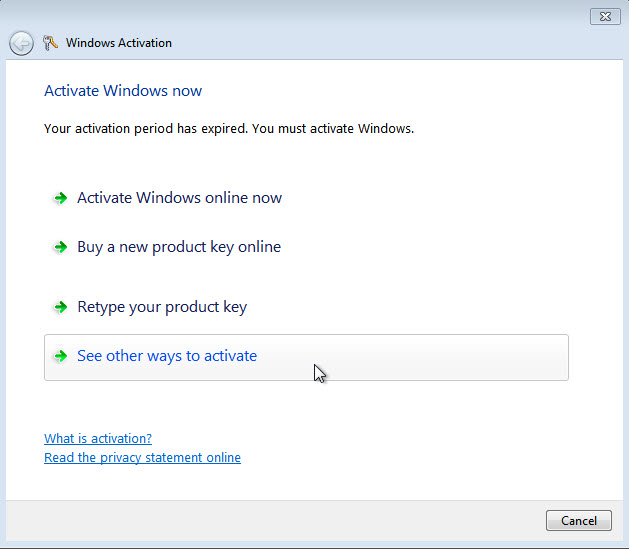
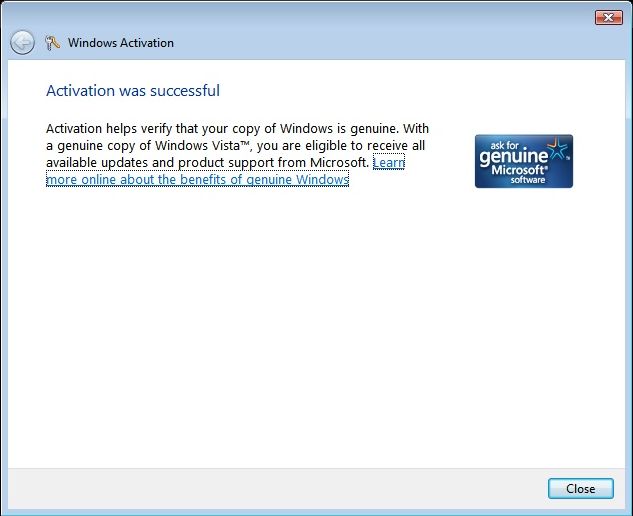
Now select the “Show me other ways to activate” option and follow the setup. Here select the “Use automated phone system” option, now wizard will give a toll-free number. Call the number and follow the instruction and you’ll be given a confirmation ID, you need to enter this ID in Windows Activation tool. Or you can directly contact a Microsoft customer care executive to explain the details and solve the non-genuine problem. With this way actually, you will be requesting the Microsoft person to check if the system you are trying to activate is the same system with the same internal components up to 60% as you purchased them. Do note that you can only do this step one time when you are changing some parts of the system.
This verification method will not work when you are changing the following parts of your system.
- Motherboard
- CPU & Hard Disk Both
- CPU & VRAM & RAM Sticks
These three combinations consist of around 60% of computer system technology, and if you change the whole computer system then what will be the point to keep the software from OEM, hence the system will get non–Genuine.
In future do note that if you are getting a PC even from the OEM try to invest more and purchase a boxed key from Microsoft, because that will save you bucks when you will be moving to a whole new computer. Also, do note that OEM keys are only set to work with the computer you purchased and hence if by chance you’re key doesn’t work even after just changing the hard disk or just the CPU then most probably you will have to get a new key for your PC. DO let us know in the comments about what do you think about the OEM key getting non–genuine.
More in How-to
This Copy Of Windows Is Not Genuine – Easy Error Fixing
“This Copy Of Windows Is Not Genuine” is a common message we usually saw when the trial period of Microsoft Windows period is over or in a pirated version of the OS. After installing Microsoft Windows Operating System of any version it will run for free, after one or two months the Operating system continuously…
How to download and install DirectX on Windows 10
DirectX is a popular application required to run multimedia and game files on Windows 10. It is a combination of application programming interfaces (API) to run multimedia, game, and video applications. When you are planning to play games on Windows 10, you must need DirectX installed on your PC. The first version of DirectX released…

How To Delete hiberfil.sys File In Windows?
Windows is a big operating system. You will find several files (both hidden and non-hidden) if you dig deeper into the operating system. If the storage space on your hard drive inside your computer is low, you should try to get rid of the gigantic hiberfil.sys file. It is possible to delete the file so…
The week in tech, minus the noise.
New reviews, fixes and the stories that matter — once a week, straight to your inbox.
We only use your email to send the newsletter. Unsubscribe any time. See our privacy policy.
Comments