

How To Stimulate iOS and Run Apps on PC
iOS is an independent robust operating system developed by Apple. For Android operating system we have various players to test, run play the games on a PC or a Laptop. But iOS we have only once choice to run iOS apps or games on PC. Meet iPadian, a good iOS simulator for Windows. The iPadian…
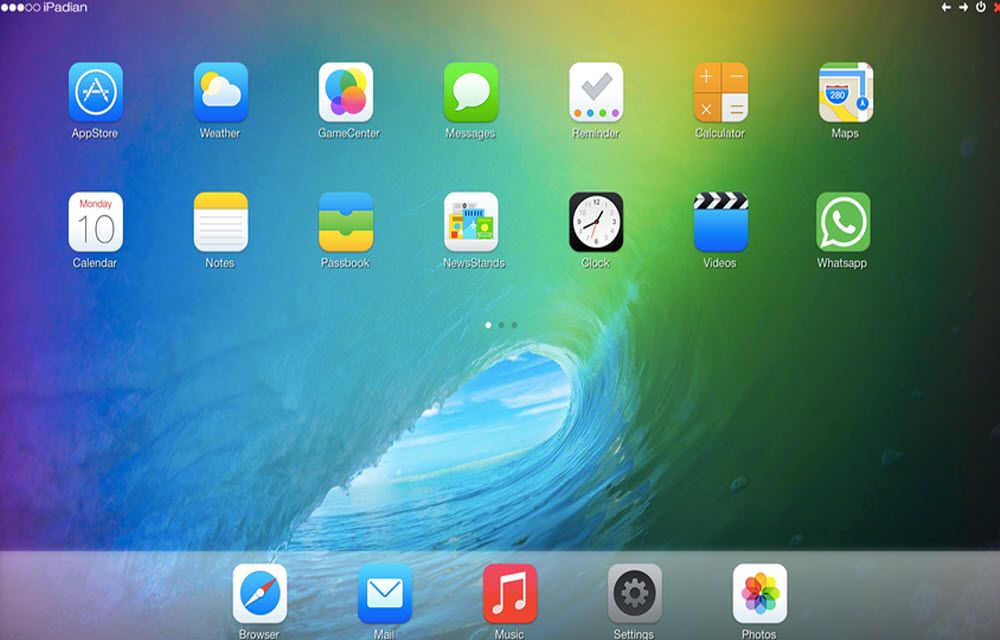
iOS is an independent robust operating system developed by Apple. For Android operating system we have various players to test, run play the games on a PC or a Laptop. But iOS we have only once choice to run iOS apps or games on PC. Meet iPadian, a good iOS simulator for Windows. The iPadian works on Adobe AIR and allows you to run all types of iOS apps on your PC.
Related Articles:
- Simulate iOS On Windows With iPadian
- Turn Your Android To iOS 8, Best Apps Selected
- Apple iPad Pro Review – Bigger is Better
How To Run iOS apps and games on PC
To get started, you need to download the iPadian file. It downloads as a zip file and extract on your desktop. During the installation, you may ned to install.Net Framework which is mandatory. If your PC already own the.Net no need to install again. During the installation, you may also need to update Adobe AIR. After updating all necessary software’s and installation, the iPadian will start working.
You will experience a big iPad screen on your PC or Laptop. The iPadian shows a large iOS environment on the PC screen. The user interface is exactly built like iOS, by default it comes with some pre-installed apps like Social networking, videos, music, web browser and email client. You can enjoy all type os iOS apps and games on PC. Even you can play some popular iOS games on Windows with the help of iPadian. The program is simple and it does justice what it meant for. The main downside of the iPadian is the lack of original Apple App Store. You can access and install iOS apps only from iPadian’s own app store.
Pro’s
- Big iPad experience
- iOS Environment
- iOS Apps and Gaming PC
Con’s
- Lack of original Apple App Store
- Usability is limited
More in How-to

How to Enable or Disable Auto iOS Updates?
Like Google, Apple also releases frequent iOS updates to ensure that iOS is bug-free and new features are also released through iOS updates. In the recently commenced WWDC 2019, Apple released the 13th iteration of its iOS operating software. iOS 13 packs multiple useful features. Some of the noteworthy features of iOS 13 are Dark…
Best Google Reader Alternatives For Android And iOS
Best Google Reader Alternatives for Android and iOS: Google Reader is shutting down in July. People are searching for best alternative feed reader for the mobile platform.

How To Manage And Cancel Subscriptions On iPhone And iPad
The subscription model services business exponentially increased in recent years. Many popular websites, games, music and video streaming services are offering a subscription-based model to enjoy their services. A subscription service offers unlimited use of service under the subscription period. The subscription model is not new to Apple iOS users. The subscription service of Apple…
The week in tech, minus the noise.
New reviews, fixes and the stories that matter — once a week, straight to your inbox.
We only use your email to send the newsletter. Unsubscribe any time. See our privacy policy.
Comments