

How to Fix iPhone 18 Pro and Pro Max Overheating
Is your iPhone 18 Pro or Pro Max running hot? Here’s how to tell normal warmth from a real problem, what Apple’s temperature guidance says, and the checks to try before you book a repair.

Fix-iPhone-18-Pro-Overheating
New iPhone 18 Pro running hotter than you’d like? You are far from the only one. The phones went on sale on September 18, 2026, and owners have been posting about heat on forums ever since. Most of it is from the first few days.
Let me be straight with you. Apple hasn’t said a word about iPhone 18 Pro heat, at least nothing I could find. So all of this is owner reports. Some of it is totally normal. Some of it isn’t.
Below I’ll help you tell normal warmth from an actual problem, show you Apple’s own temperature numbers, and go through the checks I’d do before booking a repair.
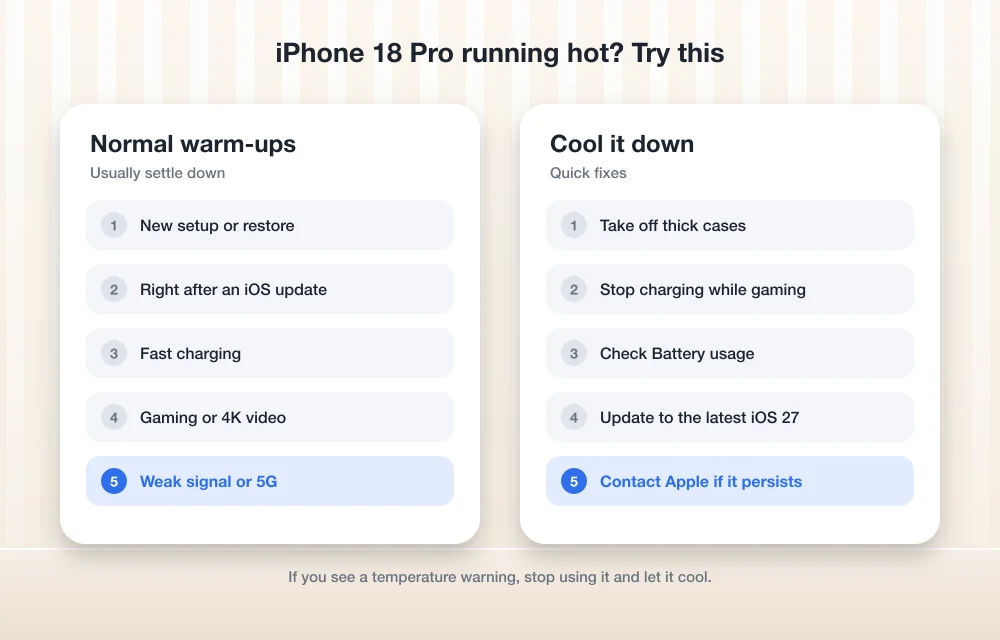
Quick answer: Some warmth is normal on the iPhone 18 Pro and Pro Max, especially during first setup, while charging, and during long gaming, camera or navigation sessions in heat or direct sun. Apple says to use iPhone where the air temperature is 0º to 35ºC (32º to 95ºF). If yours gets hot, take off the case, move it out of the sun, let it cool before charging, and update to the latest iOS 27 release. If it gets hot while sitting idle at normal room temperature, or keeps showing temperature warnings, contact Apple.
Is Your iPhone 18 Pro Overheating or Just Warm?
Figure this out first. Warm and overheating are two different things. A phone with a chip as powerful as the A20 Pro gets warm when you push it. That’s just physics.
Setting up or restoring your new phone
Apple says a new iPhone will feel warmer during first setup, and it calls that normal. It cools down once setup is done. No temperature warning on screen? Keep using it.
An iCloud restore is a big part of that first-day workload. Apple says a restore can pause if the phone gets too hot and pick up again once it cools. Restore looks stuck and the phone’s warm? Leave it somewhere cool for a bit.
Indexing after setup or an iOS update
You’ll hear people say a new iPhone spends days “indexing” your photos, messages and files in the background, and that this makes it warm and hungry. That “days” bit comes from forums, not Apple, so I can’t vouch for it. Still, if the heat started right after setup or an update, give it a few days before you worry.
Charging
Batteries warm up when they charge, and Apple says the iPhone slows the charge as it nears full. Warm on the charger is fine. Too hot to hold is not.
Gaming, camera and navigation
Apple names long GPS or navigation use, heavy games and the camera in heat or direct sun as things that can make an iPhone too warm. Think a long game on a hot afternoon, or shooting video outside in the sun. Long, loud gaming is also when some people hear audio glitches. If your speakers crackle, I’ve covered that in how to fix iPhone 18 Pro speaker crackling and popping.
What about 5G?
Lots of people blame 5G. I couldn’t find any Apple guidance on 5G and heat, and Apple hasn’t shared heat details for the C2 modem in the 18 Pro. So I’m not going to blame or clear 5G. If you suspect it, note whether the heat shows up mainly on weak signal or heavy mobile data, and tell Apple that if you contact them.
| Situation | Usually normal? | What I’d do |
|---|---|---|
| First setup or iCloud restore | Yes (Apple says so) | Let it finish somewhere cool |
| Warm while charging | Yes, if mild | Take the case off, charge out of the sun |
| Gaming, camera or GPS in heat or sun | Yes, can get too warm | Take breaks, move to shade |
| Hot while idle in a normal room | No | Run the checks below, then contact Apple |
| Frequent temperature warnings indoors | No | Contact Apple |
What Apple Says About Safe iPhone Temperatures
Apple’s guidance on keeping iPhone within acceptable temperatures is the one to follow. Here are the numbers:
| Condition | Apple’s range |
|---|---|
| Using iPhone (air temperature) | 0º to 35ºC (32º to 95ºF) |
| Storing iPhone | –20º to 45ºC (–4º to 113ºF) |
| Ideal for battery health | 16º to 22ºC (62º to 72ºF) |
| Avoid using or charging above | 35ºC (95ºF) |
Apple also warns that heavy use in very hot weather can permanently shorten battery life, and says not to leave your iPhone in a parked car. If you live through Indian summers like I do, or a US heatwave, that car rule matters most. A dashboard in the sun gets way hotter than the air outside.
What your iPhone does when it gets too hot
When it gets too warm, the iPhone looks after itself. Apple says you might see:
- Charging, including wireless charging, slows down or stops
- The screen dims or goes black
- Cellular signal gets weaker as the radios switch to a low-power state
- The camera flash or other camera features are temporarily disabled
In navigation you may get “Temperature: iPhone needs to cool down.” The screen goes off but voice directions carry on. Apple says emergency calls may still work during the warning. And if the phone can’t cool itself, it goes into deep sleep until it does.
Keep that signal drop in mind. Losing bars only when the phone is hot? Heat could be why. Losing service even when it’s cool is a separate issue, and my guide on fixing iPhone 18 Pro Max No Service or SOS on AT&T may help.
How to Fix iPhone 18 Pro Overheating
Go through these in order. Most of the time you’ll find the cause early on.
1. Cool it down properly
Close the game, stop recording, end navigation. Get the phone out of the sun and off hot surfaces. Pull off the case. Then let it cool down indoors on its own. Please don’t stick it in the fridge or in front of the AC. Slow is safer.
2. Check your Battery settings
Go to Settings > Battery > Charging. On iPhone 15 and later, Apple lets you set a charge limit anywhere from 80% to 100% in 5% steps. Optimized Battery Charging is available when the limit is set to 100%.
If heat stopped the charging, you’ll see “Charging on Hold: iPhone Temperature” on the Battery screen. It picks up again by itself once the phone cools. Apple also says the software may hold charging at 80% when the battery’s too warm, and suggests moving the phone and charger somewhere cooler.
You can override a charging hold from Settings > Battery > Resume Charging. I’d only do that after it has properly cooled. These heat protections can’t be switched off, and they’ve been around since iOS 16 for a good reason. You can read more in Apple’s page on thermally limited charging.
3. Charge in a cooler spot
Apple keeps it simple: charge between 0º and 35ºC (32º and 95ºF), keep it out of the sun and hot cars, and take the case off if it heats up while charging. My own habit? Never charge it under a pillow or on the bed. Put it on a table.
4. Use a decent charger
I couldn’t find Apple’s official wattage advice for the 18 Pro, so no numbers from me. My rule is simple: Apple’s charger or a known brand, and no cheap roadside adapters or cables. If it only gets hot with one charger, blame that charger.
5. Rethink your case
Apple says to take the case off if it heats up while charging. Past that, this is just my opinion: chunky rugged cases and some leather or wallet cases trap more heat than thin ones. Runs warm a lot? Go a day without the case and see.
6. Give it time after setup or an update
Heat since day one, or since an update? It might still be busy in the background. Leave it charging overnight somewhere cool for a few nights, then judge it. Not on the first afternoon.
7. Cut background activity and try Low Power Mode
Apps working hard in the background keep the phone busy and warm. Low Power Mode is a quick test too. One honest note: I couldn’t confirm Apple’s exact iOS 27 menu paths for Low Power Mode, Background App Refresh or per-app battery use, so I won’t guess them. Poke around Battery and General settings, and if one app keeps topping the list, close it or reinstall it.
8. Update to the latest iOS 27
Install the newest iOS 27 update. If Apple tweaks anything around heat or battery, that’s where it’ll land. Apple’s release notes on its support site list what each update fixes. Just expect a little warmth right after updating, like I said above.
Phone restarting on its own, not just warm? Different problem. See how to fix iPhone 18 Pro restarting when Face ID fails or during Apple Pay.
When to Contact Apple
Tried all that and it’s still hot? Time to talk to Apple Support, an Apple Store or an authorised service centre. I’d reach out if:
- The phone gets hot while sitting idle in a normal-temperature room
- You keep seeing temperature warnings indoors, within Apple’s 0º to 35ºC range
- Charging is regularly on hold for temperature even in a cool room
- The phone goes into deep sleep to cool down during light use
- The back or screen ever looks like it’s lifting or bulging (stop charging it and get it checked)
Before you go, jot down when it gets hot, what you were doing and whether it was charging. It saves a lot of back and forth.
My Take
From what I’ve read, most iPhone 18 Pro heat is the stuff Apple already calls normal: setup, restores, charging, heavy use in the sun. Let it cool, check Battery settings, charge somewhere cooler, ditch the case if you need to, and stay on the latest iOS 27. But if it’s hot while doing nothing in a normal room? Don’t wait. Get Apple to look at it.
Frequently Asked Questions
Has Apple acknowledged iPhone 18 Pro overheating?
Not that I could find. The reports come from owners on user forums, and Apple hasn’t made a public statement about iPhone 18 Pro heat, so they’re unconfirmed.
What temperature is safe for using an iPhone 18 Pro?
Apple says to use iPhone where the air temperature is 0º to 35ºC (32º to 95ºF) and store it at –20º to 45ºC (–4º to 113ºF). Its ideal range for battery health is 16º to 22ºC (62º to 72ºF).
Why did my iPhone 18 Pro stop charging at 80%?
If the battery gets too warm, iOS may stop charging above 80% until it cools. You may see “Charging on Hold: iPhone Temperature” in Battery settings. Move the phone and charger somewhere cooler, or use Settings > Battery > Resume Charging once it has cooled. Also check whether you’ve set an 80% limit in Settings > Battery > Charging.
Can overheating damage my iPhone battery?
Apple says using iPhone in very hot conditions can permanently shorten battery life, and it advises against using or charging above 35ºC (95ºF) or leaving the phone in a parked car.
Does 5G make the iPhone 18 Pro overheat?
I couldn’t find any Apple guidance on 5G and heat specifically, so it’s unconfirmed. Apple does say the cellular radios drop to a low-power state when the phone gets too warm, which can weaken signal.
More in How-to
How to Stop Android Auto Overheating Your Phone: 5 Fixes That Actually Work
If you’ve ever reached for your phone after a long drive and felt like you were picking up a hot baked potato, you aren’t alone. A quick search for “Android auto makes phone hot reddit” shows thousands of drivers dealing with the exact same issue every single day. Whether you are experiencing a Samsung S22…
How to Fix iPhone 18 Pro Max No Service or SOS on AT&T
Is your iPhone 18 Pro Max stuck on SOS or No Service on AT&T? Here’s how to tell if it’s the issue Apple has acknowledged, what to try first, and how to get a replacement.
How to Fix iPhone 18 Pro and Pro Max Speaker Crackling and Popping
Hearing crackles, pops or ticks from your iPhone 18 Pro or Pro Max earpiece? Here’s how to tell software from hardware, which settings to check, and when to take it to Apple.
The week in tech, minus the noise.
New reviews, fixes and the stories that matter — once a week, straight to your inbox.
We only use your email to send the newsletter. Unsubscribe any time. See our privacy policy.
Comments