

5G Home Internet vs Cable vs Fiber: Which Is Cheapest in the US? (2026)
I compared 5G home internet, cable, fiber and Starlink using official US provider pages, covering prices, data caps, price locks, fees and contracts, so you can pick the cheapest option that works at your address.
Home-Internet-Featured
Picking home internet in the US used to be a no-brainer. Whoever ran cable down your street got your money. Done. Now I keep getting messages like “should I ditch my cable company for one of those 5G boxes?” and “is fiber really worth paying extra for?”
So I sat down with the official pricing and support pages from the big providers and dug out the stuff that actually shows up on your bill. How each connection works, data caps, price-lock guarantees, equipment fees, contracts. And if I couldn’t confirm something from an official page, I’ll just say so instead of guessing (I’d rather admit I don’t know than make up a number).
Quick warning before we start. Every price here comes straight from a provider’s own page, and honestly, these things change all the time. Treat them as a starting point and check the final checkout page before you sign up for anything.
Quick answer: If fiber reaches your address, it’s usually the best deal for the money, with fast uploads and Verizon Fios starting at $30/mo with AutoPay for 300 Mbps. No fiber? 5G home internet from T-Mobile or Verizon is often the cheapest choice, especially if you already have a phone line with them, which can bring the price down to around $35/mo. Cable is the wired fallback in many areas, and Starlink is the option for rural homes that have nothing else.
How each type of internet actually works
Fiber
Fiber pushes data as pulses of light through thin glass strands that go all the way to your house. The real-world win? Upload speed. T-Mobile says its fiber plans have matching upload and download speeds, and Verizon calls Fios nearly symmetrical. If you’re on video calls all day, sending big files around or backing your photos up to the cloud, you’ll notice.
Cable
Cable internet runs over the same coaxial lines that used to bring you cable TV. It’s available pretty much everywhere and downloads can be quick, but uploads are usually way slower than downloads. You’ll normally need a modem too, and that’s where rental fees like to sneak in.
5G home internet (fixed wireless)
Think of this as a phone connection for your house. You get a gateway, which is a box that grabs signal from a nearby cell tower and turns it into Wi-Fi. No technician coming over, nobody digging up your yard. Here’s the thing though. You’re sharing that tower with everyone’s phones, so your speed can bounce around depending on how busy it is and how strong the signal is at your window.
Satellite (Starlink)
Starlink sends internet down from satellites to a dish on your roof or out in the yard. It works almost anywhere you’ve got a clear view of the sky, and that’s exactly why rural folks love it. The signal has to go up to space and come back though, so you get a bit more delay than you would on a good wired line.
Speed and latency in plain English
Speed (Mbps, or megabits per second) is how much data you can move at one time. Picture the width of a pipe. Netflix in 4K, a couple of people gaming and somebody stuck on Zoom, all at the same moment? Yeah, you want a wider pipe.
Latency is the delay, in milliseconds, for data to go somewhere and come back. Lower is better. While streaming you’ll hardly notice it, but in online games and video calls it shows up as lag, or that awkward thing where everyone talks over each other.
In general, fiber has the lowest and most consistent latency. Cable’s usually fine. 5G home internet jumps around more since tower traffic changes during the day. Satellite tends to have the most delay out of all of them, though if you’re mostly browsing and streaming, you probably won’t care much.
Price comparison: what the official pages say
This is what I was able to confirm on official provider pages. Prices move a lot and usually leave out taxes and fees, so please double-check before you order.
| Plan | Type | Starting price (official, may change) | Data | Price guarantee | Contract |
|---|---|---|---|---|---|
| T-Mobile 5G Home Internet | 5G | “As low as $40” with AutoPay; Rely $35/mo with AutoPay and a T-Mobile voice line | No cap; may slow during congestion and after 1.2TB/month | 5 years (Rely, Amplified, AWAY), 10 years (All-In) | No annual contract |
| Verizon 5G Home | 5G | $50/mo; $35 with eligible phone plan and AutoPay | Unlimited | 3, 4 or 5 years by tier | No annual contract |
| Verizon Home Internet Lite | LTE | $35/mo with AutoPay and any Verizon mobile plan | Slows to up to 10 Mbps after 150GB | 3 years | Not confirmed |
| AT&T Internet Air | Fixed wireless | $65/mo with AutoPay (current promo page) | No overage fees | Not confirmed | No annual contract |
| Verizon Fios | Fiber | $30/mo with AutoPay for 300 Mbps | Check official page | 5 years on Fios 5 Gig | Check official page |
| T-Mobile Fiber | Fiber | Check official page | Check official page | 10 years on 5 Gig | Check official page |
The 5G home internet options
T-Mobile 5G Home Internet
T-Mobile calls its plans Rely, Amplified and All-In, and there’s AWAY if you want to use it away from home. The plans page has said they start “as low as $40 with AutoPay,” and Rely goes down to $35/mo with AutoPay once you add any T-Mobile voice line. They’ve also run a limited-time $30/mo deal with a postpaid voice line, so keep an eye out for that one.
No annual contract and no data cap. Now the fine print. When the network’s congested, 5G Home users can get slower speeds than other T-Mobile customers, and things can slow down even more after 1.2TB in a month. That’s a ton of data for most homes, I’ll be real, but if your house streams 4K all day you should know about it.
The price guarantee shows as 5 years on Rely, Amplified and AWAY, and 10 years on All-In, not counting taxes, fees and some promos. One thing that bugged me: T-Mobile’s own Price Lock FAQ went back and forth on 5 vs 10 years when I read it, so confirm which one you’re getting at checkout. Oh, and the gateway only works at the address you registered when you activated it. So no, you can’t throw it in the car for a road trip on a regular plan.
Verizon 5G Home
Verizon’s got three tiers: 5G Home, 5G Home Plus and 5G Home Ultimate. If you have a postpaid Verizon phone plan, they’re $35, $45 and $60/mo. If you don’t, Verizon says plans start at $50/mo. Downloads run anywhere from 25 Mbps up to 1 Gbps, depending on the plan and where you live.
What I actually like is that the fine print here is pretty friendly. There’s no annual contract and you get a 30-day money-back guarantee. The gateway router comes at no extra cost, and if you’re leaving another provider, there’s up to $500 in credit toward early termination fees. Price guarantees run 3, 4 and 5 years depending on tier. Data’s unlimited, but the base plan caps streaming at 1080p, while Plus and Ultimate get 4K and “unlimited premium” data.
Verizon Home Internet Lite (LTE)
Verizon is now pushing Lite for areas that don’t have Fios or 5G Home. And it’s slow. Typical speeds are 10 to 25 Mbps for your first 150GB, then up to 10 Mbps for the rest of the billing cycle. Lite Extra bumps that to 200GB, lists uploads of 2 to 6 Mbps, throws in Whole-Home Wi-Fi and gives you a 4-year price lock (plain Lite gets 3 years). Lite starts at $35/mo with AutoPay and a Verizon mobile plan. Lite Extra’s price? Couldn’t confirm it. Honestly, I’d only go this route if there’s really nothing better at your address.
AT&T Internet Air
AT&T’s current promo page has Internet Air at $65/mo with AutoPay, plus a $10/mo credit for 12 months, or $29/mo if you’re on an AT&T 55+ plan. That deal isn’t available in New York, by the way. AT&T says no overage fees, no equipment fees and no annual contract. Wi-Fi extenders are $10/mo for up to five.
I couldn’t track down official speed numbers or any formal price-lock guarantee for Internet Air, so ask about both before signing up.
Fiber: Fios, AT&T Fiber, T-Mobile Fiber and Google Fiber
If fiber’s an option for you, that’s where I’d start. Verizon’s site says Fios starts at $30/mo with AutoPay for 300 Mbps, and Fios 5 Gig comes with a 5-year price guarantee. I wasn’t able to confirm the full Fios tier list, or its router and contract terms, for this post, so take a look at Verizon’s Fios page.
T-Mobile Fiber is its own thing, separate from the 5G service. It goes from 300 Mbps all the way to 5 Gig with matching upload and download, comes with a Wi-Fi 6 router, and the 5 Gig plan gets a 10-year price guarantee.
With AT&T Fiber, the one thing I could confirm is a $10/mo discount for AutoPay and paperless billing, which shrinks to $5 if you pay with a debit card. Current tier prices and whether there’s a price guarantee? Couldn’t verify either.
Google Fiber is only in select cities, but if you happen to live in one, it’s worth checking out. Look up current prices and terms on Google Fiber’s official plans page, because I couldn’t confirm them this time around.
Cable: Xfinity and Spectrum
Plenty of Americans are still on cable, and in some neighborhoods it’s the only wired choice you’ve got. While writing this I couldn’t confirm Xfinity’s or Spectrum’s current prices, data cap rules, equipment fees or price guarantees from their official pages, so I’m not going to toss random numbers at you. When you’re comparing them, ask each one four things. What’s the price after the promo ends? What are the monthly equipment fees? Is there a data cap? And can you bring your own modem?
Starlink for rural homes
Out in the country with no cable, no fiber and barely any cell signal? Starlink is often the only real broadband you can get. There are Residential and Residential Lite plans, but I couldn’t confirm current pricing or what the hardware costs, so go straight to Starlink’s residential page. And plan for the dish cost upfront, not just the monthly bill.
If your phone also cuts out in those dead zones, I wrote about whether T-Mobile’s T-Satellite is worth it for staying reachable when there’s no cell tower around.
How to check what’s available at your address
This is the step that decides everything. The “best” plan doesn’t mean a thing if it doesn’t reach your house.
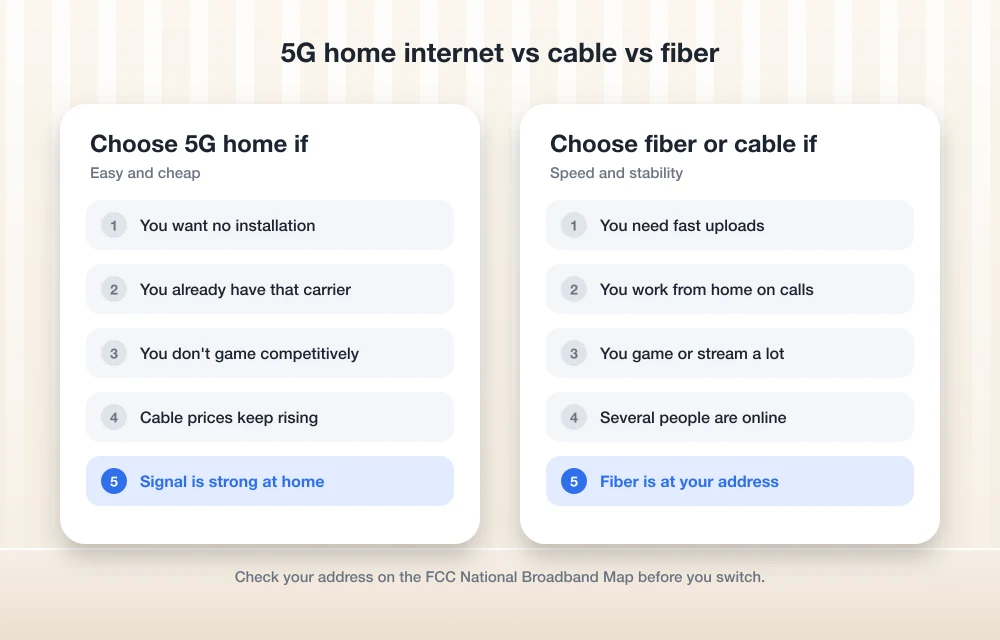
- Head to the FCC National Broadband Map and type in your full home address.
- Check the list of providers and technologies (fiber, cable, fixed wireless, satellite) reported for where you live.
- Take those names over to each provider’s own site, punch in your address there and see the real plans and prices.
- With 5G home internet, availability can be different even between you and your neighbor, so always use the provider’s own address check.
Just remember the FCC map shows what providers report, so it’s not perfect. If something looks off, the FCC has a challenge process you can use.
Which one should you pick?
Working from home, uploading a lot, or living with a gamer? Get fiber if it’s there. Those fast uploads and steady latency really do make a difference.
Already paying T-Mobile or Verizon for your phones and just need decent streaming and browsing? 5G home internet is probably the cheapest move for you. The phone-line discounts are where it gets really cheap.
Cable makes sense if it’s your only wired option, or if 5G signal is weak at your place. Just keep an eye on the fees.
And if you’re rural with no wired service at all, check Starlink first, then Verizon Lite or AT&T Internet Air as backups if they reach you.
Tips to lower your internet bill
Turn on AutoPay. Pretty much every price I quoted assumes you’ve got it on. On AT&T Fiber, paying from a bank account instead of a debit card gets you the bigger discount. Internet Air’s $5 AutoPay discount doesn’t change either way.
Bundle with your phone carrier. This one’s the biggie. T-Mobile Rely drops to $35 with a voice line, Verizon 5G Home goes to $35 with a postpaid phone plan, and AT&T sells two unlimited lines plus Internet Air for $99/mo total. If you’re overpaying for your phone plan anyway, check out my list of the cheapest unlimited phone plans in the US and see whether moving everything to one carrier saves you money. Switching isn’t as scary as it sounds, and yes, you can switch carriers and keep your phone number.
Use your own modem where allowed. If your cable provider charges a monthly rental, buying a compatible modem can end up paying for itself. Look at the provider’s approved list first. A lot of 5G plans already include the gateway, so this is mostly a cable thing.
Read the price lock carefully. A 5- or 10-year guarantee sounds amazing, right? But they usually leave out taxes, fees and some promos. Know what’s actually locked in.
Use switching credits. Verizon gives up to $500 toward early termination fees when you switch to 5G Home, so being stuck in a contract with your old provider might not actually trap you.
My take
If I were picking today, I’d check for fiber first. Every single time. If it’s not available, I’d go with whatever 5G service lines up with my phone carrier, because that discount is tough to beat. Cable and Starlink cover the gaps. Whichever way you go, run your address through the FCC map and the provider’s own checker, and actually read the price-lock fine print before committing. Prices move fast (like, really fast), so whatever’s cheapest this month might not be next month.
Frequently Asked Questions
Is 5G home internet cheaper than fiber?
It can be, especially if you get a phone-line discount. T-Mobile Rely is $35/mo with AutoPay and a T-Mobile voice line, and Verizon 5G Home is $35/mo with a postpaid Verizon phone plan. Fiber can hang in there too, though. Verizon lists Fios 300 Mbps from $30/mo with AutoPay. Prices change a lot, so check the official pages for your address.
Does T-Mobile 5G Home Internet have a data cap?
Nope, T-Mobile says there’s no data cap. But 5G Home users can get slower speeds than other customers when the network’s congested, and speeds can drop even more after 1.2TB of use in a month.
What is an internet price lock guarantee?
It’s basically a promise that your base monthly price won’t go up for a certain amount of time. T-Mobile lists 5 years on Rely, Amplified and AWAY and 10 years on All-In, and Verizon 5G Home gives you 3, 4 or 5 years depending on the tier. They usually leave out taxes, fees and some promotions.
Is Starlink a good option for rural internet?
For a lot of rural homes without cable, fiber or a strong cell signal, Starlink is often the most practical broadband you can get. Check Starlink’s official residential page for current plan prices and the upfront hardware cost before you order.
How do I check which internet providers serve my address?
Put your address into the FCC National Broadband Map at broadbandmap.fcc.gov to see which providers are reported for your location, then confirm plans and prices on each provider’s own site. The FCC map is based on what providers report, and if something looks wrong there’s a challenge process you can use.
You might also like

How to setup VPN on PS4
PS4 is a fantastic gaming console and loved by millions of users. To improve the ping rate, access the players in different regions, and to protect the online play from online attacks, many users prefer VPN on PS4. Unfortunately, there is no straightforward process for the VPN setup on PS4. However, every popular VPN service…
How to Connect Chromecast to Wi-Fi (2026 Guide for Every Model)
Your Chromecast is plugged in, the TV shows that big “set me up” screen, and nothing happens. Sound familiar? Or maybe it worked for two years and then you got a new router from your internet company, and now the TV just says it can’t find anything. Same problem in both cases. Your Chromecast has…
WiFi Speed Dropped? Here Are The Fixes For Sluggish WiFi Performance
WiFi routers became an essential part of our lives. Even in some rural areas we are seeing people using WiFi routers to connect their devices to the Internet. Today, I came up with a most common problem every WiFi user faces. It is sudden speed drops of WiFi signal resulting slow internet speed. There are…
The week in tech, minus the noise.
New reviews, fixes and the stories that matter — once a week, straight to your inbox.
We only use your email to send the newsletter. Unsubscribe any time. See our privacy policy.
Comments