

How to Check If You Installed the Hijacked Microsoft agent-framework Package (1.26.1 and 1.26.2)
On November 17, two malicious versions of Microsoft’s agent-framework Python package, 1.26.1 and 1.26.2, were published to PyPI and stayed up for less than an hour before being pulled. That was long enough to matter: any machine or CI pipeline that installed or upgraded agent-framework in that window may have run a credential stealer that…

Image: Microsoft
On November 17, two malicious versions of Microsoft’s agent-framework Python package, 1.26.1 and 1.26.2, were published to PyPI and stayed up for less than an hour before being pulled. That was long enough to matter: any machine or CI pipeline that installed or upgraded agent-framework in that window may have run a credential stealer that targets Azure, Azure DevOps and GitHub Actions secrets. This guide shows how to check your systems safely and what to do if you were hit.
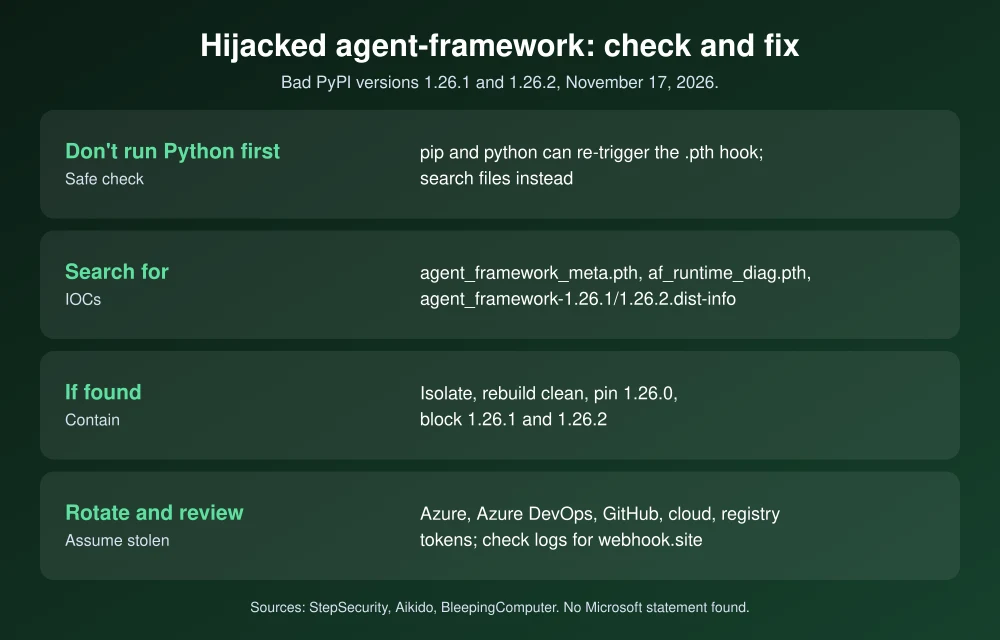
Quick answer: If you installed agent-framework between about 20:35 and 21:20 UTC on November 17, 2026, check for versions 1.26.1 or 1.26.2. Don’t start Python in a suspect environment to check, because the malware runs at interpreter startup. Search instead for the files agent_framework_meta.pth or af_runtime_diag.pth in site-packages. If you find them, isolate the machine, rebuild from a clean base pinned to agent-framework==1.26.0, and rotate every secret that machine could reach.
What happened
According to security researchers at StepSecurity and Aikido, agent-framework 1.26.1 was uploaded to PyPI at 20:35 UTC on November 17 and quarantined about 30 minutes later. Version 1.26.2 followed at 21:08 UTC, just minutes after the first was removed, and was quarantined at 21:16 UTC. Both were wheel-only releases. Version 1.26.0, released November 12, is the last clean version, and the PyPI project page now shows 1.26.0 as the latest release.
BleepingComputer reported that Microsoft hadn’t responded to its request for comment at publication time, and we couldn’t find an official Microsoft statement. How the attackers got upload access hasn’t been disclosed.
What the malware does
The trick is a .pth file. Python runs code listed in .pth files in site-packages every time the interpreter starts, so you didn’t need to import agent_framework for it to run. Running pip, pytest or any Python script in that environment was enough. Researchers report that it:
- Reads environment variables whose names contain words like TOKEN, SECRET, PASSWORD, KEY, AZURE, AWS, GITHUB and OPENAI, plus the environments of other running processes.
- Collects credential files such as Azure CLI caches (~/.azure), pip.conf, .npmrc, .netrc, .git-credentials, Docker config.json, Hugging Face tokens and Azure DevOps agent credentials.
- Tries to mint Azure DevOps and GitHub Actions OIDC tokens and Azure managed identity tokens for services like Key Vault, Storage and Microsoft Graph.
- Sends everything in one compressed POST to a webhook.site URL, running in a detached background process and printing nothing to your logs.
How to check if you’re affected (safely)
StepSecurity warns not to start with pip show, pip uninstall or any Python command in a suspect environment, because starting the interpreter can run the hook again. Use file searches instead.
1. Check lockfiles and requirements
In your repositories, search for the bad versions:
grep -rnE "agent[-_]framework.{0,6}1\.26\.[12]" --include="*.txt" --include="*.lock" --include="*.toml" .Also check CI logs from November 17 for lines like Successfully installed agent-framework-1.26.1 or 1.26.2.
2. Look for the malicious files
On Linux, macOS and CI runners:
find / \( -name "agent_framework_meta.pth" -o -name "af_runtime_diag.pth" -o -name "af_runtime_diag.py" -o -path "*agent_framework_meta/_telemetry.py" \) 2>/dev/nullOn Windows, in PowerShell:
Get-ChildItem -Path C:\ -Recurse -Force -ErrorAction SilentlyContinue -Include agent_framework_meta.pth,af_runtime_diag.pth,af_runtime_diag.py3. Check installed version folders without running Python
Look for a dist-info folder named agent_framework-1.26.1.dist-info or agent_framework-1.26.2.dist-info in each virtual environment’s site-packages, Docker images built that day and CI caches.
If none of these turn up anything and nothing installed agent-framework on November 17 between roughly 20:35 and 21:20 UTC, you’re very likely not affected.
If you find it: what to do
- Isolate the affected machine, container or runner from the network, and stop any leftover Python processes. Removing the package doesn’t stop a collector that’s already running or undo data that was already sent.
- Rebuild from a clean base, pinned to
agent-framework==1.26.0, ideally with hash pinning. Block 1.26.1 and 1.26.2 in your package proxy or allow-list. - Rotate secrets the machine could reach: CI/CD secrets, Azure service principal secrets, Azure DevOps PATs and service connections, GitHub tokens, cloud keys, npm, PyPI and NuGet tokens, Docker registry credentials, Hugging Face and OpenAI API keys. Re-register self-hosted runners whose credentials were exposed.
- Review identity activity in Microsoft Entra ID sign-in logs for service principals and federated credentials, plus managed identity role assignments and GitHub workflows with
id-token: write. Deleting a trust doesn’t revoke tokens that were already issued. - Check egress logs (proxy and DNS) for connections to webhook.site, and block webhook.site from build environments going forward.
How to avoid the next one
- Pin versions with hashes (pip’s
--require-hashes, or lockfiles from uv or Poetry), so a new upload can’t sneak into a build. - Add a cooldown: don’t auto-install releases that are only hours old in production pipelines.
- Restrict CI egress to the hosts your builds actually need.
- Use short-lived credentials such as OIDC federation instead of long-lived secrets stored in CI.
Supply-chain attacks are becoming routine. See how the Optimizely hack planted code on 178 organizations’ sites, how to fix Java4Shell, and the FBI’s warning about the ARTEX AI hacking tool.
FAQs
Which agent-framework versions are malicious?
Versions 1.26.1 and 1.26.2, both published on November 17, 2026 and removed the same evening. Version 1.26.0 is the last clean release.
Is agent-framework-core affected?
Researchers haven’t reported agent-framework-core itself as compromised. The malicious code was in the agent-framework wheel, which depends on the legitimate agent-framework-core 1.26.0.
Is uninstalling the package enough?
No. The malware may already have sent your credentials, and a background collector can keep running. Isolate the machine, rebuild cleanly and rotate any secrets it could access.
Why shouldn’t I run pip show to check?
The malware runs from a .pth file every time Python starts, and pip runs on Python. Search for the malicious files and version folders instead.
Featured image: Microsoft.
Disclosure: TheTechHacker has no paid relationship with Microsoft, StepSecurity, Aikido or any company mentioned here.
More in How-to

How to Fix KB5132061 Not Installing on Windows 11 (0x800f0993 and More)
Windows 11’s November security update, KB5132061, arrived on Patch Tuesday, November 10, and on some PCs it just won’t go in. You click Install, the progress bar crawls, and then Windows Update shows 0x800f0993, 0x80070306 or 0x800f0989, or quietly tries again on the next restart. Microsoft has acknowledged the problem, which helps, because it means…

How To Fix Office 2010 Setup Error 2203 An Internal Error Occurred
Microsoft Word is a comprehensive word processing package. Even though Office 2010 is outdated, many people still work with them. To work with Office 2010, you need to install the package properly. However, the installation process would not be smooth as expected. Sometimes, you will view a message “Error 2203. An Internal Error Occurred” during…

How To Fix Application Error 0xc000007b In Windows 10
Windows 10 has come a long way considering improvements offered with every update. However, there are some issues that only a user can solve and Microsoft isn’t really at fault. Yes, Windows isn’t a bug-free experience — but when you encounter the error “application error xc000007b”, things get annoying. The application error 0xc000007b is something…
The week in tech, minus the noise.
New reviews, fixes and the stories that matter — once a week, straight to your inbox.
We only use your email to send the newsletter. Unsubscribe any time. See our privacy policy.
Comments