

iOS 27.3: Every New Feature and When It’s Coming to Your iPhone
iOS 27.3 is shaping up to be the biggest update to iOS 27 since it launched in September, and it’s already in public beta. The headline change is a redesigned Health app with a new Longevity section, but there’s a lot more: Siri AI daily usage limits tied to your iCloud+ plan, a better StandBy…

Image: Apple
iOS 27.3 is shaping up to be the biggest update to iOS 27 since it launched in September, and it’s already in public beta. The headline change is a redesigned Health app with a new Longevity section, but there’s a lot more: Siri AI daily usage limits tied to your iCloud+ plan, a better StandBy for every iPhone, Safari vertical tabs, and a batch of features for the iPhone Duo. Apple has said the final release is coming in December.
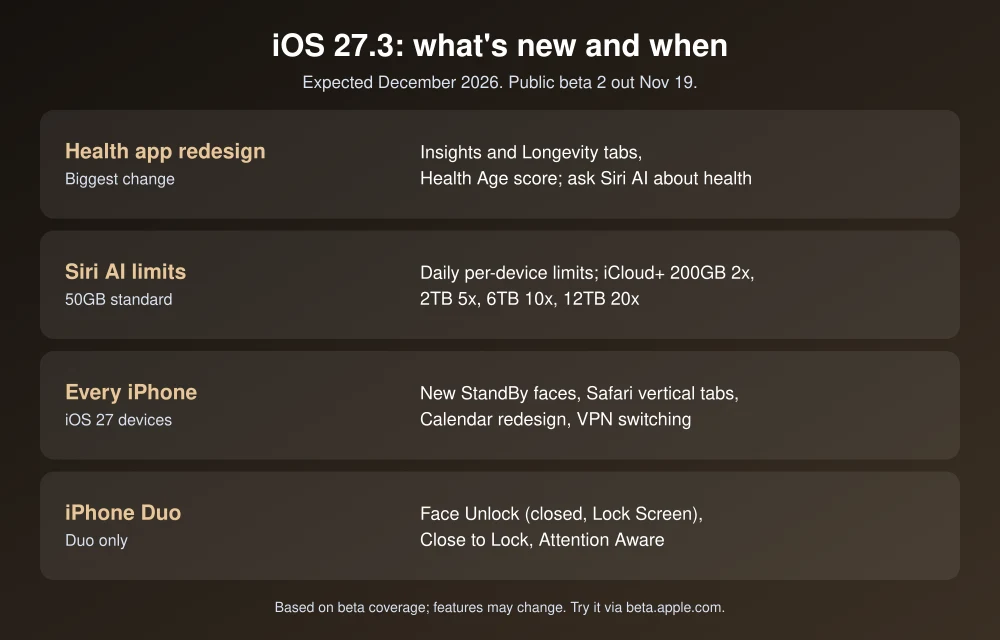
Quick answer: iOS 27.3 is expected in December 2026, according to Apple’s own Apple Intelligence announcement for China. Public beta 2 arrived on November 19. Key features include a redesigned Health app with Insights and Longevity tabs and a Health Age score, the ability to ask Siri AI about your health data, daily Siri AI usage limits with higher caps on larger iCloud+ plans, StandBy updates for all iOS 27 iPhones, Safari vertical tabs, and Face Unlock for iPhone Duo. You can try it now through the free Apple Beta Software Program.
iOS 27.3 release date
Apple hasn’t given an exact day. In its announcement of Apple Intelligence for users in China, Apple said the features become publicly available in December with the official iOS 27.3 release, as reported by 9to5Mac. The beta schedule so far:
- Developer beta 1: November 3, 2026
- Public beta 1: November 5, 2026
- Developer beta 2: November 16, 2026, with a revised build (24C5049f) on November 19, listed on Apple’s developer releases page
- Public beta 2: November 19, 2026
With a release candidate usually coming a week or two before launch, a mid-December release looks most likely.
Every major iOS 27.3 feature
Feature details below come from beta coverage by MacRumors and 9to5Mac, since Apple hasn’t published final release notes. Features can still change before release.
Redesigned Health app
- Insights tab: Activity Rings, heart rate, sleep score and vitals in one place, with Apple Intelligence “Personal Guidance.”
- Longevity tab: covers seven areas: heart health, sleep, mental wellbeing, movement, metabolic health, hearing and nutrition.
- Health Age: an estimate based on Apple Watch data plus at-home fitness checks using your iPhone camera.
9to5Mac reports these features are for iPhones that support Apple Intelligence.
Siri AI gets smarter, with limits
- Health questions: ask Siri AI about your steps, heart rate and activity rings.
- In-app actions across Mail, Safari, Files, Calendar, Maps, Messages, Music, Notes, Photos and more, plus “Ask About Page” in Safari.
- New languages: Traditional Chinese, Vietnamese, Turkish and Norwegian.
- Daily usage limits: server-based Siri AI and Apple Intelligence features get per-device daily limits. iCloud+ 200GB plans get up to 2x the standard limit, 2TB up to 5x, 6TB up to 10x and 12TB up to 20x. The 50GB plan keeps the standard limit. Our Siri AI daily limits explainer covers what counts toward your limit.
Apple Watch: Siri Recap and Live Rewind
Both arrive with watchOS 27.3 and need iOS 27.3 on your iPhone. You turn them on in the Watch app on your iPhone.
StandBy for every iPhone
The revamped StandBy from iPhone Duo comes to all iPhones that run iOS 27, with new clock faces and color options, an updated Photos face, new Calendar and Weather faces, and the ability to swipe between faces.
Safari, Calendar and more
- Safari: optional vertical tabs, Adaptive Dark Mode and a “Use Global Privacy Control” setting.
- Calendar: search and new-event buttons move to the bottom of the screen.
- Apple TV app: free video podcasts and vertical clips from Apple Originals.
- Apple Music: “Selfie Sing” karaoke recording.
- Control Center: the VPN toggle can switch between VPNs.
- Weather: new precipitation design and 10 new condition symbols.
iPhone Duo extras
- Face Unlock with the front camera on the Lock Screen when the phone is closed. Touch ID is still required for Apple Pay and passwords.
- Close to Lock option, outer-display Reachability, and Attention Aware to keep the outer screen awake while you look at it.
Comparing foldables? Read our iPhone Duo vs Galaxy Z Fold8.
How to try the iOS 27.3 public beta
- Back up your iPhone first. Apple recommends installing betas only on devices you don’t depend on.
- Sign up for the free Apple Beta Software Program with your Apple Account.
- On your iPhone, go to Settings, General, Software Update, Beta Updates and choose iOS 27 Public Beta.
- Go back to Software Update and download iOS 27.3 public beta.
If you’d rather wait for the stable release, keep an eye on Software Update in December. If the update doesn’t appear, our guide to fixing iPhone updates not showing applies to 27.3 too.
FAQs
When will iOS 27.3 be released?
Apple has said December 2026, in its announcement of Apple Intelligence for China, but hasn’t given an exact date.
What’s new in iOS 27.3?
A redesigned Health app with Insights, Longevity and Health Age, Siri AI health questions and daily usage limits, StandBy updates for all iOS 27 iPhones, Safari vertical tabs and new iPhone Duo features, based on the beta.
Is the iOS 27.3 public beta available?
Yes. Public beta 2 was released on November 19, 2026. Join the free Apple Beta Software Program to install it.
Will iOS 27.3 limit Siri AI?
Yes. Server-based Siri AI features get daily per-device limits, with higher limits on iCloud+ plans of 200GB or more.
Featured image: Apple.
Disclosure: TheTechHacker has no paid relationship with Apple or any company mentioned here.
More in Guides
Siri AI Daily Limits Explained: How iCloud+ Plans Raise Them in iOS 27.3
Siri AI is free on supported iPhones, but not unlimited. Apple has confirmed that Siri AI and several Apple Intelligence features run on server-side models with daily usage caps, and starting with iOS 27.3, paying for a larger iCloud+ storage plan raises those caps by up to 20 times. If you have seen a message…
How to Hide or Show the Battery Percentage on iPhone or iPad
The battery is the only thing in every phone which attracts our eyes with a fear. Every time you decide to open a new app or game, your eyes will automatically fall onto the battery icon on the upper part of your screen. Traditional devices are coming with a battery icon which fills as the…

Is TutuApp Safe? Why We Don’t Recommend It (and Safe Alternatives)
TutuApp is one of those names that keeps coming up when people look for free versions of paid apps or “hacked” games on Android and iPhone. We used to have a guide on how to install it. We have replaced that guide, because after looking at how TutuApp works and the risks involved, we can’t…
The week in tech, minus the noise.
New reviews, fixes and the stories that matter — once a week, straight to your inbox.
We only use your email to send the newsletter. Unsubscribe any time. See our privacy policy.
Comments