

Siri AI Daily Limits Explained: How iCloud+ Plans Raise Them in iOS 27.3
Siri AI is free on supported iPhones, but not unlimited. Apple has confirmed that Siri AI and several Apple Intelligence features run on server-side models with daily usage caps, and starting with iOS 27.3, paying for a larger iCloud+ storage plan raises those caps by up to 20 times. If you have seen a message…
Photo by Bagus Hernawan on Unsplash
Siri AI is free on supported iPhones, but not unlimited. Apple has confirmed that Siri AI and several Apple Intelligence features run on server-side models with daily usage caps, and starting with iOS 27.3, paying for a larger iCloud+ storage plan raises those caps by up to 20 times. If you have seen a message that you reached your limit, or you are wondering whether a bigger iCloud plan is worth it, this guide covers what Apple has published.
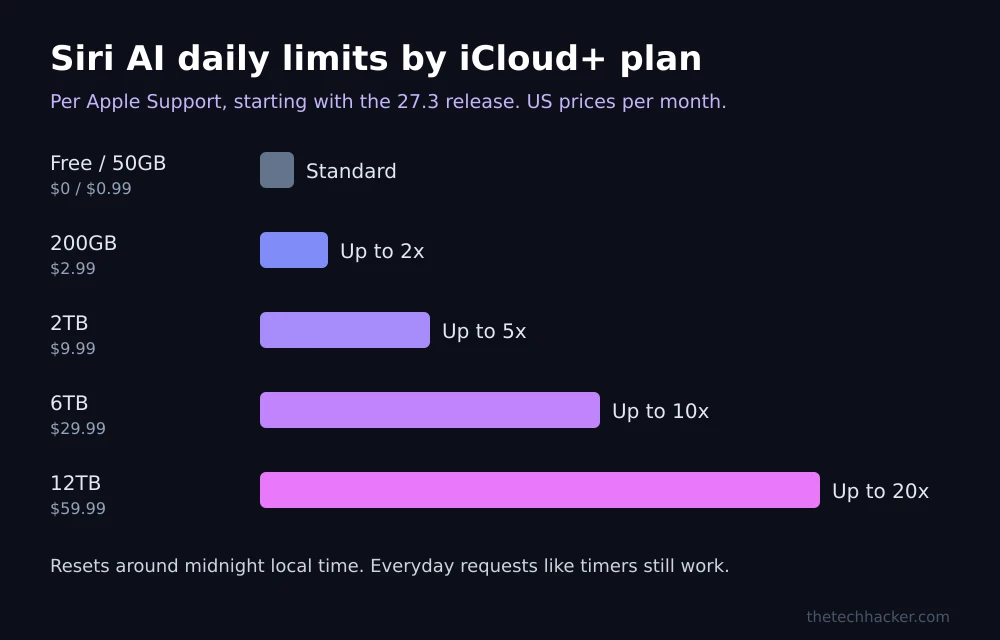
Quick answer: Each device gets a standard daily limit for Siri AI and other cloud-based Apple Intelligence features, and the limit resets around midnight in your time zone. Everyday Siri requests like timers keep working after you hit it, but advanced requests pause. Starting with the iOS 27.3 release, iCloud+ plans of 200GB or more raise the limit: up to 2x with 200GB ($2.99 a month), 5x with 2TB, 10x with 6TB and 20x with 12TB. The free tier and the 50GB plan get only the standard limit.
Which features have daily limits
According to Apple’s support article Learn about iCloud+ with Apple Intelligence and Siri AI, the limited feature categories include, but are not limited to:
- Siri AI requests that need Apple’s server-side models
- Images: Clean Up, Extend and Spatial Reframing in Photos, plus Image Playground
- Shortcuts that use the AFM Cloud and Cloud Pro models
- Third-party apps that use Apple Foundation Models through Private Cloud Compute
- Home app video summaries, which are limited by number of cameras on higher plans
Apple says limits vary by feature category, how complex a request is, system demand and other factors. It has not published the exact number of free requests per day.
How the daily limit works
- Per device, per category: each iPhone, iPad or Mac has its own daily limit for each feature category.
- When you hit it: you get a notification. Everyday Siri requests, such as setting a timer, still work, but advanced Siri AI requests pause until the reset.
- Reset time: all categories reset around midnight in your current time zone, and unused requests do not roll over.
- Traveling abroad: the reset follows the central time zone of your Apple Account’s country or region.
- Family Sharing: the reset follows the time zone of the person who bought the plan.
- Not signed in: the limit resets about 24 hours after you started using that category.
iCloud+ plans and Siri AI limits
Apple says increased access arrives with eligible iCloud+ plans starting with the 27.3 release. Prices below are Apple’s current US iCloud+ pricing; some states add tax.
| Plan | US price per month | Siri AI and select Apple Intelligence | Shortcuts with AFM Cloud Pro |
|---|---|---|---|
| Free (5GB) | $0 | Standard device limit | None |
| 50GB | $0.99 | Standard device limit | None |
| 200GB | $2.99 | Up to 2x | Access |
| 2TB | $9.99 | Up to 5x | Up to 5x |
| 6TB | $29.99 | Up to 10x | Up to 10x |
| 12TB | $59.99 | Up to 20x | Up to 20x |
The higher allowance kicks in after a device uses up its standard limit. It is then shared by every device signed in to your Apple Account and by Family Sharing members on your plan, on a first-come, first-served basis. A busy family on a 200GB plan may run through the extra allowance quickly.
Increased Siri AI access with iCloud+ is not available in Brazil, the EU, the UK or South Korea, and increased access to select Apple Intelligence features is also excluded in China.
How to upgrade your iCloud+ plan
- Open Settings on your iPhone and tap your name.
- Tap iCloud.
- Tap Manage Storage (or Upgrade to iCloud+), then Change Storage Plan.
- Choose 200GB or higher and confirm with your Apple Account.
If you already pay for Apple One, check which storage tier it includes, since Apple One Individual comes with 50GB, which does not raise the limit.
Is a bigger plan worth it for Siri?
For most people, no extra spending is needed: the standard limit covers everyday use, and the counter resets every night. The 200GB plan makes sense if you already need the storage for photos and backups, since the Siri boost comes at no extra cost. Paying for 2TB or more only for Siri is hard to justify until Apple publishes the actual limits. If Siri AI stops responding for reasons other than the cap, our guides on fixing Siri AI not working on Apple TV 4K and checking for an Apple outage can help. Also make sure you are on the latest update; our iOS 27.2.1 guide covers the current release.
FAQs
Does Siri AI have a daily limit?
Yes. Apple says Siri AI and some Apple Intelligence features that use server-side models have daily usage limits per device. Everyday requests like timers keep working after you reach the limit.
When does the Siri AI limit reset?
Around midnight in your current time zone. If you are not signed in to an Apple Account, it resets about 24 hours after you started using the feature.
Which iCloud+ plan increases Siri AI limits?
Plans of 200GB or more. Apple lists up to 2x with 200GB, 5x with 2TB, 10x with 6TB and 20x with 12TB. The 50GB plan does not raise the limit.
Is Siri AI free?
Yes. Apple says Siri AI and Apple Intelligence are free on supported devices, with a standard daily limit. Paid iCloud+ plans only increase how much you can use each day.
Featured image: Bagus Hernawan on Unsplash.
Disclosure: TheTechHacker has no paid relationship with Apple or any company mentioned here.
More in Guides
How to Fix Gemini Not Showing on Apple CarPlay: 8 Fixes That Work
Google started rolling out the Gemini app to Apple CarPlay on November 11, and plenty of iPhone owners got into their cars this week expecting a new icon that simply wasn’t there. If that’s you, the fix is usually quick. Google’s setup has a couple of steps that are easy to miss, and CarPlay itself…
How to Fix Siri AI Not Working on Apple TV 4K After tvOS 27.2.1
Apple released tvOS 27.2.1 on November 13, and it brings Siri AI, the new Apple Intelligence version of Siri, to older Apple TV 4K boxes from 2021 and 2022. The same day, the new fourth-generation Apple TV 4K went on sale. Plenty of people updated, pressed the Siri button, and got the same old Siri.…
What Does “Low Disk Space” Mean on iPhone? (And How to Clear It)
You try to take a photo, and the camera refuses. You try to update iOS, and it says there’s not enough space. Somewhere in between, you see a warning about storage and start wondering: what does low disk space mean on iPhone, and how serious is it? Don’t worry, it is one of the most…
The week in tech, minus the noise.
New reviews, fixes and the stories that matter — once a week, straight to your inbox.
We only use your email to send the newsletter. Unsubscribe any time. See our privacy policy.
Comments