

How to Fix Pixel Work or School Wi-Fi Not Connecting After the November Update
If your Pixel connects to Wi-Fi at home but won’t connect to the network at work, school or a university campus since the November 2026 update, you’re not alone. Pixel owners on several generations, including the Pixel 10a and Pixel 11 Pro, report that the phone tries again and again and then shows “Saved” or…

Image: Google
If your Pixel connects to Wi-Fi at home but won’t connect to the network at work, school or a university campus since the November 2026 update, you’re not alone. Pixel owners on several generations, including the Pixel 10a and Pixel 11 Pro, report that the phone tries again and again and then shows “Saved” or “Connection failure.” The problem affects WPA2-Enterprise networks that use PEAP with MSCHAPv2, the setup most offices and campuses use, including eduroam. Google hasn’t confirmed a cause or a fix yet. This guide covers what’s known, what to try, and how to stay connected until a patch arrives.
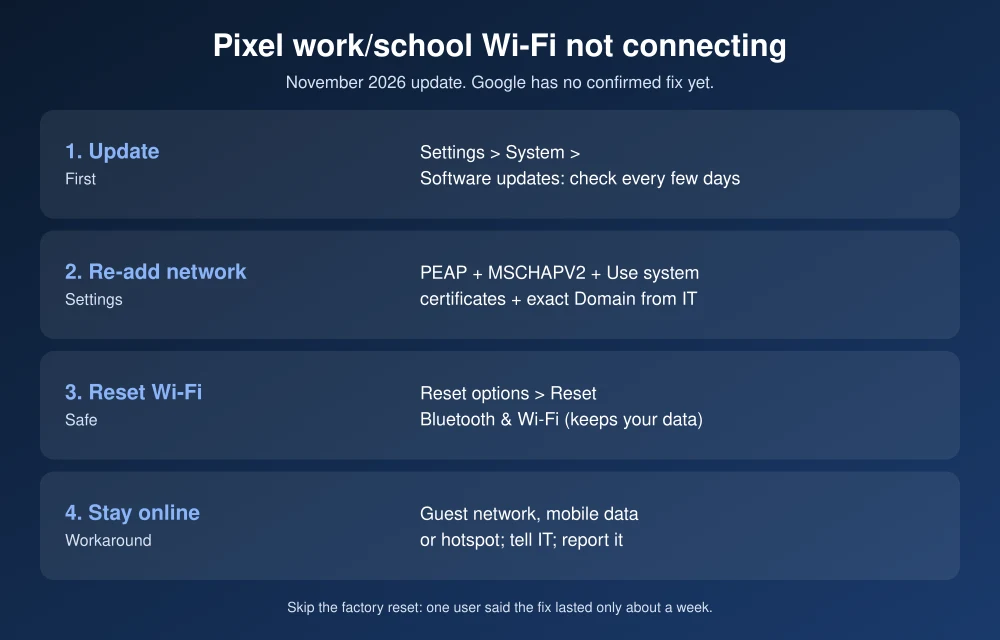
Quick answer: Google has no confirmed fix yet for Pixel phones that won’t connect to work or school Wi-Fi after the November 2026 update. First, check for a newer update in Settings > System > Software updates. Then forget the network and add it again with the exact settings from your IT department: EAP method PEAP, Phase 2 MSCHAPV2, CA certificate Use system certificates, plus the correct Domain. If it still fails, use mobile data or a hotspot, tell your IT team, and report it to Google. A factory reset helped one user only for about a week, so skip it.
What’s going on
- Which networks: WPA2-Enterprise networks using PEAP/MSCHAPv2 authentication, the kind where you sign in with a username and password rather than a single shared password, Android Authority reports. Some users mention networks run on Windows Network Policy Server.
- Which phones: Reports come from several Pixel generations. Pixels that haven’t installed the November update are reported to still connect normally.
- Home Wi-Fi works: Regular password-protected networks aren’t affected.
- Google’s response: Google’s Pixel Community team said on Reddit it had contacted a few affected users for more information. It hasn’t named a cause or a fix date.
The same update is also behind other reported Pixel problems. If your phone has more than one, see our fixes for the Pixel camera not working, wireless charging not working and Always-On Display and lock screen problems after the November update.
How to fix Pixel work or school Wi-Fi not connecting
None of these steps is a confirmed fix, since Google hasn’t identified the cause. They’re ordered so the quick, safe checks come first.
1. Check for a newer update
Go to Settings > System > Software updates and tap System update. Google often ships fixes for widespread bugs in a smaller follow-up update, so check every few days. Also open Google Play system update on the same screen, since some networking parts update separately.
2. Forget the network and add it again
The update may have changed how saved enterprise settings are handled, so set the network up from scratch with the exact details your IT department publishes.
- Go to Settings > Network & internet > Internet.
- Tap the gear next to your work or school network, then tap Forget.
- Tap the network again and fill in each field:
- EAP method: PEAP
- Phase 2 authentication: MSCHAPV2
- CA certificate: Use system certificates (unless IT gave you a certificate to install)
- Minimum TLS version: leave the default unless IT says otherwise
- Online Certificate Status: leave the default
- Domain: the exact server domain IT lists, such as radius.yourschool.edu
- Identity and Password: your network username and password
- Tap Connect.
A wrong or missing Domain is one of the most common reasons Android refuses an enterprise network, so check it against your IT department’s instructions. If your school uses eduroam, use its official setup tool (geteduroam) if IT recommends it. Don’t choose “Do not validate” for the certificate even if you see that suggested online. It sends your password to any network pretending to be your campus Wi-Fi.
3. Restart and turn off Wi-Fi for 30 seconds
Hold the power button and tap Restart. When the phone is back on, turn Wi-Fi off, wait 30 seconds, then turn it on. It won’t fix a software bug, but it clears a stuck connection attempt.
4. Reset network settings
Go to Settings > System > Reset options > Reset Bluetooth & Wi-Fi. This erases saved Wi-Fi networks and Bluetooth pairings, but not your apps, photos or data. Then add the enterprise network again as in step 2.
5. Stay connected another way
- Use your building’s guest network if there is one. These usually use a captive portal instead of PEAP.
- Switch to mobile data. If you need a laptop online too, turn on Hotspot in Settings > Network & internet > Hotspot & tethering.
- For Wi-Fi calling at work, keep mobile data on until this is fixed.
6. Tell IT and report it to Google
Tell your IT team it’s the Pixel November update, so they don’t spend time on your account. They can check the authentication server’s logs for the exact error. Report the bug to Google by adding your phone model and network details to the Pixel Phone Help Community. More reports help Google find the cause sooner.
7. Skip the factory reset
One user said a factory reset fixed the connection for about a week before the problem came back. Since the bug appears to be in the update itself, a reset costs you hours of setup for no lasting benefit. Downgrading to the October build also means wiping the phone, and Google doesn’t recommend it for most users.
Should you install the November update yet?
If you rely on work or school Wi-Fi and haven’t updated, consider waiting a few days for Google’s response, but don’t wait forever. The update includes security fixes, and staying on an old build has its own risk. Our November 2026 Pixel Drop coverage lists what the update adds.
FAQs
Why won’t my Pixel connect to work Wi-Fi after the November update?
Pixel owners report that the November 2026 update breaks WPA2-Enterprise networks that use PEAP and MSCHAPv2. The phone shows Saved or Connection failure. Google hasn’t confirmed the cause yet.
Is there a fix for Pixel enterprise Wi-Fi problems?
Not yet. Google says it’s gathering information from affected users. Check for updates in Settings, re-add the network with your IT department’s exact settings, and use mobile data in the meantime.
Does the bug affect home Wi-Fi?
No. Reports say regular home networks that use a single Wi-Fi password still work. The problem is with enterprise networks where you sign in with a username and password.
Should I factory reset my Pixel to fix Wi-Fi?
It’s not worth it. One user said a reset fixed the problem for only about a week. Wait for a Google update instead.
Featured image: Google.
Disclosure: TheTechHacker has no paid relationship with Google or any company mentioned here.
More in How-to
How to Fix Pixel Wireless Charging Not Working After the November Update
You put your Pixel on the charger, the charging icon lights up, and an hour later the battery is lower than when you started. Since Google’s November update arrived, some Pixel owners have been reporting exactly that: the phone says it’s charging wirelessly, but the percentage drops. Others see “Connected, not charging” on a pad…
How to Fix Pixel Camera Not Working After the November Update
If your Pixel’s camera opens to a black screen or a “Camera error” message since the November update, it’s not just you. Since November 13, Pixel 10 and Pixel 11 owners have reported the same thing, and for some of them it affects third-party camera apps too, not only Pixel Camera. Google hadn’t issued a…

How to Fix Outlook Not Working After the Microsoft 365 Outage
If Outlook has been spinning, refusing to send, or showing an empty inbox since Thursday, November 12, you’re not alone and it probably isn’t your computer. Microsoft has been dealing with a large Microsoft 365 incident that hit Exchange Online, the service behind work and school Outlook mailboxes, and features in Teams and other apps…
The week in tech, minus the noise.
New reviews, fixes and the stories that matter — once a week, straight to your inbox.
We only use your email to send the newsletter. Unsubscribe any time. See our privacy policy.
Comments