

How to Fix the Passkey “Something Went Wrong” Error on Android When Signing In on Windows 11
You scan the QR code on your Windows 11 PC, approve the passkey on your Android phone, and the website signs you in. Then your phone says “Something went wrong.” It’s a Windows bug, not a problem with your phone or your account. Microsoft fixed it in the November 19, 2026 preview update, KB5132057, for…

Image: Microsoft
You scan the QR code on your Windows 11 PC, approve the passkey on your Android phone, and the website signs you in. Then your phone says “Something went wrong.” It’s a Windows bug, not a problem with your phone or your account. Microsoft fixed it in the November 19, 2026 preview update, KB5132057, for Windows 11 25H2 and 26H2, and in KB5132265 for 26H1. This guide shows how to tell a false error from a real one, how to install the fix now, and what to check if passkeys still fail afterwards.
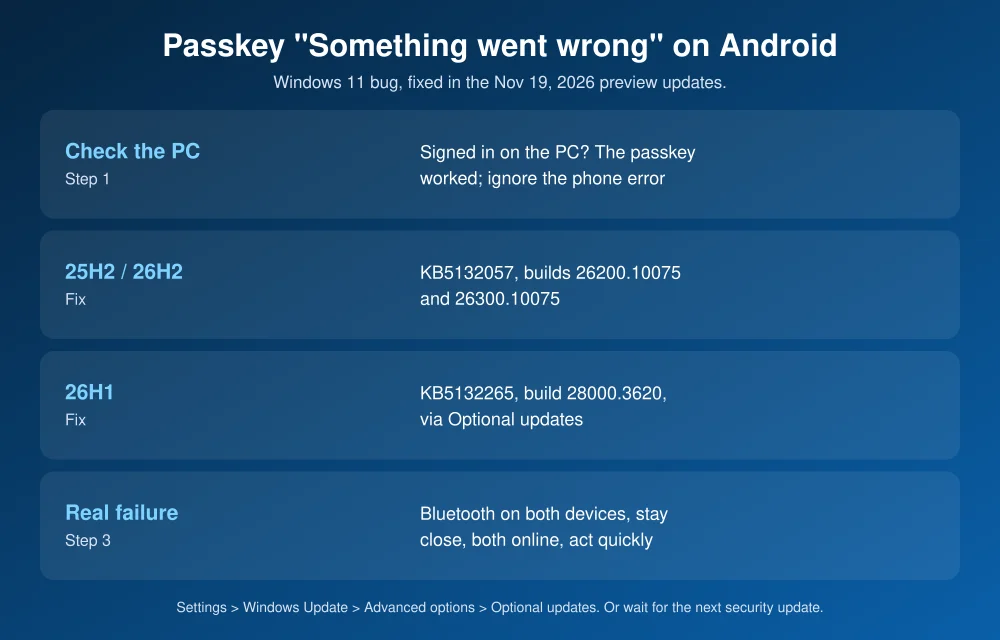
Quick answer: If your Android phone shows “Something went wrong” after a passkey sign-in on a Windows 11 PC, check the PC first. If you’re signed in, it worked and you can ignore the phone’s error. To fix it for good, install the optional update: Settings > Windows Update > Advanced options > Optional updates, then download KB5132057 (25H2 and 26H2) or KB5132265 (26H1). If you skip it, the fix arrives with Microsoft’s next security update. If the PC did not sign you in, it’s a real failure: turn on Bluetooth on both devices, keep them close, and try again.
What’s going on
This happens when you use a passkey saved on your Android phone to sign in on a Windows 11 PC. That’s the “use a phone or tablet” option, where you scan a QR code. Microsoft’s KB5132057 release notes describe the bug as “cross-device passkey authentication on Android devices” displaying a “Something went wrong” error. The 26H1 notes for KB5132265 go further. They say the fix lets the process “complete without displaying an incorrect ‘Something went wrong’ message on your phone,” for both creating a passkey and signing in.
The Register reports that the full message reads “Something went wrong. Restart the process on your other device and try again.” It says the bug shows up with Google Password Manager and Microsoft Authenticator, in Edge and Chrome, and that iPhones aren’t affected. A user on Microsoft’s Tech Community forum traced it to Windows sending the wrong “finished” signal to the phone after the passkey step had already completed. Microsoft hasn’t confirmed a cause.
Step 1: Check whether you actually signed in
Look at the PC, not the phone. If the website or app shows you as signed in, the passkey worked and the phone’s message is the bug. You don’t need to retry, and you don’t need to delete or recreate your passkey.
If the PC is still on the sign-in screen, you have a real failure. Skip to Step 3.
Step 2: Install the fix (KB5132057 or KB5132265)
First check your version: Settings > System > About, under Windows specifications.
| Windows 11 version | Fix | Build after update |
|---|---|---|
| 26H2 | KB5132057 | 26300.10075 |
| 25H2 | KB5132057 | 26200.10075 |
| 26H1 | KB5132265 | 28000.3620 |
| 24H2 | No November preview listed | None |
- Open Settings > Windows Update and click Check for updates.
- Go to Advanced options > Optional updates.
- Under “Optional updates available,” click Download & install next to the preview update.
- Restart when asked, then try a passkey sign-in again.
These are optional, non-security preview updates, so Windows won’t install them on its own. Microsoft lists the passkey fix in the “normal rollout” part of the update, so everyone who installs it gets the fix, not just a test group. To get future previews like this automatically, turn on Get the latest updates as soon as they’re available on the Windows Update page. IT admins can grab the packages from the Microsoft Update Catalog. Windows Update for Business doesn’t offer preview updates.
Prefer to wait? Microsoft says the changes “will appear in the next security update.” That’s normally Patch Tuesday, the second Tuesday of the month, which is December 8, 2026. Microsoft also says there will be no December preview update.
Step 3: If passkey sign-in really fails
Microsoft’s passkey troubleshooting page lists the usual causes. “Something went wrong” can also be a real error when one of these is off:
- Bluetooth is off on the PC or the phone. Cross-device passkeys need Bluetooth on both, even though you scan a QR code. On a desktop with no Bluetooth, use a USB Bluetooth adapter.
- The devices are too far apart. Keep the phone near the PC during the whole sign-in.
- One device is offline. Both need an internet connection.
- The request timed out. Scan the code and approve it promptly.
- Outdated software. Update Chrome or Edge, Google Play services, and your password manager app.
Still stuck? Sign in with your password or another method, then check that the passkey is still listed in Google Password Manager (or Samsung Pass, or Authenticator) on your phone.
Should you stop using passkeys?
No. The bug only affects the message on your phone, not the security of the sign-in. Passkeys still resist phishing better than passwords and texted codes. Treat any unexpected passkey or sign-in prompt you didn’t start with suspicion, though. Scammers copy these screens, as our guide to tech support scam pop-ups shows. If Microsoft sign-ins fail across Outlook and Teams at once, it may be an outage instead: see how to check if Microsoft 365 is down. iPhone users who want stronger account security can turn on Advanced Data Protection for iCloud.
FAQs
Why does my Android phone say “Something went wrong” after a passkey sign-in?
A Windows 11 bug makes Android show the error after cross-device passkey sign-ins, even when they succeed. Microsoft fixed it in KB5132057 (25H2 and 26H2) and KB5132265 (26H1).
Can I ignore the passkey error on my phone?
Yes, if your PC shows you as signed in. Then the passkey worked. If the PC didn’t sign you in, it’s a real failure, so check Bluetooth and distance and try again.
How do I install KB5132057?
Go to Settings > Windows Update > Advanced options > Optional updates and download and install it. It’s an optional preview update, so Windows won’t install it automatically.
When will the passkey fix install automatically?
Microsoft says the changes will appear in the next security update. Patch Tuesday normally falls on the second Tuesday of the month, which is December 8, 2026.
Featured image: Microsoft Windows.
Disclosure: TheTechHacker has no paid relationship with Microsoft, Google or any company mentioned here.
More in How-to

Bing Chat not working on Edge or Windows? Best fixes to get it running today
Bing Chat, now powered by the latest ChatGPT-based model and integrated across Microsoft Edge and Windows, is drawing strong adoption, but users frequently report that it stops responding, fails to load, or throws generic “Something went wrong” errors. The good news is most issues are routine and fixable with a handful of browser, network, and…

Is Steam Down? How to Fix Steam Purchase and Checkout Errors
Steam’s checkout broke for a lot of people on Saturday morning, November 21. Downdetector logged more than 1,000 problem reports at the peak, against a normal level of about 14. Players described failed purchases, transaction errors, warnings that Steam was “experiencing high activity,” and a “Something Went Wrong” page with the code E502 L2. Valve…

Resolving “Something Went Wrong. Please Try Again” Error on Messenger App
Are you frustrated by the recurring “Something went wrong. Please try again” error on your Messenger app? This is the most common problem we see regularly on our mobiles. If you find yourself stuck with this issue, preventing you from logging in and connecting with friends, worry not. This article provides straightforward solutions that can…

The week in tech, minus the noise.
New reviews, fixes and the stories that matter — once a week, straight to your inbox.
We only use your email to send the newsletter. Unsubscribe any time. See our privacy policy.
Comments