

Siri AI Can Read Your Health Data in iOS 27.3 Beta: What It Accesses and How to Control It
Siri AI is learning to answer questions about your health. In the second iOS 27.3 beta, released November 16, 2026, testers found that Siri AI can read Health app data such as step counts, heart rate and Activity rings when given permission, according to MacRumors and 9to5Mac. Before this, Apple’s new AI-powered Siri couldn’t touch…

Image: Apple
Siri AI is learning to answer questions about your health. In the second iOS 27.3 beta, released November 16, 2026, testers found that Siri AI can read Health app data such as step counts, heart rate and Activity rings when given permission, according to MacRumors and 9to5Mac. Before this, Apple’s new AI-powered Siri couldn’t touch Health at all. As of November 22, Apple’s own support page still says “Reading Health app data is not available with Siri AI at this time,” and Apple hasn’t announced the change. iOS 27.3 is expected in December. This guide covers what testers are seeing, how Apple handles Health data with Siri today, and the settings that control it.
Quick answer: In the iOS 27.3 beta, Siri AI can answer questions using your Health data, like “Am I on track to hit my weekly step goal?”. It shows the answer on a Health-style card. This is reported by testers, not yet announced by Apple, and it’s expected with the public iOS 27.3 release in December. To control Siri’s Health access, go to Settings > Apps > Health and check the Siri options, such as “Learn from this App” or Data Access & Devices > Siri, depending on your version. Apple says Health data Siri uses for a recognized Health request “is not stored or made accessible to Apple.” If you use Siri’s ChatGPT extension, anything you say in a request routed to ChatGPT goes to OpenAI.
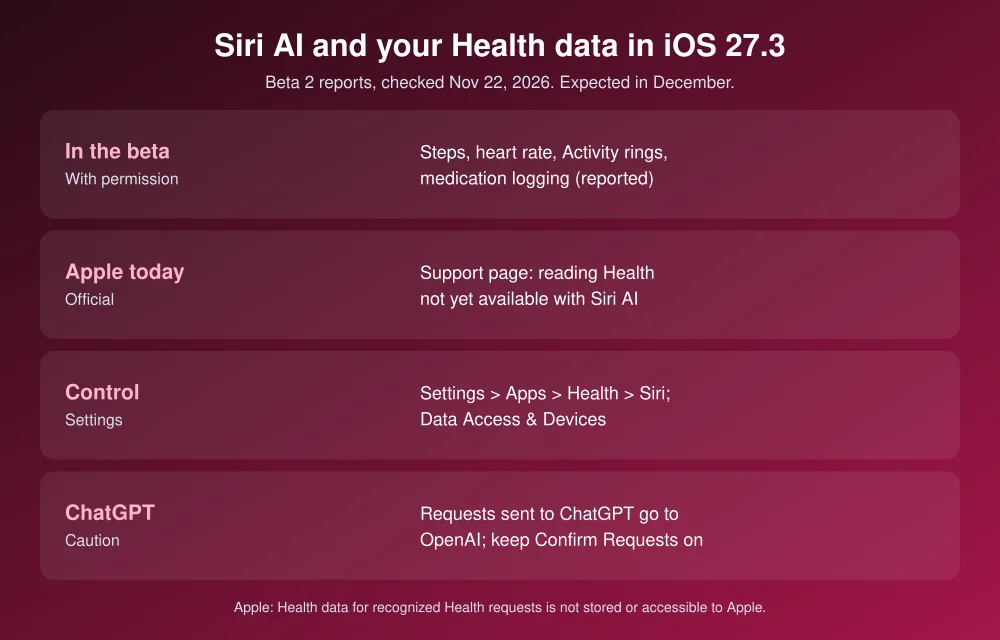
What Siri AI can do with Health in the beta
From hands-on reports by 9to5Mac, MacRumors and iClarified, testers have found that Siri AI can:
- Tell you recent step counts, such as last week’s total and daily average.
- Read heart rate readings.
- Show Activity ring progress with a ring graphic.
- Help with medication logging.
- Use the data in other tasks, such as “Send a message to Chance about the status of my activity rings.”
9to5Mac says earlier Siri AI builds blocked Health access entirely, while the older “classic” Siri could reach some Health data. Reports so far cover the iPhone only. It’s unclear whether Siri AI can also write new Health data, and which data types beyond these are included. Apple’s iOS 27.3 beta 2 release notes don’t mention it, so it could still change before release.
How Apple handles Health data with Siri today
Apple’s Siri and Health support page explains the rules that apply now:
- Siri can “read and write certain Health app data, such as blood pressure or body temperature.”
- When Siri recognizes a request as a Health request, the Health data involved “is not stored or made accessible to Apple.”
- If Siri doesn’t recognize the request as a Health request, it handles it the normal way, and any health details you said are sent to Apple like any other Siri request. Phrasing matters, so keep health questions clear and specific.
- Health data is encrypted on your iPhone with your passcode and is inaccessible by default while the phone is locked.
Apple Intelligence runs some tasks on the iPhone and others on Apple’s Private Cloud Compute servers. Apple says personal data sent there “is not stored nor made accessible to Apple or anyone else.” Its Health privacy notice says some health insights may be processed there. Apple hasn’t said where Siri AI’s Health answers will be processed.
How to control Siri’s access to your Health data
- Open Settings > Apps > Health.
- Tap Siri (shown as Apple Intelligence & Siri on some versions) and turn Learn from this App on or off. Apple’s support page says that if this is off and a request needs Health data, Siri asks you to turn it back on.
- Also check Data Access & Devices > Siri in the Health settings. Apple’s privacy notice points there, and the exact menu may differ by iOS version.
- Review which other apps can read your Health data on the same Data Access & Devices screen, and remove any you no longer use.
Once iOS 27.3 ships, look for a new permission prompt the first time you ask Siri AI a health question. Testers say access works “when given permission,” but the exact prompt wording isn’t public yet.
Watch the ChatGPT extension
Siri can hand some requests to ChatGPT. According to Apple’s ChatGPT extension privacy notice, it’s off by default, and Siri asks before sending a request unless you turned off “Confirm ChatGPT Requests.” When it does send one, your request and attachments go to OpenAI. If you’re signed in to a ChatGPT account, OpenAI may keep them and use them for training. Apple’s notice doesn’t mention Health data, but anything you say about your health in a request sent to ChatGPT is included.
To keep health questions on Apple’s side, leave Confirm ChatGPT Requests on, or turn the extension off at Settings > Apple Intelligence & Siri > ChatGPT. If you’d rather use ChatGPT for health on purpose, OpenAI’s own Health feature has separate controls, covered in our ChatGPT Health guide.
Also new in iOS 27.3: the redesigned Health app
Apple confirmed on November 3 that the redesigned Health app is in the iOS 27.3 beta and will arrive “as a free software update later this year.” It adds an Insights tab with an Apple Intelligence summary of your heart, sleep, fitness and vitals, and a Longevity tab tracking long-term trends. A Health Age estimate needs an Apple Watch. You can also add lab results such as A1c and LDL. It needs an iPhone that supports Apple Intelligence: iPhone 15 Pro or later. Some features are limited to adults.
Should you try it in the beta?
Only on a phone you don’t depend on. Apple’s beta FAQ says to back up before installing. The beta 2 release notes list a Siri AI bug where it “might not ask you to unlock” before showing information that normally requires unlocking, which matters for anything personal. If you wait for the December release, the feature will have its final permission prompts. Remember that server-based Siri AI requests count toward daily limits, as we explain in Siri AI daily limits. For everything else coming in the update, see iOS 27.3 features and release date. For stronger protection of the rest of your iCloud data, turn on Advanced Data Protection.
FAQs
Can Siri AI read my Health data?
Not in the current public release. Apple’s support page says reading Health data isn’t available with Siri AI yet. Testers report that the iOS 27.3 beta adds it with your permission, and iOS 27.3 is expected in December.
Does Apple see the Health data Siri uses?
Apple says Health data used for a request Siri recognizes as a Health request is not stored or made accessible to Apple. If Siri doesn’t recognize it as a Health request, what you said is handled like any other Siri request.
How do I stop Siri from using my Health data?
Go to Settings > Apps > Health, tap Siri, and turn off Learn from this App. Also check Data Access & Devices > Siri in the Health settings.
Will ChatGPT get my Health data through Siri?
Apple’s ChatGPT extension notice doesn’t mention Health data, but anything you say in a request Siri sends to ChatGPT goes to OpenAI. Keep Confirm ChatGPT Requests on, or turn the extension off.
Featured image: Apple.
Disclosure: TheTechHacker has no paid relationship with Apple, OpenAI or any company mentioned here. This is general information, not medical advice.
More in Guides

iOS 27.3: Every New Feature and When It’s Coming to Your iPhone
iOS 27.3 is shaping up to be the biggest update to iOS 27 since it launched in September, and it’s already in public beta. The headline change is a redesigned Health app with a new Longevity section, but there’s a lot more: Siri AI daily usage limits tied to your iCloud+ plan, a better StandBy…

How to Stop Siri AI From Reading Your Apps With Excluded Apps in iOS 27.2
Siri AI in iOS 27 can read what’s on your screen, pull details out of your messages and act inside your apps. That’s useful until you remember it can also see your Signal chats, your banking app and your health notes. iOS 27.2 adds a simple fix: an Excluded Apps list that blocks Siri AI…
How to fix Siri does not respond or answers correctly
Having trouble with Siri after an iOS update? Here’s how to fix it!
The week in tech, minus the noise.
New reviews, fixes and the stories that matter — once a week, straight to your inbox.
We only use your email to send the newsletter. Unsubscribe any time. See our privacy policy.
Comments