

ChatGPT Health Comes to Android: How to Connect Health Connect and What It Shares
ChatGPT Health now reads Android Health Connect data in the US. How to connect it, what OpenAI uses for training, and how to disconnect and delete your data.
ChatGPT can now read health and fitness data from Android phones. In its November 19, 2026 release notes, OpenAI said Health is rolling out to more places, including the desktop app, and that Android users can “connect your health and fitness information with Android Health Connect.” Until now, only iPhone owners could link a phone’s health data, through Apple Health, which arrived in July. The feature is US-only. It’s free on every consumer plan, and it raises real privacy questions. This piece covers what it does, how to connect it, what OpenAI says it does with the data, and how to cut it off.
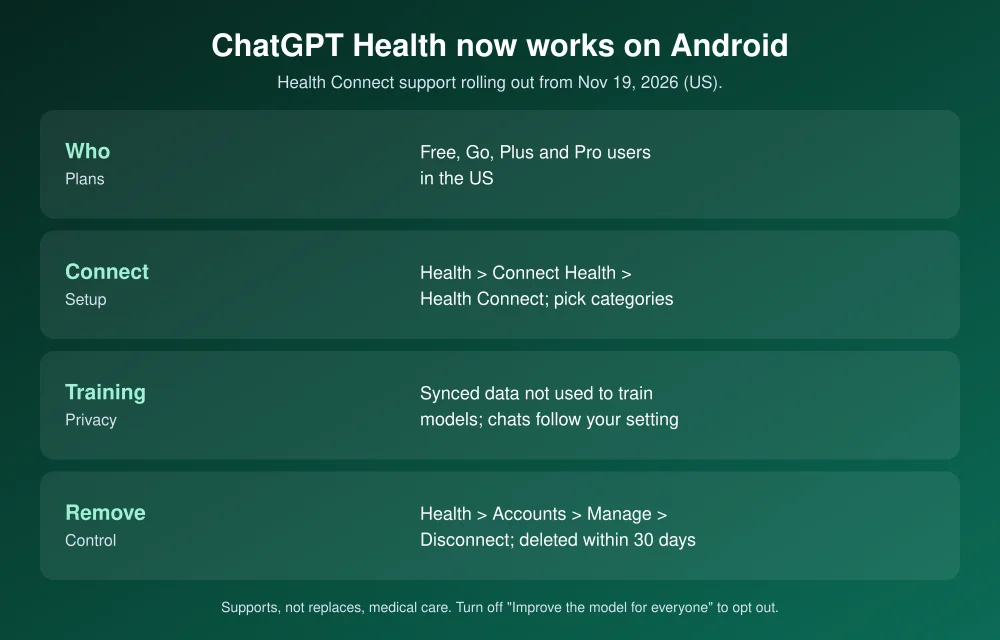
Quick answer: ChatGPT Health now works with Android Health Connect, rolling out gradually from November 19, 2026 to Free, Go, Plus and Pro users in the US. To connect it, open Health in the ChatGPT sidebar, tap Connect Health (or Get started), choose Health Connect and approve the data categories you want to share. OpenAI says synced health data isn’t used to train its foundation models or target ads. Chats that mention your health data can still be used to improve models unless you turn off “Improve the model for everyone.” To disconnect, go to Health > Accounts > ••• > Manage > Disconnect.
What’s new
- Android: Health can read data from Android’s Health Connect hub. Health Connect is where apps such as fitness trackers store your sleep, activity and workout data.
- Desktop: Health is now in the ChatGPT desktop app too.
- Who gets it: logged-in Free, Go, Plus and Pro users in the US. The July launch was limited to adults 18 and older. The rollout is gradual, so it may not be on your account yet.
OpenAI pitches it for things like spotting patterns in sleep and activity, preparing questions for a doctor’s visit, or understanding a lab result. Its Health help article says the feature “is designed to support, not replace, medical care and is not intended for diagnosis or treatment.”
How to connect Health Connect
- Update the ChatGPT app from the Play Store.
- Open the sidebar, tap Health, then Connect Health or Get started.
- Choose Health Connect and approve only the data categories you want ChatGPT to read.
- Wait for the sync, then review the conditions, medications and family history ChatGPT has on file.
Your fitness apps have to share their data into Health Connect first. If ChatGPT shows no workouts, check that the tracker’s app is writing to Health Connect. To see exactly what ChatGPT can read, open Android Settings, search for “Health Connect”, and look under the connected apps list. ChatGPT only has read access. It can’t change your Health Connect data, your Apple Health data or your medical records.
What OpenAI says it does with your data
| Question | OpenAI’s answer |
|---|---|
| Is synced health data used for training? | No. OpenAI says it’s “not used to train our foundation models or target ads.” |
| What about chats that mention it? | They can be used to improve models under your data settings. Turn off Settings > Data controls > “Improve the model for everyone” to opt out. |
| Can it create memories? | Health conversations can. Use Temporary Chat or turn Memory off to avoid that. |
| Is it HIPAA-covered? | No. It’s a consumer product. OpenAI points doctors and covered entities to its separate healthcare products. |
| How long after disconnecting? | Synced data is deleted from OpenAI’s systems within 30 days. Chats that already contain health details stay until you delete them. |
One detail matters. When Health launched in July, OpenAI’s announcement said conversations using connected data were excluded from training regardless of your settings. Its current help article and its Health Privacy Notice, updated November 19, say those conversations follow your normal “Improve the model” setting. The synced data itself is still excluded. If you connect health data, check that setting.
How to disconnect and delete
- In ChatGPT: Health > Accounts > ••• next to Health Connect > Manage > Disconnect. For linked medical records, choose Remove account.
- On Android: revoke ChatGPT’s permissions in the Health Connect settings.
- Old chats: delete any conversations that discussed your health, since disconnecting doesn’t remove them.
- Everything: request export or deletion through OpenAI’s privacy portal.
Should you connect it?
It can be useful for spotting trends you’d otherwise miss, like sleep dropping on weeks you skip workouts. Treat it like any other app holding sensitive data, though. Share only the categories you need, keep “Improve the model” off if you’d rather your health chats stay out of training, and confirm anything important with your doctor. If you’re setting this up on a parent’s phone over Thanksgiving, our parents’ phone checklist covers Medical ID and emergency info first. Google offers its own assistant features on Android, and Gemini Tasks is now free. iPhone users who want tighter control over cloud data can turn on Advanced Data Protection.
FAQs
Does ChatGPT Health work on Android?
Yes. Since November 19, 2026, it’s rolling out with Android Health Connect support to Free, Go, Plus and Pro users in the US.
Is ChatGPT Health free?
Yes. OpenAI says Health is available on the Free, Go, Plus and Pro plans in the US.
Does OpenAI train on my health data?
OpenAI says synced health data isn’t used to train its foundation models or target ads. Conversations that reference it follow your “Improve the model for everyone” setting, which you can turn off.
How do I disconnect Health Connect from ChatGPT?
Go to Health > Accounts, tap ••• next to Health Connect, then Manage > Disconnect. Synced data is deleted within 30 days.
Featured image: OpenAI.
Disclosure: TheTechHacker has no paid relationship with OpenAI, Google or any company mentioned here. This is general information, not medical advice.
More in News
What Is ChatGPT Space? How to Use It Now That It Replaced Library
If the Library button in ChatGPT has disappeared, you’ve probably got ChatGPT Space instead. OpenAI started rolling Space out to Plus subscribers on November 20, 2026. Space is where your pages, slides, images and uploaded files now live. It also lets ChatGPT build interactive pages and presentations you can edit and share. Pro, Business and…
Android 17 QPR2 Beta 7.1 Is Out: What’s Coming to Pixel Phones Next
Android 17 QPR2 Beta 7.1 is out for Pixel phones. See what Google has documented, which Pixels qualify, and when the stable update may land.
How to Back Up Android Photos to a Windows PC Automatically with Quick Share
Google’s November 2026 system update adds automatic photo and video backup from Android to Windows through Quick Share. Here’s what’s confirmed, what you need, how setup reportedly works, and what to use until it reaches you.
The week in tech, minus the noise.
New reviews, fixes and the stories that matter — once a week, straight to your inbox.
We only use your email to send the newsletter. Unsubscribe any time. See our privacy policy.
Comments