

TSA ConfirmID: How to Pay the $45 Fee If You Don’t Have a REAL ID
If your driver’s license doesn’t have the REAL ID star and you’re flying for Thanksgiving, you have two choices. You can bring a different accepted ID, such as a passport, or you can pay TSA’s $45 ConfirmID fee before you get to the airport. TSA says it could screen more than 3 million passengers on…

Image: TSA
If your driver’s license doesn’t have the REAL ID star and you’re flying for Thanksgiving, you have two choices. You can bring a different accepted ID, such as a passport, or you can pay TSA’s $45 ConfirmID fee before you get to the airport. TSA says it could screen more than 3 million passengers on Sunday, November 29, so getting turned away from the checkpoint and sent to the back of the line is the last thing you want. This guide explains what ConfirmID is, how to pay for it on Pay.gov, how long it lasts, and which IDs let you skip it entirely.
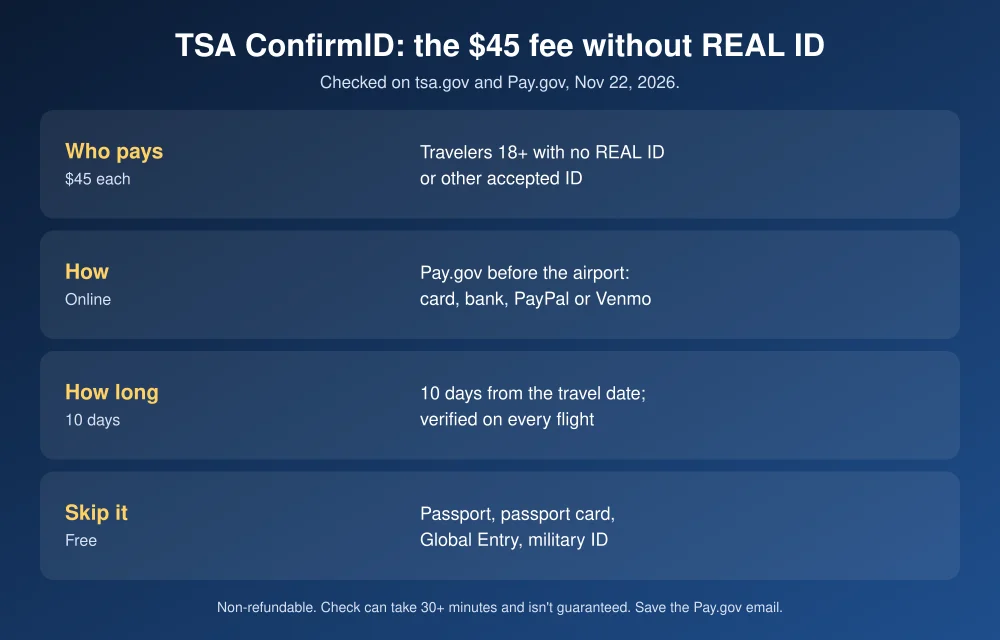
Quick answer: TSA ConfirmID is a $45 per person, non-refundable identity check for travelers 18 and older who don’t have a REAL ID or other acceptable ID. You pay it online at Pay.gov before you arrive at the airport, using a card, bank account, PayPal or Venmo. It covers 10 days from the travel date on your receipt. Save the confirmation email from [email protected], since that’s your only proof. Verification can take up to 30 minutes and isn’t guaranteed. If you have a passport, passport card, Global Entry card or another ID on TSA’s list, you don’t need ConfirmID at all.
Do you need ConfirmID?
Check your license first. A REAL ID has a star (or a flag) in the top corner, or the card says “Enhanced.” If it has either, you’re fine and can stop here. TSA has enforced REAL ID since May 7, 2025, according to its REAL ID page. If you can’t tell, your state DMV can confirm it.
No star? You still don’t need ConfirmID if you carry any of these, from TSA’s acceptable ID list:
- U.S. passport or U.S. passport card
- Global Entry, NEXUS, SENTRI or FAST card
- Department of Defense ID, including dependent IDs
- Permanent resident card or border crossing card
- Photo ID from a federally recognized Tribal Nation
- Foreign government passport
- Veteran Health Identification Card, TWIC, Merchant Mariner Credential, HSPD-12 PIV card, or USCIS Employment Authorization Card
- An approved state mobile driver’s license, but only if it’s based on a REAL ID or enhanced license
Two useful details on that page: TSA accepts IDs on its list for up to two years after they expire, and it does not accept temporary paper driver’s licenses. So an expired passport in a drawer can save you $45, while the paper slip the DMV gave you won’t help.
Kids under 18 don’t need ID for domestic flights. The exception is an unaccompanied minor using TSA PreCheck. Airlines can set their own rules for young travelers, so check with yours.
How to pay the TSA ConfirmID fee
- Go to the TSA ConfirmID page and follow the link to the Pay.gov form. Type tsa.gov yourself rather than tapping a link in a text or ad.
- Fill in one form per traveler. Enter the traveler’s exact legal name as it appears on the ID they’ll show, plus the travel date. You don’t need a Pay.gov account.
- Double-check both fields. You can’t edit the form after paying, and a wrong date can mean paying again.
- Pay $45 by debit card, credit card, bank account (ACH), PayPal or Venmo. Cash isn’t accepted.
- Save the confirmation email from [email protected]. Screenshot it or print it. TSA says you may have to pay again if you can’t show it.
Someone else can pay for you, such as an adult child booking for a parent, as long as the form has the traveler’s own name and date. Do it before you leave for the airport. TSA’s FAQ says that if you reach the checkpoint without an acceptable ID or payment, you’ll have to step out of line, pay, and rejoin at the back.
What happens at the checkpoint
Show your confirmation and whatever ID you have. TSA will then try to verify who you are using other information. On its ConfirmID FAQs and about page, TSA says the check averages 10 to 15 minutes but can take 30 minutes or more, and you may get extra screening. Paying doesn’t guarantee you’ll get through: if TSA can’t confirm your identity, you won’t be allowed into the screening area.
Plan for it. Arrive at least 30 minutes earlier than you normally would, and more on the busiest days: the Tuesday and Wednesday before Thanksgiving and the Sunday and Monday after.
The rules that catch people out
| Rule | What it means for you |
|---|---|
| Non-refundable | TSA says the fee is non-refundable “under any circumstance,” even if your flight is canceled or verification fails. |
| 10-day window | It covers the 10 days from the travel date on your receipt. A Thanksgiving round trip leaving Nov 24 and returning Nov 30 fits in one payment. A two-week trip doesn’t. |
| Check every time | You can reuse it within the window, but you go through verification on each flight. |
| Per person | A couple without REAL IDs pays $90. |
| Fraud penalties | The Pay.gov form warns that fraud tied to the process can bring federal penalties. |
The fee took effect February 1, 2026, under a Federal Register notice published December 3, 2025. TSA had first proposed $18 before setting it at $45.
Is it worth paying, or should you get a REAL ID?
For one trip this week, $45 is the only fast option if you have no other accepted ID. If you fly more than once or twice a year, it adds up fast, since every trip outside the 10-day window costs another $45. A REAL ID or a passport card covers domestic flights for years. Book a DMV appointment after the holiday so you’re not paying $45 per trip.
Watch for scams too. Fake “TSA fee” texts and lookalike payment sites are an easy trick this week. The only official place to pay is Pay.gov, reached from tsa.gov. Our guide to spotting fake flight cancellation texts covers the warning signs. If storms are disrupting your trip, see how to set up flight delay alerts, and our explainer on the FAA ground stop and flight refunds covers what airlines owe you.
FAQs
How much is the TSA ConfirmID fee?
$45 per traveler. It’s paid online through Pay.gov before you arrive at the airport and is non-refundable.
How long is TSA ConfirmID good for?
10 days from the travel date on your receipt. You can use it on more than one flight in that window, but TSA verifies your identity each time.
Can I fly without a REAL ID if I have a passport?
Yes. A U.S. passport or passport card is on TSA’s acceptable ID list, so you don’t need a REAL ID or ConfirmID. TSA accepts listed IDs up to two years after they expire.
Do children need ConfirmID?
No. Travelers under 18 don’t need ID for domestic flights, and the Pay.gov form applies the fee to travelers 18 and older.
Featured image: TSA.
Disclosure: TheTechHacker has no paid relationship with TSA, Pay.gov or any company mentioned here. Rules were checked on tsa.gov and Pay.gov on November 22, 2026.
More in How-to
How to Form an LLC in 2026: Step-by-Step Guide for US Small Businesses
Forming an LLC is one of the first real decisions most US small business owners make, and it’s easier than it sounds. You can usually do it online in an afternoon, often for less than $200 in state fees. Where people get into trouble is the part after filing: missing the annual report, paying a…

How to Set Up Donations on Twitch
Twitch lately have been quite popular for streamers who love gaming. There are even people who moved to gaming as their careers as they were earning quite well with the online streaming thing. There are different genres available in-game streaming which can help you to get an amazing follower base. Donations are another way you…

ChatGPT Wallet: How It Works, Who Can Use It and How to Set It Up
OpenAI wants ChatGPT to do more than recommend what to buy. On Friday, November 13, it launched ChatGPT Wallet, a way for its AI agents, called dots, to actually pay for things on your behalf. You ask your dot to find a sweater or book a hotel, review the order, approve it with Face ID…
The week in tech, minus the noise.
New reviews, fixes and the stories that matter — once a week, straight to your inbox.
We only use your email to send the newsletter. Unsubscribe any time. See our privacy policy.
Comments