

How to Fix Zelle Payment Delays After the Bank Outage
Monday’s banking mess left a lot of people staring at a Zelle payment that never showed up. Rent, a split dinner bill, money for family. When a payment you sent or expected goes missing, it is stressful, and the worst thing you can do is panic and send it again. The good news is that…


Photo by Rodion Kutsaiev on Unsplash
Monday’s banking mess left a lot of people staring at a Zelle payment that never showed up. Rent, a split dinner bill, money for family. When a payment you sent or expected goes missing, it is stressful, and the worst thing you can do is panic and send it again.
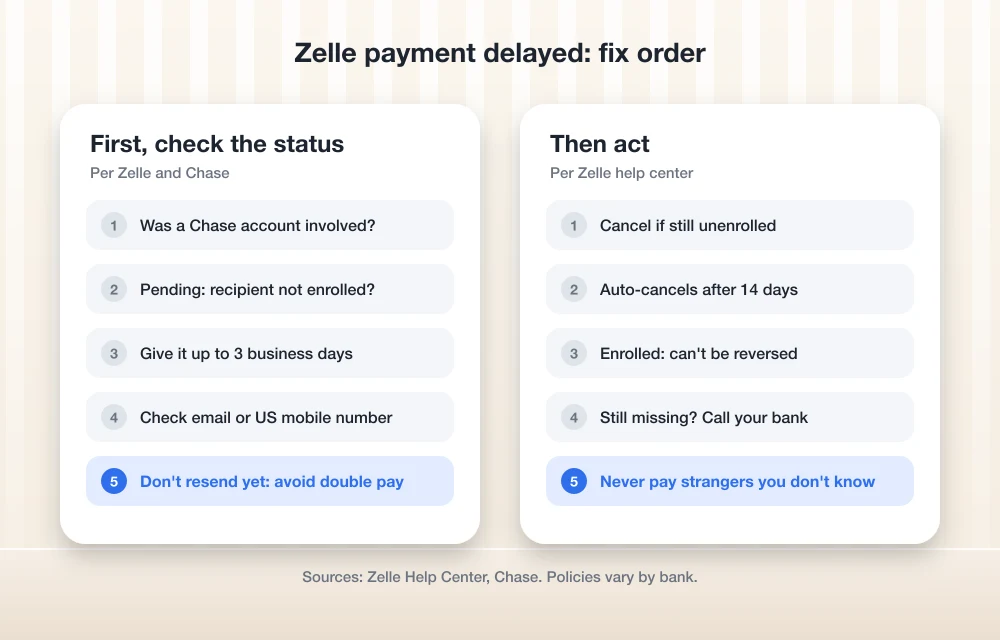
The good news is that most delayed payments sort themselves out. Here is what is going on and the fixes to try, in order, based on Zelle’s own help center and Chase’s statement.
Quick answer: If your Zelle payment was delayed on November 16, it was likely caught up in the Chase software problem that slowed transactions with other banks. Wait up to three business days before acting, and don’t resend the money. If the payment still shows “pending,” the recipient may not be enrolled with Zelle, and you can usually cancel it. If it is still missing after that, contact your bank.
Why Zelle Payments Were Delayed This Week
On November 16, JPMorganChase said in an official statement that a software bug in its on-premise hardware slowed some transactions. The bank said other banks “may have been impacted” where Chase was part of the transaction, and that it was not cyber-related. So if you sent money to or from a Chase customer that day, a delay is the most likely explanation. We cover the app side in our guide to fixing the Chase app.
1. Don’t Send the Money Again
This is the big one. If the first payment is just delayed, a second one means you have paid twice, and Zelle says completed payments to enrolled users can’t be reversed. Wait for the first one to settle or fail before you do anything else.
2. Give It Up to Three Business Days
Most Zelle payments arrive in minutes, but Chase notes that some can take up to three business days. Zelle’s help center says technical problems can delay a payment by up to 48 hours, not counting weekends and holidays. After a large outage, a short wait is normal.
3. Check the Payment Status
Open your bank app’s Zelle activity and look at the status. A “pending” payment usually means the recipient hasn’t enrolled in Zelle yet. According to Zelle’s help center, if they don’t enroll within 14 days, the payment is canceled and the money returns to you.
4. Confirm the Email or Phone Number
A typo in the email address or US mobile number is a common reason money goes nowhere. Check the details you used against the recipient’s, and ask them to confirm which email or number is linked to their Zelle account.
5. Cancel It If You Can
You can cancel a Zelle payment only if the recipient hasn’t enrolled yet. Find the payment in your activity and look for a cancel option. If the recipient is already enrolled, the money goes straight to their account and can’t be canceled.
6. Contact Your Bank
If more than three business days have passed and the money still hasn’t arrived or come back, call your bank or credit union. Zelle runs inside your bank’s app, so your bank is the one that can trace a specific payment.
7. Watch for Outage Scams
Scammers love confusion. Ignore texts or calls claiming to be Zelle or your bank that ask you to “resend” money or “verify” your account. Zelle says it doesn’t offer protection for payments you authorize, so only send money to people you know. This week’s Optimizely cyberattack is a good reminder to stay alert. If you are curious how AI assistants are starting to handle payments, see our look at ChatGPT Wallet.
FAQs
Why is my Zelle payment still pending?
Zelle says a pending payment usually means the recipient hasn’t enrolled yet. If they don’t enroll within 14 days, the payment is canceled and the money is returned.
Was Zelle down on November 16?
Chase said a software bug slowed some of its transactions on November 16, which could delay payments involving other banks. That likely explains many delayed Zelle payments that day.
Can I cancel a Zelle payment?
Only if the recipient hasn’t enrolled with Zelle. Once the money reaches an enrolled user, it can’t be canceled or reversed.
How long can a Zelle payment take?
Most arrive in minutes, but Chase says some can take up to three business days.
Featured image: Rodion Kutsaiev on Unsplash.
Disclosure: TheTechHacker has no paid relationship with Zelle, JPMorganChase or any bank mentioned here.
More in How-to

How to Fix Chase App Not Working: Login, Balance and Transfer Problems
On Monday, November 16, a lot of Chase customers found the app stuck, transfers slow and logins failing, and Chase later confirmed a real problem on its end. But an outage is not the only reason the Chase app stops working. Plenty of sign-in trouble comes from the phone itself, and that part you can…

How to Fix Outlook Not Working After the Microsoft 365 Outage
If Outlook has been spinning, refusing to send, or showing an empty inbox since Thursday, November 12, you’re not alone and it probably isn’t your computer. Microsoft has been dealing with a large Microsoft 365 incident that hit Exchange Online, the service behind work and school Outlook mailboxes, and features in Teams and other apps…
Instagram DM Not Working? 9 Fixes That Actually Work
If your Instagram DMs are not working, first check whether Instagram itself is down, then force-close the app, update it, and switch between Wi-Fi and mobile data. If messages still will not send or load, clear the app’s cache (Android) or reinstall it (iPhone), and check your Account Status for a messaging restriction. DM problems…
The week in tech, minus the noise.
New reviews, fixes and the stories that matter — once a week, straight to your inbox.
We only use your email to send the newsletter. Unsubscribe any time. See our privacy policy.
Comments