

How to Turn Off Google AI Mode’s Access to Wallet and Drive
Google Search’s AI Mode can now connect to Google Wallet. In a November 23 post, Google said the Wallet connection is starting to roll out, with Drive and the Gemini app following in the coming weeks. It lets AI Mode answer questions using your spending and the benefits of cards linked in Wallet. Nothing is…

Image: Google
Google Search’s AI Mode can now connect to Google Wallet. In a November 23 post, Google said the Wallet connection is starting to roll out, with Drive and the Gemini app following in the coming weeks. It lets AI Mode answer questions using your spending and the benefits of cards linked in Wallet. Nothing is connected until you agree: Google says you opt in. It also says the access is read-only and “can’t move, manage, or invest your money.” This guide shows how to check whether you’ve connected it, turn it off, and remove saved history.
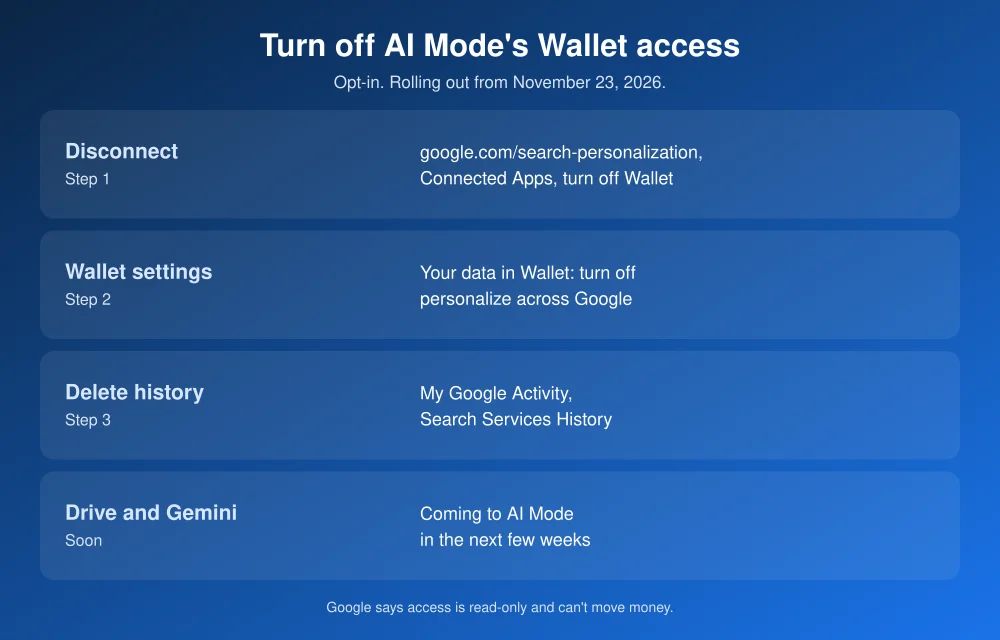
Quick answer: To turn off AI Mode’s access to Google Wallet, open google.com/search-personalization, select Connected Apps, and turn off Wallet. Do the same for Drive, Gmail, Calendar or Photos. Wallet is opt-in, so if you never connected it, AI Mode isn’t using it through this feature. For more control, open Google Wallet’s Your data in Wallet settings and turn off Use Wallet to personalize experiences across Google. Disconnecting an app doesn’t delete your saved Search Services History, so clear that separately.
What AI Mode can see in Wallet
- Wallet: your spending, and credit card benefits based on cards linked in Wallet. Rolling out from November 23.
- Drive and the Gemini app: coming in the next few weeks.
- Already available: Gmail, Calendar and Photos.
Google’s post doesn’t say which countries, plans or ages get the Wallet connection. Its help page for connected apps says the feature needs a signed-in personal account and an age of 18 or over, but it hasn’t been updated to mention Wallet.
How to disconnect Wallet from AI Mode
- Sign in and open google.com/search-personalization.
- Select Connected Apps. Some accounts may show Connected Content Apps.
- Turn off Wallet, and any other app you don’t want used.
If you don’t see Wallet there, it probably hasn’t reached your account yet. Google’s help page warns that menus are changing and may not match your screen.
How to stop Wallet from personalizing other Google services
- Open the Google Wallet app and tap your profile picture > Your data in Wallet > Manage data from Wallet and payments services. On the web, go to wallet.google.com > Settings > Data & Privacy.
- Turn off Use Wallet to personalize experiences across Google, or choose services one by one.
- To stop ad personalization, turn off Use Wallet to personalize Google Ads.
These controls are rolling out gradually, Google says. The page doesn’t say whether the switch also blocks AI Mode, so disconnect it in Connected Apps too.
How to turn off personalization completely
Go to your Google Account > Data & privacy > Personalization settings and turn off Personalized Recommendations. Google lists it as a requirement for connecting apps.
How to delete what’s already saved
- Search history: open My Google Activity > Search Services History and choose Turn off and delete activity. Google says this history can include data from connected apps.
- Wallet history: go to myactivity.google.com > Other activity > Google Wallet and payments services data > Manage.
- AI Mode memory: in AI Mode, type “Forget” followed by the detail. Google lists this for US English.
Does Google train AI on this data?
For Gmail, Drive, Calendar and Photos, Google says it doesn’t train directly on your library or inbox. It does train on summaries, excerpts and inferences, plus your questions and the answers, and human reviewers may see some data. Google’s Search help page doesn’t say how this applies to Wallet.
The Gemini app is a separate connection
The Gemini app has had its own Wallet connection in the US since November 13. To turn it off in the mobile app, go to Menu > your profile > Personal Intelligence > Connected Apps. Turning off one doesn’t turn off the other.
To find old AI chats, see how to find your AI searches in Google Search. Driving? Read what Gemini Personal Intelligence does on Android Auto. iPhone users can check what Google Wallet does on iPhone.
FAQs
Can Google AI Mode see my Wallet by default?
No. Google says the Wallet connection is opt-in. You choose which apps to connect and can turn them off at any time.
Can AI Mode spend my money?
No. Google says it can’t move, manage or invest your money. The connection is read-only.
How do I turn off Google Drive in AI Mode?
Open google.com/search-personalization, select Connected Apps and turn off Drive. Google says Drive is arriving in the coming weeks, so it may not show yet.
Does disconnecting Wallet delete my data?
Not by itself. Google says disconnecting an app doesn’t delete data from your Search Services History, so delete that in My Google Activity.
Featured image: Google.
Disclosure: TheTechHacker has no paid relationship with Google or any company mentioned here.
More in How-to
How to Share a Google One Subscription With Your Family
When we are in need of access to digital storage in an emergency, having a Google One subscription is a wonderful thing to have. Some of the more expensive Google One plans actually offer access to Gemini Advanced, which is the most advanced form of Google’s artificial intelligence model. Google One is a subscription service…
How to make Google Doc available offline
How to make google doc available offline: This article is about making online Google doc to offline access. Google doc is a document creating service which works under the Google Drive cloud service. This service lets you create documents online and it saves automatically in the cloud. Google Docs has three types of document support…

How to Enable Google Assistant Ambient Mode
How to Enable Google Assistant Ambient Mode: Smartphones are merely small computers. You can do anything done on a personal PC on your handheld device. You can make calls, socialize and play games on your 6-inch iPhone comfortably. Android users have the advantage of exclusive Google features which are not available in other mobile OS’s.…
The week in tech, minus the noise.
New reviews, fixes and the stories that matter — once a week, straight to your inbox.
We only use your email to send the newsletter. Unsubscribe any time. See our privacy policy.
Comments