

WhatsApp Travel eSIMs: How They’ll Work and How to Use a Travel eSIM Now
WhatsApp will soon let you buy a travel data eSIM right inside the app. The idea is simple: land in another country, tap a few times, and keep using WhatsApp on your normal number without roaming charges or hunting for a local SIM card. It isn’t live yet, but you can already use travel eSIMs…


WhatsApp Travel eSIM
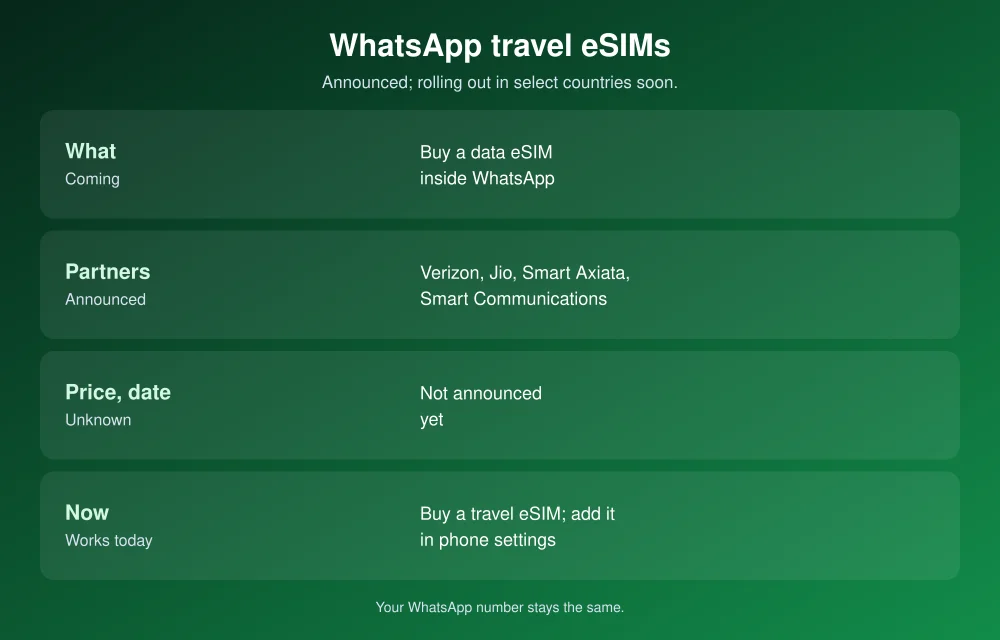
WhatsApp will soon let you buy a travel data eSIM right inside the app. The idea is simple: land in another country, tap a few times, and keep using WhatsApp on your normal number without roaming charges or hunting for a local SIM card. It isn’t live yet, but you can already use travel eSIMs on most recent phones.
Quick answer: WhatsApp announced it will let users buy and install a data-only travel eSIM inside the app, working with partners including Verizon, Jio, Smart Axiata and Smart Communications. It will roll out in select countries “soon”; there’s no launch date or pricing yet, and it will appear in the app when available. Until then, you can buy a travel eSIM from your carrier or an eSIM provider and add it in your phone’s settings. Your WhatsApp number stays the same either way.
What WhatsApp Announced
- Buy and install a data eSIM for international travel in a few taps, without leaving WhatsApp, according to WhatsApp’s announcement.
- Keep using WhatsApp on your same phone number while abroad.
- Partners include Jio, Smart Axiata, Smart Communications, Verizon “and others.”
- Rolling out in select countries soon. WhatsApp hasn’t named the countries or prices.
Will It Work on My Phone?
You’ll need a phone that supports eSIM and is carrier-unlocked. Most iPhones from the last several years and recent Pixel and Galaxy phones support eSIM. US iPhone models from the iPhone 14 onward are eSIM-only.
How to Use a Travel eSIM Now (Before WhatsApp’s Launches)
- Check your carrier’s international plan first. Some include data abroad for a daily fee.
- Buy a data eSIM for your destination from a carrier or eSIM provider. You’ll get a QR code or an install link.
- Install it: on iPhone, go to Settings > Cellular > Add eSIM. On Android, look in Settings > Network & internet > SIMs. Google explains dual SIM setup in its Pixel help page.
- Set the travel eSIM for cellular data and keep your home line for calls and texts, or turn off roaming on your home line to avoid charges.
- WhatsApp keeps working on your usual number because it’s tied to your account, not the SIM that carries the data.
Other WhatsApp Features Coming
- View-once text messages: being tested on iPhone, WABetaInfo reports. Recipients can’t screenshot, copy or forward them.
- Minimal tab bar: icons without labels, in testing on iPhone.
- Scheduled messages: already rolling out. See how to schedule WhatsApp messages.
More WhatsApp help: back up WhatsApp without iCloud and use two iPhones with the same number.
That’s all for now. Please do share your views and feedback in the comment box below.
FAQs
When will WhatsApp travel eSIMs launch?
WhatsApp says soon, in select countries. There’s no date yet.
How much will WhatsApp eSIMs cost?
WhatsApp hasn’t announced prices.
Will I keep my WhatsApp number with a travel eSIM?
Yes. WhatsApp says you keep using your same number.
Which carriers are partners?
Jio, Smart Axiata, Smart Communications, Verizon and others, WhatsApp says.
Featured image: WhatsApp.
Disclosure: TheTechHacker has no paid relationship with WhatsApp or Meta.
More in How-to

How to Use Two iPhones With the Same Phone Number in iOS 27 (iPhone Handoff)
iOS 27 lets you use one phone number on two iPhones. Apple’s feature is called iPhone Handoff, and its setup guide explains that your calls, voicemail and messages follow whichever iPhone you unlock. That’s useful if you carry a big phone like the iPhone Duo for home and a smaller one for workouts or nights…
How To Resolve iPhone 17 Stuck in SOS Service
Learn how to fix your iPhone 17 when it’s stuck in SOS mode, preventing normal cellular connection.
How to Fix ‘SIM Not Provisioned’ After Switching Carriers on iPhone and Android
Seeing “SIM Not Provisioned” or MM#2 after switching carriers? Here’s what the message means and the fixes I’d try, in order, on iPhone and Android.
The week in tech, minus the noise.
New reviews, fixes and the stories that matter — once a week, straight to your inbox.
We only use your email to send the newsletter. Unsubscribe any time. See our privacy policy.
Comments