

What Is ChatGPT Space? How to Use It Now That It Replaced Library
If the Library button in ChatGPT has disappeared, you’ve probably got ChatGPT Space instead. OpenAI started rolling Space out to Plus subscribers on November 20, 2026. Space is where your pages, slides, images and uploaded files now live. It also lets ChatGPT build interactive pages and presentations you can edit and share. Pro, Business and…

Image: OpenAI
If the Library button in ChatGPT has disappeared, you’ve probably got ChatGPT Space instead. OpenAI started rolling Space out to Plus subscribers on November 20, 2026. Space is where your pages, slides, images and uploaded files now live. It also lets ChatGPT build interactive pages and presentations you can edit and share. Pro, Business and Enterprise users have had it since September 29. This guide covers what Space does, how to make your first page, how sharing works, and the privacy settings worth checking before you invite anyone.
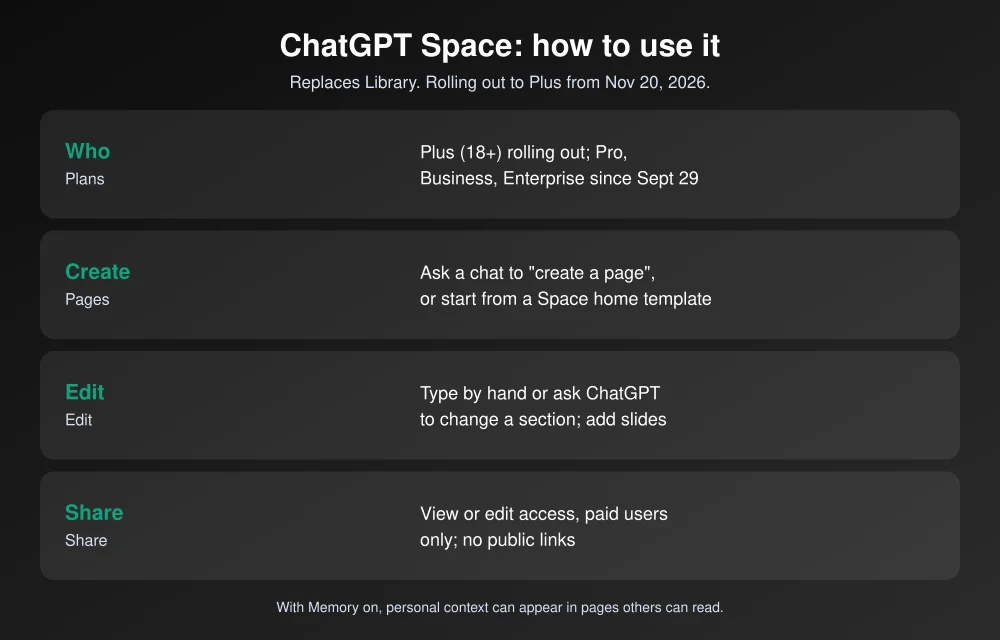
Quick answer: ChatGPT Space replaces Library as the home for your pages, slides, images and uploaded files. It’s rolling out to Plus users 18 and older worldwide, and it’s already on Pro, Business and Enterprise. Free and Go plans don’t get it. To make a page, ask ChatGPT in any chat to “create a page” about your topic, or start one from a template on Space home. Edit it by hand or ask ChatGPT to change a section. Then tap Share and pick view or edit access. Shared pages only open for people on Plus, Pro, Business or Enterprise, and there are no public links.
What ChatGPT Space is
Think of Space as a shared drive that ChatGPT can write into. According to OpenAI’s release notes, it’s “your new home for pages, slides, images, and uploaded files.” You can:
- Build pages: trip plans, study guides, project trackers or recipe collections, with charts, checklists and small interactive tools.
- Make slides and export them. OpenAI says slides are rolling out to accounts with Space, including Plus, and sheets are “coming soon.”
- Keep pages up to date from connected apps and tools.
- Collaborate in real time with people you invite.
Projects stay separate. Space doesn’t replace or merge your existing Projects.
Who gets it
| Plan | Space access |
|---|---|
| Free, Go | No, and they can’t open pages shared with them |
| Plus | Rolling out from Nov 20, 2026 (18 and older) |
| Pro, Business, Enterprise | Yes, since Sept 29, 2026 |
Rollouts are gradual, so if you’re on Plus and still see Library, check again in a few days. On the desktop app, update to the latest version first.
How to create your first page
- From a chat: in any conversation, ask something like “Create a page for our Thanksgiving trip with the flight times, a packing checklist and a shared grocery list.” ChatGPT builds the page, and you open it to review.
- From Space home: open Space, pick a template, or just start writing.
- Edit it: type directly on the page, or ask ChatGPT to rewrite the whole page or one section. You can keep editing by hand even after you hit your Plus message limit.
- Organize it: you get a personal space by default. Ask ChatGPT to “create a space named Family” or to “make this a subpage of Trip plans.” Moving a page needs edit access to both pages.
- Comment: select text and add a comment describing the change you want. Use the page’s chat for bigger changes.
You can create and edit pages on the web, in the desktop app, and on iOS and Android. On mobile, use Space search or ChatGPT’s main search to find pages. The Getting started with Space help article lists views such as Space home, Pages, Recents, Images, and All > Shared with you.
How to share a page
- Open the page and select Share.
- Add people and choose view or edit access.
- Editors can work on the page with you at the same time.
Know the limits before you plan a family project around it. Everyone you share with needs a Plus, Pro, Business or Enterprise account with Space access. A relative on the free plan can’t open it, and there’s no public link option. For a free group trip plan, export the page or use a shared document instead.
Privacy settings to check first
- Memory can leak into pages. OpenAI says that with Memory on, ChatGPT may use your personal context when writing a page, and anyone who can view the page can read it. Reread a page before sharing it. Use Temporary Chat or turn Memory off for pages you’ll share widely.
- Sharing doesn’t expose your chats. OpenAI’s Space sharing and data controls article says sharing a page “does not give them access to your private chats or your ChatGPT Memory.”
- Training depends on everyone’s settings. Each collaborator’s “Improve the model for everyone” setting (Settings > Data controls) applies to their own use, so content on a shared page may be used for training if a collaborator has it on. OpenAI doesn’t train on Business or Enterprise data by default.
- Deleting is powerful. Only a page’s owner can delete it, and deleting a parent page sends all its subpages to Trash, including ones other people own.
What about my old Library files?
OpenAI says Space “replaces” Library but doesn’t spell out a migration. Its help articles show uploaded files under All > Your items and images in the Images view, which suggests your files carry over. If something seems missing, check those two views first. Files from locked chats stay hidden until you open Projects > Locked chats and authenticate.
Space is OpenAI’s answer to the workspace tools Google and Apple are building into their assistants. Google just made its agent mode free, as covered in how to use Gemini Tasks, and Apple is metering Siri’s AI features, as we explain in Siri AI daily limits in iOS 27.3. If you keep important files in ChatGPT, keep a copy elsewhere too. Our best backup software guide can help.
FAQs
What is ChatGPT Space?
Space is ChatGPT’s home for pages, slides, images and uploaded files. It replaces Library, and ChatGPT can build interactive pages and presentations in it that you can edit and share.
Is ChatGPT Space free?
No. It’s rolling out to Plus users 18 and older from November 20, 2026, and has been on Pro, Business and Enterprise since September 29. Free and Go users can’t use it or open shared pages.
Where did ChatGPT Library go?
Space replaced it for accounts with access. Uploaded files appear under All > Your items, and images in the Images view.
Can I share a ChatGPT Space page with anyone?
Only with people on Plus, Pro, Business or Enterprise who have Space access. You can give view or edit access, but there are no public links.
Featured image: OpenAI.
Disclosure: TheTechHacker has no paid relationship with OpenAI or any company mentioned here.
More in How-to

How to Change Zoom Background in Windows, Mac and iOS
Knowing how to change your Zoom background is quintessential to make your virtual meetings more productive. Additionally, while you work from home, there’s always a chance of your bedroom or home office being messy or cluttered. But that won’t be a problem if you change your Zoom background to something pleasant so that it feels…

How to Convert MP3 to M4R
Before now, iPhone users will tell you that when they search for and find some of their favorite songs online in mp3 format, they are always at crossroads as to whether they should hit the download button or not, owing primarily to the fact that their iPhone doesn’t support the mp3 music format. Instead, it…

ChatGPT Wallet: How It Works, Who Can Use It and How to Set It Up
OpenAI wants ChatGPT to do more than recommend what to buy. On Friday, November 13, it launched ChatGPT Wallet, a way for its AI agents, called dots, to actually pay for things on your behalf. You ask your dot to find a sweater or book a hotel, review the order, approve it with Face ID…

The week in tech, minus the noise.
New reviews, fixes and the stories that matter — once a week, straight to your inbox.
We only use your email to send the newsletter. Unsubscribe any time. See our privacy policy.
Comments