

Gemini App’s New Camera on Android: What Changed and How to Use It
The Gemini app's camera now opens as a sheet in your chat. What changed, how to use it, where flash moved, and how to manage Gemini History.


The Gemini app on Android has a new camera. Instead of switching to a separate full-screen camera, it now slides up as a sheet on the Gemini home screen or inside a chat, so you can snap a photo and ask about it without leaving the conversation. 9to5Google spotted the redesign rolling out on November 21 with Google app version 17.76. It first appeared on iPhone, and Android Authority found it in testing back in September. Google hasn’t announced it, and it isn’t in the Gemini release notes yet. This article covers what changed, how to use it, and how to control what Gemini keeps.
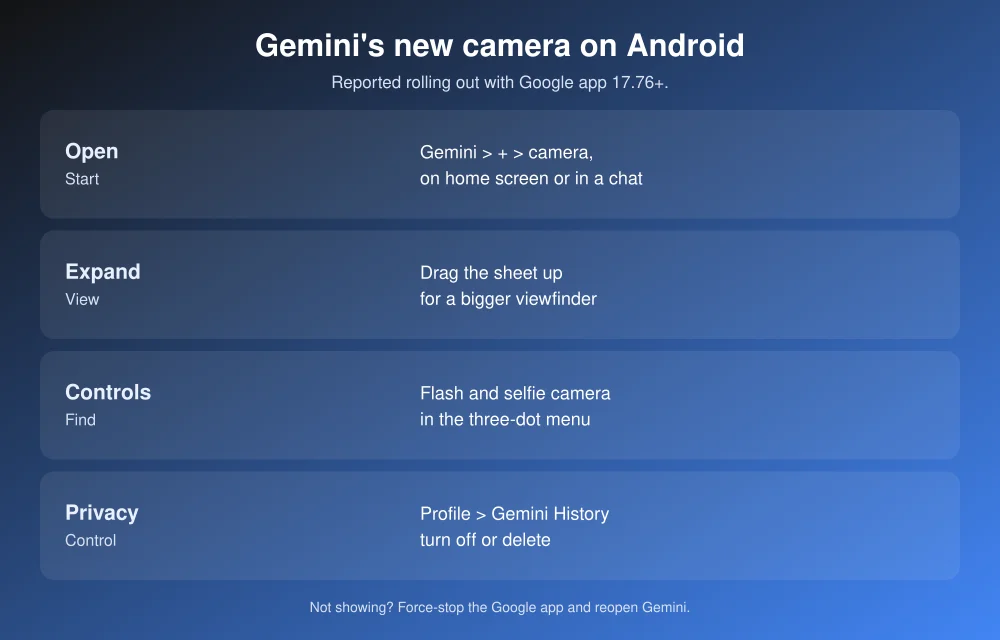
Quick answer: To use the new Gemini camera on Android, update the Google app to version 17.76 or later, open Gemini, and open the camera from the + menu on the home screen or in a chat. It opens as a sheet that you can drag up to fill most of the screen. Take a photo, then type your question. Flash and the front camera are now under the three-dot button next to the shutter. Swipe down or tap back to close. If you don’t see it, force-stop the Google app and reopen it.
What’s new in the Gemini camera
According to 9to5Google:
- Opens in place: the camera appears as a sheet at the bottom of the Gemini home screen or a chat instead of taking over the whole app.
- Bigger viewfinder: drag the sheet up and it fills nearly the whole screen, extending behind the navigation bar.
- Cleaner controls: flash and the front-camera switch moved into a three-dot button to the right of the shutter, with a back button on the left.
- Swipe to close: swipe down on the sheet to dismiss it.
The camera you get from the Gemini overlay, the pop-up you summon over other apps, still uses the old full-screen design for now.
How to use the new Gemini camera
- Update the Google app in the Play Store. 9to5Google says the redesign comes with version 17.76 and later, in both beta and stable.
- Open the Gemini app.
- On the home screen or in a chat, tap + and choose the camera.
- Drag the sheet up for a larger view if you need it.
- Tap the shutter. The photo is attached to your prompt.
- Type your question, such as “What plant is this?” or “Summarize this receipt,” and send it.
- For flash or the selfie camera, tap the three-dot button next to the shutter.
Not seeing it? Go to Settings > Apps > Google > Force stop, then reopen Gemini. Google rolls these changes out gradually, so it can take a few days to reach every phone.
How to control what Gemini keeps
Google has renamed Gemini Apps Activity to Gemini History. From Google’s Gemini History help page:
- Turn it off: in Gemini, open the menu, tap your profile picture > Gemini History, tap On, then choose Turn off or Turn off and delete history.
- Delete past chats: in Gemini History, tap Delete and pick Last hour, Last day, All time or a custom range.
- Know the limits: even with history off, Google keeps chats for up to about 2 months, and chats that human reviewers looked at can be kept for up to 3 years.
Google’s Gemini privacy hub says photos you share can be used to improve its services, including with human review, when Gemini History is on. Avoid photographing IDs, cards or medical records.
More from Gemini this week: how to use Gemini Tasks for free, Gemini’s Call for Me feature, and Gemini Personal Intelligence on Android Auto.
FAQs
Why does the Gemini camera look different?
Google is rolling out a redesigned camera in the Gemini app. It opens as a sheet inside the home screen or a chat, with flash and the front camera moved to a three-dot menu.
Which version has the new Gemini camera?
9to5Google reports it arrives with Google app version 17.76 and later on Android. It reached iPhone first.
Where is the flash in the Gemini camera?
Tap the three-dot button next to the shutter to find the flash and the switch to the front camera.
Does Gemini save the photos I take?
Photos you share are part of your chat. With Gemini History on, Google may use them to improve its services. You can turn off or delete Gemini History from your profile menu in the app.
Featured image: Google.
Disclosure: TheTechHacker has no paid relationship with Google or any company mentioned here.
More in News
Google Is Retiring the Nest App and Assistant on Speakers and Displays: What Owners Should Do
The Nest app ends Jan 25, 2027 and Google Assistant on speakers moves to Gemini for Home Aug 2, 2027, per reports. What changes and what Nest owners should do.
How to Use Gemini on Apple CarPlay: Setup, Voice Tips and Limits
Google’s Gemini app now works on Apple CarPlay. Google announced it on November 11, 2026, rolling out “to all Gemini users on iOS,” and the App Store listing now shows a “Gemini is now on CarPlay” banner. Many people will be on the road for Thanksgiving this week, and Gemini can read out your calendar,…

Gemini Personal Intelligence on Android Auto: What It Does and Which Cars Get It
Gemini on Android Auto can now use your Gmail, Calendar and Photos. What Personal Intelligence does, who gets it in the US, which cars, and how to turn it off.
The week in tech, minus the noise.
New reviews, fixes and the stories that matter — once a week, straight to your inbox.
We only use your email to send the newsletter. Unsubscribe any time. See our privacy policy.
Comments