

Windows

12 Best Media Players for Windows
Which is the best media player for Windows? It is a big question for many PC users. The search for the best media player for Windows is a big task because every player comes with a different set of features. Some players come with pre-loaded codecs and in some, you need to manually install them.…

Best Data Recovery Software for Windows, Mac & Linux
Before we start explaining in-depth, you need not fear – recovering the data you deleted by accident (or intentionally) is not hard at all. The first step you need to take – stop transferring files from and to your PC or Mac or Linux based machine in order to mitigate the “damage” you already did…

Best Skype alternatives for better video conferencing and VOIP
Skype is one of the most popular video conferencing app available for almost all platforms. You could also consider VoIP and general video calls with Skype. However, no matter how good an app or service is, there are definitely better alternatives to it depending on what a user wants. In this case, we consider the…

What is Windows OS
Windows is an operating system founded by Microsoft which is one of the most recognized computer OS out there. It utilizes the GUI instead of the older command line interface. It’s hard to find a computer user who hasn’t tried Windows at least once. The navigation throughout the OS is incredibly easy, and the functions are capable…

Macrorit Disk Partition Expert Review
A Good Partition Manager is needed when you’re running out of space on your disk partition in Windows 10. Macrorit Partition Expert is the best option in partition manager software, and here’s how you can solve low disk space problems on the system partition. Features of Macrorit Partition Expert Macrorit Partition Expert is free for…
Duplicacy is a Free Cloud Backup Tool For Windows
Ever felt insecure about your data? There are many reasons for data loss. We can’t stop the data loss, but we can save our data before any data loss. Microsoft Windows a most popular operating system, there are millions of systems running on Windows. If you are the user of Windows and thinking about to…

Best Notepad Alternatives for Windows
Notepad is a good text editor that comes with Windows OS by default. For an average user who only needs to fulfill his regular needs like note taking, adding some bold and italics or even underline, copy/cut and paste, etc… to his texts, notepad is more than enough. But, looking at the skeleton of the…

Error 651 – Methods To Fix it in Windows 7/8
If you are using windows for a while, you might came across the Error 651. Many of our users who works online reported that they are getting Error code 651 frequently. So, we decided to provide some solutions for this error that are very well worked for many of our visitors. We gathered these informations from trusted sources that…
How to Find Installation Date of Windows
You may be using your windows for a while and over the years of use, you may not remember when exactly the windows had installed on your computer. At any moment you need the installation date of your windows, it is not easy as looking at the calendar and calculating the date. Windows is intelligent enough…
How to Show Hidden Files and Folders in Windows and Mac
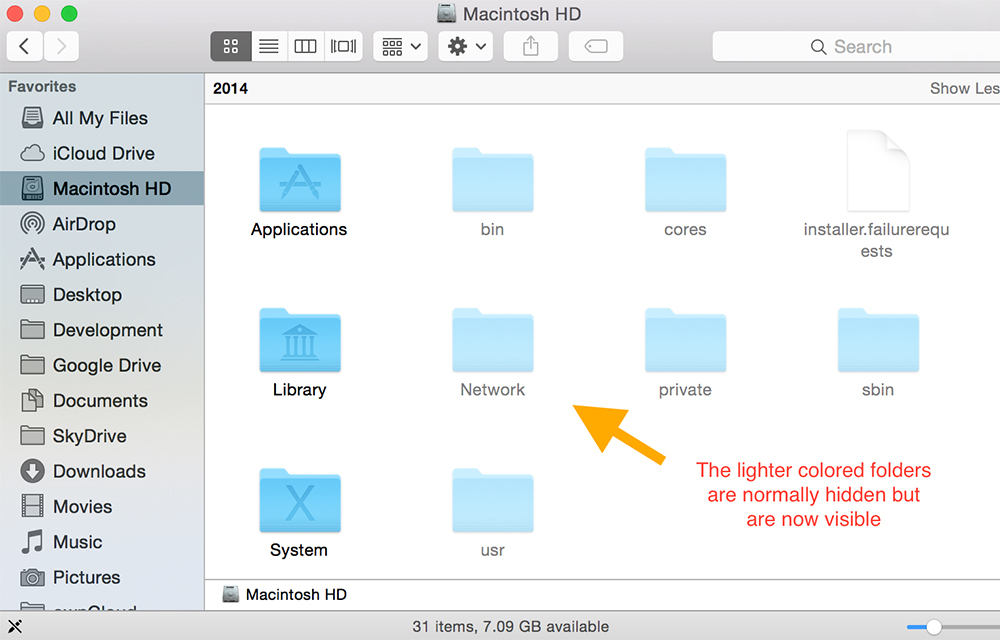
You may face several situations where you need the access to hidden files in your computer. The system itself protects some important files by hiding them in various parts of the computer to keep them safe from accidental deletions or misplacement. So, the computer blocks the users from accessing the hidden files. Hidden files can’t…

How to do a System Restore in Windows
System Restore is a very useful feature of windows which allows you to restore your computer to a previous normal working state by fixing any changes made by malicious programs or tweaks. If your PC misbehaves or express any lags in performance after any installations or changes made to the settings, a system restore might…

What is $WINDOWS.~BT Folder On your PC Hard Drive
Windows installation directory (Most probably C:/) will be filled up by the new program installation or desktop files in you PC. Once you have found that, it consuming some storage without any installations or files, It might look suspicious. You have cleared the Temp folder and cleaned junk files, but nothing pays. This might be due to…