

How to Fix Gmail Slow or Not Loading (Web, Android and iPhone)
Gmail stuck on the loading screen, taking ages to open messages, or not getting new mail? On November 17, about 2,800 people reported Gmail problems on Downdetector, mostly with receiving email, according to Gagadget. Google said it wasn’t seeing “evidence of a broad Gmail service disruption,” as reported by TechCrunch. Its Workspace Status Dashboard shows…

Image: Google
Gmail stuck on the loading screen, taking ages to open messages, or not getting new mail? On November 17, about 2,800 people reported Gmail problems on Downdetector, mostly with receiving email, according to Gagadget. Google said it wasn’t seeing “evidence of a broad Gmail service disruption,” as reported by TechCrunch. Its Workspace Status Dashboard shows no Gmail incidents for that week. When Gmail is up for everyone else, the problem is usually your browser, app or account storage. This guide covers Google’s fixes for the web, Android and iPhone.
Quick answer: First, check the Google Workspace Status Dashboard to see whether Gmail is down. If it isn’t, on a computer: update or switch your browser, try an incognito window, turn off extensions one at a time, then clear cache and cookies. On Android or iPhone, swipe down in the inbox to sync, update the Gmail app, and restart your phone. Then check that Sync Gmail (Android) or Background App Refresh (iPhone) is on. If you’re not receiving mail, check whether your Google storage is full.
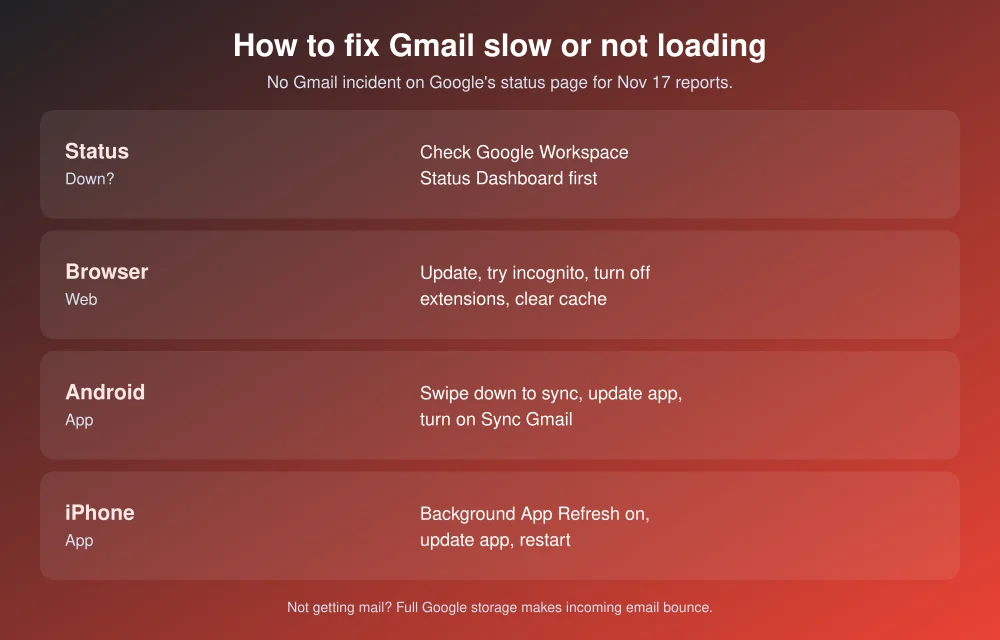
Step 1: Check if Gmail is down
Open the Google Workspace Status Dashboard at google.com/appsstatus/dashboard. A colored marker next to Gmail means Google has confirmed a problem, and you’ll have to wait for the fix. If the Gmail row is clear but lots of people are complaining, the issue may be with a network, an internet provider or a region rather than Gmail itself.
How to fix Gmail not loading on a computer
From Google’s Gmail won’t load help article:
- Use a supported browser and update it. Gmail works on current versions of Chrome, Firefox, Safari and Edge. If it won’t load in one, try another.
- Try an incognito or private window. If Gmail loads there, an extension or saved data is the problem.
- Turn off extensions one at a time, reopening Gmail after each, to find the one causing trouble. Ad blockers and email trackers are common culprits.
- Clear cache and cookies. In Chrome, go to Settings > Privacy and security > Delete browsing data. You’ll need to sign back in to sites afterward.
- Restart your computer and router, or try a different network.
- Try another device. Google notes that some older devices can’t load Gmail.
If the browser says it can’t reach the site at all, see our fix for Chrome’s “server IP address could not be found” error.
Gmail slow on a work or school account?
Google’s admin help for slow Gmail suggests turning off VPNs or proxies, keeping labels and filters under 500, and avoiding bulk actions on more than about 1,000 messages at once. Your IT team can also check the Workspace admin console for problems.
How to fix the Gmail app on Android
From Google’s Gmail sync troubleshooting page:
- Swipe down from the top of your inbox to sync manually.
- Update Gmail in the Play Store, then restart your phone.
- Open a website in Chrome to make sure your connection works.
- In Gmail, tap Menu > Settings > your account. Under Data usage, make sure Sync Gmail is checked.
- Free up phone storage by deleting unused apps and old downloads.
- Last resort: go to Settings > Apps > See all apps > Gmail > Storage & cache > Clear storage, then restart. This can erase drafts, your signature and other app settings.
How to fix the Gmail app on iPhone and iPad
- Swipe down in the inbox to sync.
- Update Gmail in the App Store and restart your iPhone.
- Open a website in Safari to check your connection.
- Go to Settings > General > Background App Refresh and turn it on for Gmail.
- In Gmail, tap Menu > Settings, then under General tap Data usage > Sync settings. Fewer days to sync means a lighter, faster app.
Not receiving emails? Check your storage
Your 15GB of free Google storage is shared by Gmail, Google Photos and Google Drive. Google says that when it’s full, you can’t send or receive email, and messages sent to you bounce back to the sender. Check your usage at one.google.com/storage, then delete large attachments and empty Trash and Spam.
What doesn’t work anymore
Older guides suggest switching to Gmail’s basic HTML view to speed things up. Google retired it in early 2024, according to TechCrunch, and Gmail now opens in the standard view.
Comparing email for a small business? See Google Workspace vs Microsoft 365. If Outlook is the one acting up, check whether Microsoft 365 is down.
FAQs
Is Gmail down right now?
Check the Google Workspace Status Dashboard. If Gmail shows no incident, the problem is most likely your browser, app, network or account storage.
Why is Gmail so slow in my browser?
Browser extensions, a full cache, an outdated browser or a slow network are the most common causes. Try an incognito window. If Gmail is fast there, turn off extensions one at a time and clear your cache.
Why am I not receiving emails in Gmail?
Your Google storage may be full. Gmail, Drive and Photos share it, and when it’s full, incoming mail bounces. Also check Spam, and make sure Gmail sync is on in the app.
Can I still use Gmail basic HTML?
No. Google retired basic HTML view in early 2024, according to TechCrunch.
Featured image: Google.
Disclosure: TheTechHacker has no paid relationship with Google or any company mentioned here.
More in How-to
How to Fix Safari Slow Page Load and Crashes After iOS 26 Update
After installing iOS 26, many iPhone users are reporting that Safari has become noticeably slower. Pages take longer to load, scrolling feels laggy, and in some cases, the browser crashes altogether. While some performance dips are common after a major iOS update, the severity of these reports suggests deeper compatibility issues. The good news: most…
Instagram DM Not Working? 9 Fixes That Actually Work
If your Instagram DMs are not working, first check whether Instagram itself is down, then force-close the app, update it, and switch between Wi-Fi and mobile data. If messages still will not send or load, clear the app’s cache (Android) or reinstall it (iPhone), and check your Account Status for a messaging restriction. DM problems…

How to Fix Chase App Not Working: Login, Balance and Transfer Problems
On Monday, November 16, a lot of Chase customers found the app stuck, transfers slow and logins failing, and Chase later confirmed a real problem on its end. But an outage is not the only reason the Chase app stops working. Plenty of sign-in trouble comes from the phone itself, and that part you can…
The week in tech, minus the noise.
New reviews, fixes and the stories that matter — once a week, straight to your inbox.
We only use your email to send the newsletter. Unsubscribe any time. See our privacy policy.
Comments