

Microsoft To Do Is Shutting Down: How to Export Your Tasks and Pick a Replacement
Microsoft is retiring the To Do apps. In a November 18 post on its Planner blog, Microsoft said the To Do apps for web, Windows, Mac, iPhone and Android will be retired on June 30, 2027. Work and school users are being moved to Microsoft Planner. People using To Do with a personal Microsoft account…

Image: Microsoft
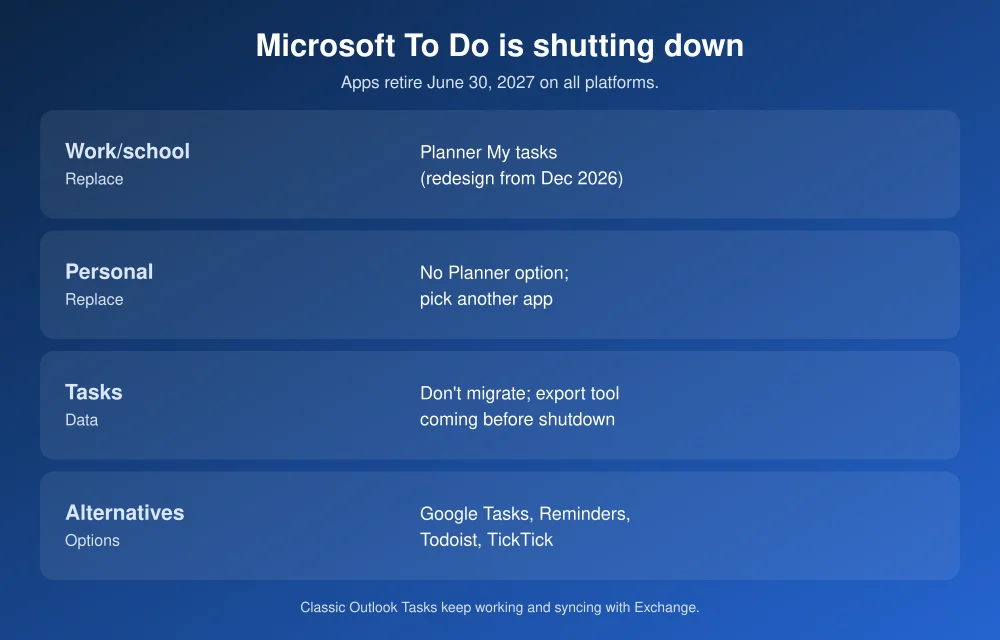
Microsoft is retiring the To Do apps. In a November 18 post on its Planner blog, Microsoft said the To Do apps for web, Windows, Mac, iPhone and Android will be retired on June 30, 2027. Work and school users are being moved to Microsoft Planner. People using To Do with a personal Microsoft account get no Planner option. Microsoft says these users “will need to choose another app.” This guide covers the timeline, what happens to your tasks, how to export them, and the best replacements.
Quick answer: The Microsoft To Do apps stop working on June 30, 2027. Work or school accounts should switch to Planner’s My tasks, which gets a redesign starting in December 2026, but tasks and lists don’t migrate automatically. Personal accounts, including Microsoft 365 Personal and Family, have no Planner option and need another app, such as Google Tasks, Apple Reminders, Todoist or TickTick. Microsoft says it will release an export tool before the shutdown. It isn’t available yet. Classic Outlook’s built-in Tasks keep working.
Microsoft To Do retirement timeline
- November 18, 2026: Microsoft announced the change alongside “unified tasks and plans” for Copilot and Microsoft 365.
- December 2026: a redesigned My tasks in Planner starts rolling out for work and school accounts.
- June 30, 2027: the To Do apps retire on all platforms, for both work and personal accounts.
- Later: the To Do service, APIs and sync with other apps retire separately. Microsoft says it will give separate notice before those connections end.
What happens to your tasks
From Microsoft’s To Do to Planner support page:
- No automatic move: your tasks and lists don’t migrate to Planner. Work and school users can still see them in Planner until June 30, 2027.
- No deletion yet: Microsoft says the app retirement “does not itself schedule existing task data for deletion.”
- Sharing is lost: people you shared a list with, assignments and permissions don’t carry over.
- Missing features: Planner has no list groups and no option to print or email a list. Attachments aren’t supported on tasks in the new private plan.
How to export your Microsoft To Do tasks
Microsoft says it “will provide a way to export your To Do data before the apps retire,” but hasn’t published the tool or its instructions yet. Exporting won’t import your tasks into Planner or any other app, so you’ll still have to move them yourself. Until then:
- Write down your shared lists and who’s on each, since sharing won’t carry over.
- Save any important attachments from tasks to OneDrive or your computer.
- Choose your replacement app now, and start new tasks there.
- Run Microsoft’s export when it’s available, before June 30, 2027.
Best Microsoft To Do alternatives
| App | Best for | Free plan |
|---|---|---|
| Planner (My tasks) | Work and school Microsoft 365 accounts | Included with eligible plans; web, Teams and Outlook |
| Classic Outlook Tasks | People who live in Outlook | Keeps syncing with Exchange, per Microsoft |
| Google Tasks | Gmail and Google Calendar users | Free |
| Apple Reminders | iPhone, iPad and Mac users | Free |
| Todoist | Cross-platform power users | 5 personal projects; Pro is $5 a month billed yearly |
| TickTick | Built-in calendar and habit tracking | 9 lists, 99 tasks per list; Premium is $49.99 a year |
Todoist and TickTick plan limits are from their pricing pages. Planner works in a browser, in Teams and inside Outlook, but there’s no standalone Planner app for Windows or Mac, and Windows Latest reports the web and Teams versions have no offline access.
Weighing your options at work? See Google Workspace vs Microsoft 365 for small business, Microsoft 365 Copilot’s new usage-based billing, and what Microsoft showed at Ignite 2026.
FAQs
Is Microsoft To Do being discontinued?
Yes. Microsoft says the To Do apps on web, Windows, Mac, iOS and Android will retire on June 30, 2027.
What replaces Microsoft To Do?
For work and school accounts, Microsoft Planner’s My tasks. For personal accounts, Microsoft says Planner isn’t available and you’ll need another app, such as Google Tasks, Apple Reminders, Todoist or TickTick.
Will my To Do tasks move to Planner automatically?
No. Microsoft says tasks and lists don’t migrate. Work and school users can view them in Planner until June 30, 2027.
Can I export my Microsoft To Do tasks?
Not yet. Microsoft says it will provide an export option before the apps retire, but it hasn’t shared details or a date.
Featured image: Microsoft.
Disclosure: TheTechHacker has no paid relationship with Microsoft or any app mentioned here.
More in Guides
How to Convert Excel to PDF
Converting Microsoft Excel documents to PDF is a task that doesn’t require geeky knowledge of computer applications, but without a guide like this, you might get stuck in the middle of nowhere. Here’s a quick rundown of the easiest ways to convert an Excel document to PDF. Converting Excel to PDF come in handy when…
5 Different ways to Restart Windows 11
When it comes to computers, one of the fundamental and most straightforward things to do are Start, Shutdown, and Restart. In the latest Microsoft Windows 11, there are several different ways to restart your PC in seconds. Usually, when we think of restarting a PC we use a one-way command which you can operate from…
How to Fix an External Hard Drive or SSD Not Showing Up on Windows 11 or Mac
External drive not detected on Windows 11 or your Mac? Here’s how I work through it, from cables and Disk Management to Disk Utility First Aid, and when to stop and call a data recovery service.
The week in tech, minus the noise.
New reviews, fixes and the stories that matter — once a week, straight to your inbox.
We only use your email to send the newsletter. Unsubscribe any time. See our privacy policy.
Comments