

How to Set a Separate Alarm Volume on iPhone in iOS 27
iOS 27 finally separates your iPhone alarm’s volume from your ringtone’s. Before, turning down the ringer could leave you with an alarm too quiet to wake you. Now you can keep calls quiet and alarms loud. The option is in Settings, and Apple’s alarm support page covers it: “In iOS 27, you can set volume…

Image: Apple
iOS 27 finally separates your iPhone alarm’s volume from your ringtone’s. Before, turning down the ringer could leave you with an alarm too quiet to wake you. Now you can keep calls quiet and alarms loud. The option is in Settings, and Apple’s alarm support page covers it: “In iOS 27, you can set volume specifically for an alarm.” Your alarm keeps following the ringtone until you change it. This guide shows how to set it, which alarms it affects, and what to check if yours is still too quiet.
Quick answer: To set a separate alarm volume on iPhone, go to Settings > Sounds & Haptics. Under Alarms and Timers, turn off Match Ringtone Volume, then drag the slider. You need iOS 27. The setting covers Clock alarms and timers. The sleep schedule alarm has its own slider in Clock > Alarms > Change. Silent mode and Do Not Disturb don’t affect the alarm sound, so you can mute your phone and still wake up.
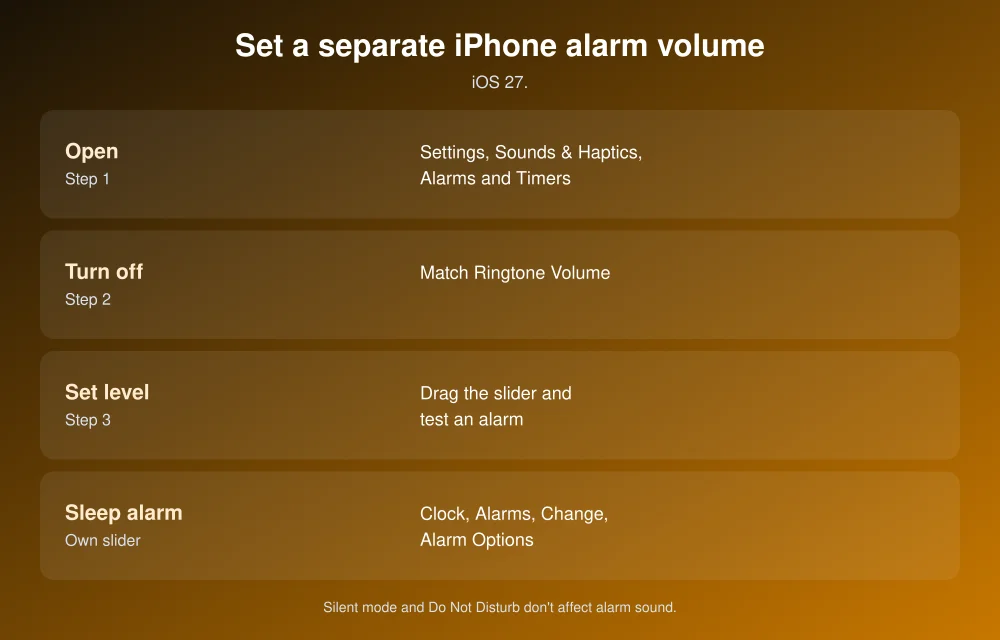
How to set a separate alarm volume in iOS 27
- Update your iPhone in Settings > General > Software Update.
- Open Settings > Sounds & Haptics.
- Find Alarms and Timers and turn off Match Ringtone Volume.
- Drag the slider to the level you want.
- Set a test alarm for a minute from now to hear it.
To go back, turn Match Ringtone Volume on again. The iPhone User Guide describes a second slider for Alerts and System Sounds that works the same way. 9to5Mac reports both match the ringtone by default.
How to change the sleep schedule alarm volume
The wake-up alarm has its own control and ignores the slider above:
- Open Clock > Alarms and tap Change next to your wake-up alarm.
- Scroll to Alarm Options and set the alarm volume.
- Tap Done, then choose Change Next Alarm Only or Change This Schedule.
That’s from Apple’s wake-up alarm guide.
What changes the alarm sound and what doesn’t
| Setting | Effect on Clock alarms |
|---|---|
| Silent mode, Ring/Silent switch | None on the sound |
| Do Not Disturb | None on the sound |
| Headphones connected | Plays through the iPhone’s speakers and the headphones |
| StandBy | Turns off alarm haptics, so make sure a sound is set |
| Alarm sound set to None | Vibrates only |
iPhone alarm still too quiet? Check these
- Sound: in Clock > Alarms > Edit, tap the alarm and make sure Sound isn’t None.
- Slider: check that Match Ringtone Volume is off. If it’s on, a quiet ringer means a quiet alarm.
- Change with Buttons: if you leave Match on, turn this off in Sounds & Haptics so the side buttons can’t lower the ringer by accident.
- Attention Aware Features: Apple says iPhones with Face ID lower alert volume when you look at them. It mentions alerts rather than alarms, but you can turn it off in Settings > Face ID & Passcode to test.
- Apple Watch: if alarms only sound on your wrist, check Watch app > My Watch > Clock > Push Alerts from iPhone.
Third-party alarm apps may behave differently, so test yours before relying on it.
Which iPhones can use it
Any iPhone that runs iOS 27: iPhone 11 and later, including iPhone SE (2nd generation and newer), iPhone Air and iPhone Duo.
More iOS 27 help: fix iOS 27 battery drain, frozen widgets and touchscreen bugs, and see what’s coming in iOS 27.3.
FAQs
Can I make my iPhone alarm louder than my ringtone?
Yes, in iOS 27. Go to Settings > Sounds & Haptics, turn off Match Ringtone Volume under Alarms and Timers, and raise the slider.
Does Silent mode turn off iPhone alarms?
No. Apple says Do Not Disturb, the Ring/Silent switch and Silent mode don’t affect the alarm sound.
Can I set a different volume for each alarm?
9to5Mac reports there’s no volume for each individual alarm. One slider covers Clock alarms and timers, and the sleep schedule alarm has its own.
Why is my iPhone alarm so quiet?
It may be matching a low ringtone volume. Turn off Match Ringtone Volume and raise the alarm slider, and check that the alarm’s sound isn’t None.
Featured image: Apple.
Disclosure: TheTechHacker has no paid relationship with Apple or any company mentioned here.
More in How-to
How to Fix iPhone 18 Pro Restarting When Face ID Fails or During Apple Pay
If your iPhone 18 Pro restarts when Face ID fails, Apple has fixed that bug in iOS 27.0.1. This guide covers how to update, what to try next, and what is still unknown about the Apple Pay shutdowns.
How to Let Important Calls Ring in iPhone Focus Mode
To let important calls ring on your iPhone while a Focus is on, open Settings > Focus, pick the Focus, tap People and add those contacts (or set Calls From to Favorites). For people who must always get through, even in Sleep or Silent mode, turn on Emergency Bypass in their contact card. Focus is…
How to Fix iPhone Freezing When Moving Widgets in iOS 27
Is your iPhone freezing when you drag widgets between Home Screen pages on iOS 27? Here’s which iOS 27 bug Apple has fixed, which one it hasn’t acknowledged, and what you can do right now.
The week in tech, minus the noise.
New reviews, fixes and the stories that matter — once a week, straight to your inbox.
We only use your email to send the newsletter. Unsubscribe any time. See our privacy policy.
Comments