

Guides

How To Get Discord On PS4 And PS5
Discord, a popular audio, video, and text chat application, has spread through the gaming world. Discord, which was launched in 2015, immediately gained popularity among gamers because of its user-friendly UI and seamless communication features. PlayStation 4 and PlayStation 5, the popular gaming consoles from Sony don’t need any introduction to the gaming world. Now…

How To Network A Printer?
Setting up a network printer allows users to conveniently print from multiple devices within the home network. Gone are the days of relying on a single computer to handle all printing tasks. By networking a printer, users can seamlessly print from laptops, desktops, smartphones, and tablets without the need for cumbersome cable connections. This enhanced…

How To Add Admin To Facebook Group?
In this article, you will know how to add admin to Facebook Group in easy steps. Managing a Facebook Group can become overwhelming as its popularity grows. To ensure smooth functioning and effective moderation, it’s essential to have multiple administrators to share the responsibilities. Adding admins to a Facebook Group provides the ability to distribute…
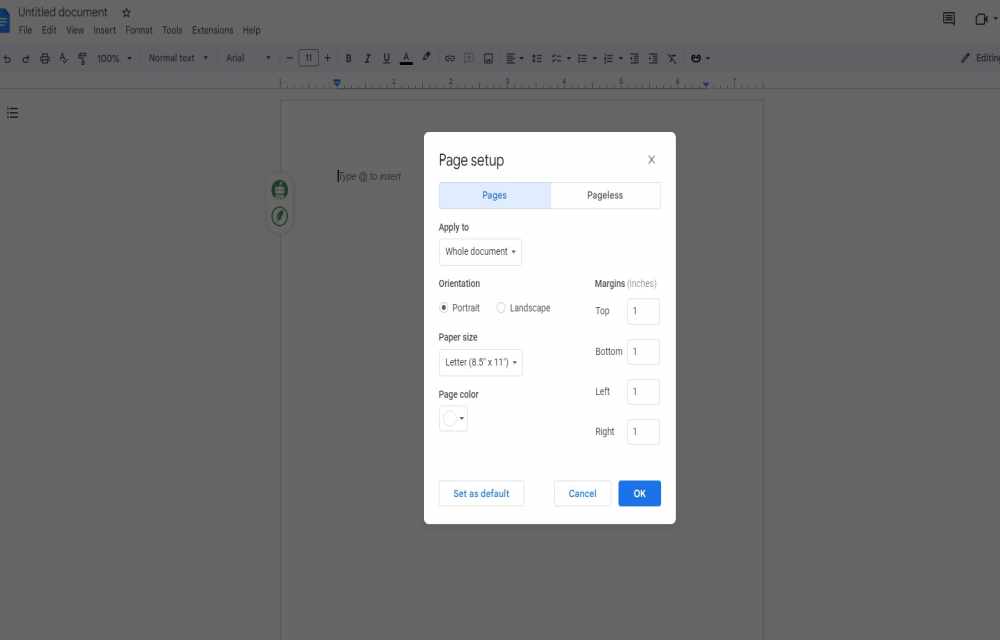
How to Change the Margins in Google Docs
Google Docs is a great word processor from the house of Google. It hs plenty of collaboration features, add-ons support, and many more. Margins are important in document formatting because they allow you to regulate the space between the content and the page’s edges. Adjusting margins is vital while working on a school project, a…

Best Tips For Freeing Up Storage Space On Your iPhone
Are you an iPhone user? So this article will definitely help you. Many iPhone users are frustrated by the problem of running out of storage space, which prevents them from receiving new messages, and files, or even saving new images and videos. If you’re experiencing this problem, don’t worry; there are various ways to free…

A Quick Guide to Web Scraping and Uses
Enter the world of the Quick Guide to Web Scraping! The virtual world teems with information in our technologically evolved day, just ready to be tapped. That is where web scraping comes into play, a hard talent to learn for a variety of purposes. Unravel the complexities of data scraping, also known as online harvesting, and…

Protect Your Privacy: Easy Steps to Lock Your Secrets on WhatsApp
Handing over your unlocked phone to someone can be a tense experience. Will they respect your privacy or stumble upon those embarrassing messages you’d rather keep hidden? While many messaging apps leave you hanging, with its brand-new feature, aptly named “Chat Lock,” you can now lock away specific chats and shield them from prying eyes.…

How to Block YouTube Ads on Your Android TV?
YouTube has become an essential aspect of our digital life, supplying us with an infinite supply of video entertainment. However, the annoying advertisements that appear during our favorite videos might ruin our viewing experience. If you’re tired of seeing advertisements while viewing YouTube on your Android TV, you’re in luck. We’ll show you how to…

How To Write An Email When Sending A Resume?
Emailing your CV has become the standard in today’s competitive job market. However, adding your resume and pressing the send button will not suffice. You must design a compelling and interesting email to leave a lasting impression on potential employers. We’ll walk you through the art of crafting an email when uploading your CV in…

How To Fix A Missing Wi-Fi Option In Windows 11
The newest operating system from Microsoft, Windows 11, is recognized for its sleek, futuristic appearance and cutting-edge new capabilities. The Wi-Fi option may not be shown in the taskbar or in the network settings for some clients, though. This may be incredibly frustrating while attempting to connect to wireless networks. Be at ease, though! You…
How To Edit Your WhatsApp Messages
Through text messages, voice calls, and multimedia sharing, WhatsApp users can stay in touch with friends, family, and coworkers around the world. But we’ve all had that experience of reading a sent message and finding a typo or mistake. Fortunately, WhatsApp has introduced a convenient feature that allows you to edit your messages, providing the…

How to Fix Code 22 Errors?
Code 22 errors, often known as “Device Manager Error Codes,” can be quite annoying, especially if they restrict your device from functioning properly. This error typically happens when a device is disabled in Windows or when there are driver-related issues. However, there is no need to be concerned because resolving Code 22 issues is usually…