

iOS 27.2 Is Out: What’s New and Should You Update?
iOS 27.2 is rolling out with Siri AI memory, Suggestions in Messages and SynthID tags in Photos. Here's what Apple confirmed and whether to update now.


iOS 27.2 is now rolling out to iPhones. For most of us, it’s the first proper point update since iOS 27 arrived.
I went through what Apple has published for this one. The confirmed list is shorter than some of the chatter online suggested, so I’ll keep this simple. Here’s what’s actually in it, what isn’t, and whether I’d install it today.
Quick answer: iOS 27.2 adds Siri AI that remembers context from earlier conversations, a new Suggestions feature in Messages, and SynthID watermark support in Photos and Image Playground. Apple has also published a security content page for the release. For most people I’d say update, but back up your iPhone first.
What’s new in iOS 27.2
Siri AI remembers more
This is the headline change. According to Apple’s iOS 27 update notes, iOS 27.2 lets Siri AI retain useful context from previous Siri interactions and draw from a wider range of personal context.
Apple’s own example is Siri recalling past conversations, “like the restaurants it recommended last week.” So you shouldn’t have to repeat yourself as often. These Siri AI features need supported hardware, so not every iPhone that runs iOS 27 will get them.
Suggestions in Messages
Apple lists Suggestions in Messages as new in iOS 27.2. You may have seen specific examples floating around, like turning a dinner plan into a Calendar event. I couldn’t confirm those details from Apple’s notes, so I’d rather not guess how it works. I’ll update this post once I know more.
SynthID watermarks in Photos and Image Playground
This one flew under the radar. Photos and Image Playground now support SynthID watermarking. In plain terms, SynthID is an invisible marker that helps show whether an image was made or changed with generative AI tools. With so many edited and AI-made pictures going around, that’s a genuinely useful addition.
A fix for businesses
If your iPhone is managed by your company, Apple’s enterprise notes say iOS 27.2 fixes an issue where software updates over cellular data wouldn’t go through.
What I couldn’t find in Apple’s notes
There’s been talk of Dual Capture for Group FaceTime, changes to Up Next in Apple Podcasts, and a redesigned Health app that was supposedly pulled before release. None of these appear on the Apple pages I checked. Until Apple confirms them, I wouldn’t count on seeing any of them after you update.
Security fixes
Apple has published a page called “About the security content of iOS 27.2 and iPadOS 27.2,” which you’ll find on its Apple security releases list. I’ve seen different numbers quoted for how many fixes it includes, and I haven’t confirmed the exact count or whether any of the bugs were being exploited. So I’m not going to throw a number at you. What I will say is that security patches alone are usually reason enough to update.
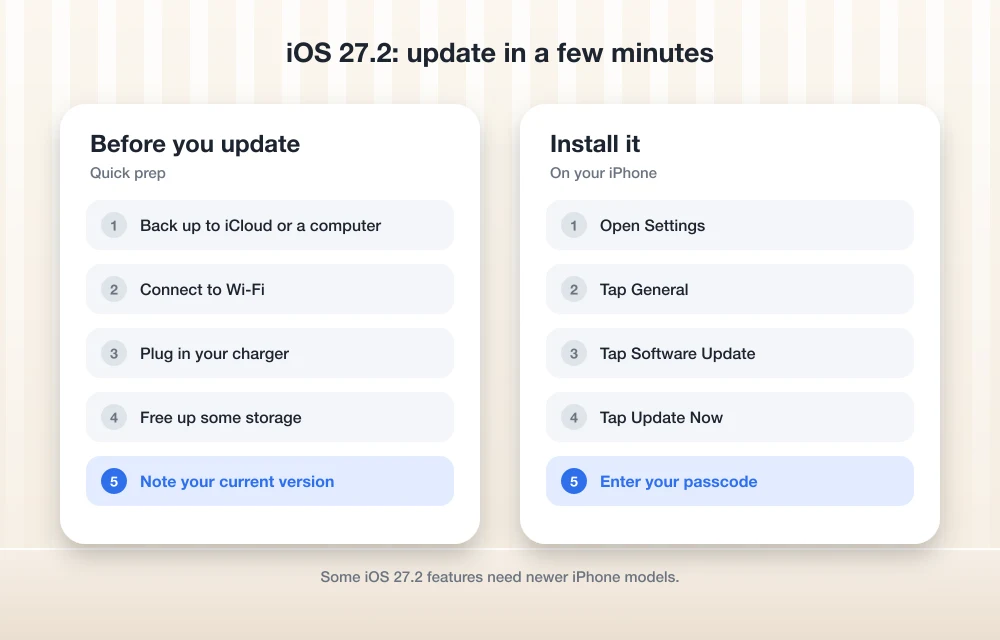
How to update to iOS 27.2
Back up your iPhone first, plug it into a charger, and connect to Wi-Fi. Then:
- Open Settings.
- Tap General, then Software Update.
- Tap Update Now (or Install Now) and follow the prompts.
If you don’t want to do this by hand every time, turn on Automatic Updates on the same Software Update screen.
Should you update now?
Honestly, yes for most people. The Siri changes are the kind of thing you’ll notice day to day, and the security fixes matter even if you never touch the new features.
One caution. Apple’s notes don’t say whether iOS 27.2 fixes the bugs we’ve been covering recently. If your phone locks up when you rearrange widgets, our guide on fixing iPhone freezing when moving widgets in iOS 27 still applies. iPhone 18 Pro owners dealing with restarts when Face ID fails or during Apple Pay or speaker crackling and popping should try the update, then check those guides if the problem sticks around.
If you rely on your iPhone for work and can’t afford a hiccup, waiting a few days is fine. Just don’t put off security updates for weeks.
Frequently Asked Questions
What’s new in iOS 27.2?
Apple’s notes confirm Siri AI that retains context from previous interactions, a new Suggestions feature in Messages, and SynthID watermarking support in Photos and Image Playground. Managed business iPhones also get a fix for updates failing over cellular data.
Does iOS 27.2 include Dual Capture for FaceTime or a new Health app?
Neither appears on the Apple pages I checked. Until Apple confirms them, don’t expect to see them after updating.
How do I update my iPhone to iOS 27.2?
Back up, plug in and connect to Wi-Fi. Then go to Settings > General > Software Update and tap Update Now or Install Now.
Featured image: wirestock on Magnific.
More in News

Galaxy S27 Launch Date: What We Know So Far
Samsung hasn't announced the Galaxy S27 yet. Leaks point to January 2027, with February possible. Here's past Unpacked timing and whether to wait.

Windows 11 23H2 Enterprise and Education Reach End of Updates on November 10, 2026
Windows 11 23H2 Enterprise and Education get their last update on November 10, 2026. Here's who is affected, how to check your version and how to upgrade.
Windows 10 ESU 2027: Free Consumer Security Updates Did Not End in October 2026
Windows 10 ESU 2027: Microsoft now says consumer security updates run to October 12, 2027. Here's how to enroll, check Windows 11 support and plan ahead.
The week in tech, minus the noise.
New reviews, fixes and the stories that matter — once a week, straight to your inbox.
We only use your email to send the newsletter. Unsubscribe any time. See our privacy policy.
Comments