

Microsoft Confirms Windows November Update Can Break Sign-Ins: NTLM Signing Explained
Microsoft says its NTLM signing change can break sign-ins through some proxies and SSO tools. Who's affected, the temporary workaround and May 2027.

Microsoft has confirmed that its November Windows security updates can break sign-ins for some business apps and devices. The cause is a security change to NTLM, an older Windows authentication method. Most home users won’t notice anything. Companies that use authentication proxies, single sign-on tools or app packaging software are the ones at risk.
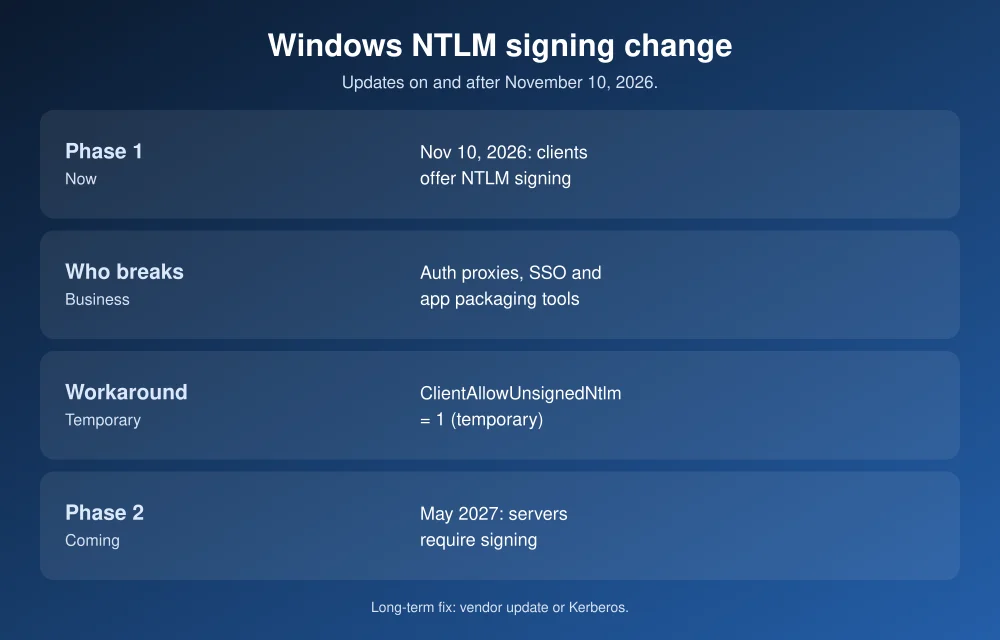
Quick answer: Windows updates released on and after November 10, 2026 make Windows PCs offer NTLM signing on every connection, to fix CVE-2026-118737. Microsoft says some third-party authentication proxy servers, single sign-on (SSO) solutions and app packaging tools don’t handle this correctly, so sign-ins through them can fail. There’s no fix yet. Microsoft’s temporary workaround is a registry value, ClientAllowUnsignedNtlm = 1. The long-term fix is a vendor update or switching to Kerberos.
What Microsoft Changed
Microsoft’s KB5135557 article describes a two-phase rollout:
- Phase 1, November 10, 2026: Windows clients offer NTLM signing on all connections by default. Servers still accept signed and unsigned clients, and audit events show which clients don’t sign.
- Phase 2, May 2027: Windows servers begin requiring NTLM signing by default. Clients that don’t sign will be rejected.
The change protects against relay attacks. The flaw it fixes, CVE-2026-118737, is a remote code execution bug in the Windows RPC runtime that unauthenticated attackers could exploit without user interaction, BleepingComputer reports.
Who Is Affected
Microsoft says the problem happens when a third-party device or app doesn’t implement NTLM correctly. For example, it sends a challenge message with an empty or incomplete TargetInfo field. Windows then rejects the sign-in with STATUS_LOGON_FAILURE.
- Authentication proxy servers.
- Single sign-on (SSO) solutions.
- Application packaging solutions that use NTLM.
The update applies to Windows 11 versions 23H2 through 26H2, Windows 10 Enterprise LTSC 2021, and Windows Server 2016, 2019, 2022 and 2025.
What IT Admins Can Do Now
- Find the cause. Microsoft says affected devices send an NTLM challenge with an empty “Target Info List” in network traces, or show “Not Found” in Target Machine fields in event logs.
- Check the vendor. Ask whether a firmware or software update supports the new NTLM signing requirement, or whether the product can use Kerberos.
- Use the temporary workaround if needed. On affected clients, set
ClientAllowUnsignedNtlm(REG_DWORD) to1underHKEY_LOCAL_MACHINE\SYSTEM\CurrentControlSet\Control\Lsa\MSV1_0. Microsoft says to use it only for temporary compatibility, and BleepingComputer reports it may be removed later. - Plan for May 2027. Use NTLM audit events 4022 (client) and 4023 (server) to find devices that still don’t sign.
The workaround stops the PC from offering signing, which removes the protection the update added. Apply it only to the PCs that need it, and track when the vendor fix arrives.
Other November Update Problems
BleepingComputer reports that this month’s updates have also caused Windows activation failures, SQL Server performance issues and printing problems with complex documents. Separately, Microsoft fixed a bug that showed a blank white box in Office apps. Microsoft says that one is fixed in Microsoft 365 Apps Version 2611.
For the full security details, see Microsoft’s CVE-2026-118737 entry. Related: Windows 11 Bluetooth file transfer changes, the Radware breach and our tech outage checklist.
FAQs
Why are sign-ins failing after the November Windows update?
NTLM signing changes for CVE-2026-118737 break some third-party proxies, SSO tools and packaging apps that don’t follow the NTLM protocol.
Is there a fix?
Not yet. Microsoft’s temporary workaround is the ClientAllowUnsignedNtlm registry value. The long-term fix is a vendor update or Kerberos.
Are home users affected?
Microsoft lists business tools such as authentication proxies and SSO solutions. Most home PCs don’t use them.
What happens in May 2027?
Windows servers start requiring NTLM signing by default, so clients that don’t sign will be rejected.
Featured image: Microsoft.
Disclosure: TheTechHacker has no paid relationship with Microsoft.
More in News
November 2026 Patch Tuesday: Outlook Zero-Day Fixed, USB Audio Code 10 Bug Finally Solved
Patch Tuesday landed on November 10 this month, and for once the Outlook part of the release matters more than the Windows part. Microsoft fixed a spoofing bug in Outlook (CVE-2026-124194) that it says was already being exploited before the patch was ready, and that fix doesn’t come through Windows Update at all, it comes…
How to Fix the Passkey “Something Went Wrong” Error on Android When Signing In on Windows 11
You scan the QR code on your Windows 11 PC, approve the passkey on your Android phone, and the website signs you in. Then your phone says “Something went wrong.” It’s a Windows bug, not a problem with your phone or your account. Microsoft fixed it in the November 19, 2026 preview update, KB5132057, for…

How to Fix Outlook Not Syncing Email in Microsoft 365 (Windows, Mac, iPhone and Android)
Outlook stuck on old mail? Here’s how I’d fix Microsoft 365 sync problems in new and classic Outlook on Windows, Outlook for Mac, and the Outlook app on iPhone and Android.
The week in tech, minus the noise.
New reviews, fixes and the stories that matter — once a week, straight to your inbox.
We only use your email to send the newsletter. Unsubscribe any time. See our privacy policy.
Comments