

Microsoft Releases Emergency Hotpatch KB5138318 to Fix Windows Server 2025 Crashes
Microsoft's out-of-band KB5138318 fixes Windows Server 2025 stop error 0x139 crashes after the November hotpatch. Who's affected and what to do.

Microsoft released an emergency out-of-band update for Windows Server 2025 after this month’s security hotpatch caused some servers to crash. The fix installs automatically and doesn’t need a restart.
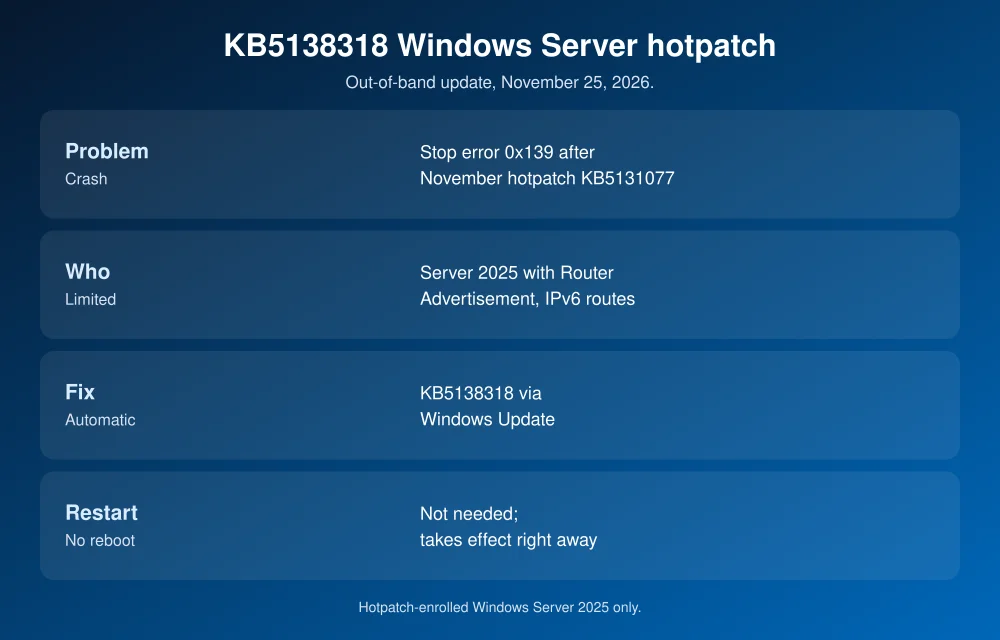
Quick answer: Microsoft’s KB5138318, released November 25, 2026, fixes Windows Server 2025 crashes with stop error 0x139 (KERNEL_SECURITY_CHECK_FAILURE) after the November hotpatch KB5131077. It affects a limited number of servers with Router Advertisement enabled that receive time-bound IPv6 routes. The update rolls out through Windows Update to hotpatch-enrolled servers and takes effect without a restart.
What Microsoft Says
- Affected servers may stop unexpectedly with error 0x139 when an IPv6 route timer expires.
- It happens on some Windows Server 2025 devices after the November 2026 security hotpatch.
- KB5138318 is a non-security out-of-band update.
Details are in Microsoft’s KB5138318 article and the Windows message center.
Who Is Affected
- Windows Server 2025 devices enrolled in hotpatch updates.
- With Router Advertisement (RA) enabled.
- That receive time-bound IPv6 routes.
What Admins Should Do
- Check Windows Update on affected servers and confirm KB5138318 is installed.
- Look for past 0x139 crashes in event logs to confirm whether you were affected.
- No restart needed: the hotpatch takes effect immediately, Microsoft says.
- Review other November issues before wider rollouts (below).
Other November Update Problems
BleepingComputer reports that November hotpatches also caused app installation and launch issues, including Office, on Windows 11, and printing problems on systems running Forcepoint’s DLP Endpoint Agent. Separately, Microsoft’s NTLM signing change is breaking some sign-ins: see our coverage of Windows November update sign-in failures. For Office users, see fixing the Microsoft 365 blank dialog.
Microsoft also confirmed it is removing the WSUS server role in Windows Server 2028, BleepingComputer reports. See our tech outage checklist for planning.
FAQs
What does KB5138318 fix?
Windows Server 2025 crashes with stop error 0x139 after the November hotpatch KB5131077.
Does KB5138318 need a restart?
No. Microsoft says it takes effect without a restart.
Which servers are affected?
Some Windows Server 2025 hotpatch devices with Router Advertisement enabled that receive time-bound IPv6 routes.
How do I get the fix?
It installs automatically through Windows Update on enrolled servers.
Featured image: Microsoft.
Disclosure: TheTechHacker has no paid relationship with Microsoft.
More in News

How to Fix Windows 11 Blue Screen Caused by a Wi-Fi Driver
A bad Wi-Fi driver is one of the most common reasons a Windows 11 PC suddenly blue-screens. Today the driver runs inside the Windows kernel, so when it crashes, the whole PC goes down with it. Microsoft plans to change that in 2027 by moving Wi-Fi drivers out of the kernel, Windows Latest reported on…

How to Fix SQL Server Linked Server Connections Staying Open After Windows Updates
If your SQL Server box has been getting slower every day since October, and your Oracle or PostgreSQL DBA keeps asking why there are hundreds of idle sessions coming from it, this one’s for you. Microsoft has confirmed that Windows updates released on or after October 13, 2026, can leave SQL Server linked server connections…

How to Fix Windows Activation Error 0x80041008 After the November Update
If you manage Windows PCs or servers and your activation scripts started failing this week with error 0x80041008, the November security update is the cause. Microsoft confirmed the bug on November 13 and released out-of-band updates the same day to fix it. The error shows up when you run slmgr.vbs commands to set a KMS…
The week in tech, minus the noise.
New reviews, fixes and the stories that matter — once a week, straight to your inbox.
We only use your email to send the newsletter. Unsubscribe any time. See our privacy policy.
Comments