

How to Fix GTA 6 Pre-Load Not Downloading on Xbox Series X|S
GTA 6 is four days away, and on Xbox the pre-load has been open since Monday evening, November 9, in the US. If your Series X or Series S hasn’t started the download, or it’s been sitting at the same percentage for hours, you’re not alone. With a download of up to 212 GB, a…

Photo by Dimitris C on Unsplash
GTA 6 is four days away, and on Xbox the pre-load has been open since Monday evening, November 9, in the US. If your Series X or Series S hasn’t started the download, or it’s been sitting at the same percentage for hours, you’re not alone. With a download of up to 212 GB, a lot of things can get in the way: a pre-order that didn’t bill, a full SSD, a console that shuts all the way down at night, or a home connection that’s busy with everything else.
Most of these are quick fixes, and you have until launch to sort them out. I’ll start with the checks that solve the most problems, then move to the slower ones.
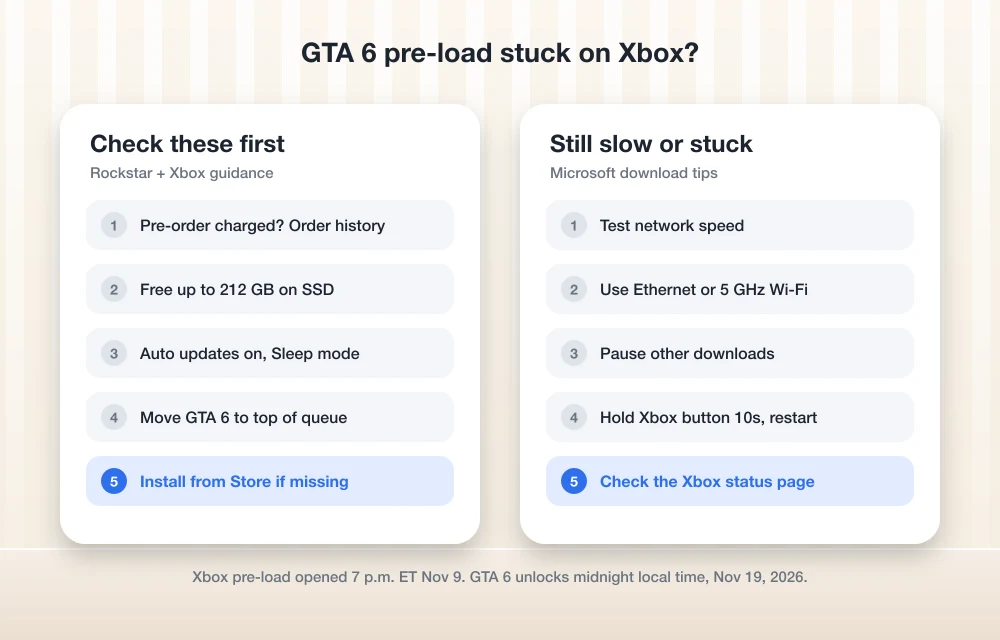
Quick answer: On Xbox Series X|S, the GTA 6 pre-load opened at 12 a.m. GMT on November 10, 2026, which was 7 p.m. ET on November 9 in the US. If it isn’t downloading, check that your pre-order was charged in your Microsoft account order history, free up at least 212 GB on the internal SSD or Storage Expansion Card, turn on automatic updates, set the console to Sleep mode, and check the download queue in My games & apps. If the game is missing from your library, find it in the Microsoft Store and select Install. You won’t be charged again if the original purchase went through.
The key dates for Xbox players
According to Rockstar’s GTA 6 pre-load FAQ, Xbox works a little differently from PS5. The PS5 pre-load opened at midnight in each local time zone, but the Xbox pre-load opened at the same moment worldwide.
| What | When (US time) |
|---|---|
| Xbox pre-load opened | Nov 9, 7 p.m. ET / 4 p.m. PT (12 a.m. GMT Nov 10) |
| Pre-orders charged | About 10 days before release, so around Nov 9 |
| Game unlocks | Nov 19, midnight local time |
| Space needed | Up to 212 GB |
Rockstar says the pre-load needs automatic updates turned on and the console either on or in Sleep mode. Those two settings explain a lot of the “nothing is happening” reports.
1. Make sure your pre-order was actually charged
This is the one people miss. Microsoft’s Xbox pre-order FAQ says card pre-orders are usually charged about 10 days before release. If that charge fails, Microsoft tries again a few days later. If the second attempt also fails, the pre-order is canceled, and you’d have to buy the game again.
So before you mess with storage or network settings, sign in to your Microsoft account in a browser, open Payment & billing > Order history, and look for GTA 6. If it says “Completed,” you’re fine. If you see a payment problem, update your card now, because a canceled pre-order can’t pre-load.
2. Free up at least 212 GB on the right drive
Rockstar says the pre-load needs up to 212 GB of free space, depending on your console. That’s a big ask on a 512 GB Series S, and it can fill a Series X quickly too if you keep a few large games installed.
Check your space in Settings > System > Storage devices. Microsoft also shows a notification when space runs low, so press the Xbox button and look at your notifications. One thing to keep in mind: games built for Series X|S have to run from the internal SSD or a Storage Expansion Card. You can park older games on a USB drive to free up the SSD, but GTA 6 itself needs to live on the internal drive or the expansion card to play.
3. Turn on automatic updates and Sleep mode
If your Xbox shuts down completely when you turn it off, it can’t download anything overnight. Go to Settings > General > Power options and choose Sleep. Then go to Settings > System > Updates and turn on Keep my games & apps up to date. Those are the two requirements Rockstar lists for the automatic pre-load.
While you’re in Updates, install any pending console update. Microsoft says a “Download stopped” error can mean the console needs a system update before the download will finish.
4. Check the download queue
Sometimes the pre-load is there but stuck behind other downloads, or paused. Press the Xbox button, open My games & apps > See all > Manage > Queue. If GTA 6 is listed, move it to the top and make sure it isn’t paused. Close any running game too, since Microsoft says a game running in the background can slow downloads.
5. Install it from the Store if it’s missing
If GTA 6 doesn’t show up in My games & apps at all, Microsoft says to find it in the Store. Go to Store > Browse games > Search games, search for Grand Theft Auto VI, select the edition you pre-ordered and choose Install. If you see a price instead of Install, stop there and don’t buy it again. Check your order history first, and contact Xbox Support if you have a completed order but no Install button.
Also make sure you’re signed in with the same Xbox profile that bought the game.
6. Speed up a slow download
A 200 GB download takes time even on a fast connection, and launch week is when everyone is downloading at once. Run Settings > General > Network settings > Test network speed & statistics and compare the result with what your internet plan should deliver.
If it’s much slower, Microsoft’s own advice is the same advice I’d give:
- Plug the Xbox into your router with an Ethernet cable if you can.
- On Wi-Fi, use the 5 GHz band for the console and move other devices to 2.4 GHz.
- Pause streaming and big downloads on other devices in the house.
- Let the download run overnight, when your internet provider’s network is less busy.
If your home internet is the real bottleneck, our comparison of 5G home internet vs cable vs fiber covers which connection types handle huge game downloads best.
7. Restart the console and check Xbox status
If the progress bar hasn’t moved in a long time, restart the console fully. Hold the Xbox button on the front of the console for about 10 seconds until it turns off, unplug it for a moment, then turn it back on. The download usually picks up where it left off.
Before you go further, check the Xbox status page. If Store or download services show an alert, the problem is on Microsoft’s end and you just have to wait. Rockstar also points Xbox players to Microsoft’s install troubleshooting guide if the pre-load still fails.
What to expect on launch night
Even with the pre-load done, GTA 6 stays locked until midnight local time on November 19. If Rockstar pushes a launch update, leaving the console in Sleep mode on launch eve lets it install automatically. If you’re also playing on PS5 or helping someone who is, we have a separate guide on fixing GTA 6 locked or not starting on PS5. For everything else about the game, see our GTA 6 facts roundup.
FAQs
When did the GTA 6 pre-load start on Xbox?
Rockstar says the Xbox Series X|S pre-load began globally at 12 a.m. GMT on November 10, 2026. In the US, that was 7 p.m. ET or 4 p.m. PT on November 9.
How much space does GTA 6 need on Xbox?
Rockstar says the pre-load needs up to 212 GB of free space, depending on the console. It has to be installed on the internal SSD or a Storage Expansion Card to play.
Why isn’t GTA 6 showing in My games & apps?
Your pre-order may not have been charged, or you may be signed in with a different profile. Check your Microsoft account order history, then search for the game in the Store and select Install. You won’t pay twice if the original order completed.
What time does GTA 6 unlock on Xbox?
GTA 6 unlocks at midnight local time on November 19, 2026, on both Xbox Series X|S and PS5, according to Rockstar.
Featured image: Dimitris C on Unsplash.
Disclosure: TheTechHacker has no paid relationship with Rockstar Games, Microsoft or any company mentioned here.
More in How-to
How to Fix Not Enough Storage When Preloading GTA 6 on PS5 and Xbox Series X|S
Rockstar says the GTA 6 preload needs up to 212GB. Here’s how to check your free space, clear room, add an M.2 SSD or Xbox expansion card, and get a stuck download moving again.
How to Fix GTA 6 Preload Not Showing or Not Starting on PS5 and Xbox Series X|S
Can’t find the GTA 6 preload button, or is the download stuck at 0%? Here’s how to track down the preload on PS5 and Xbox Series X|S and get it moving before the November 19 launch.
How to Fix GTA 6 Locked or Not Starting on PS5 on Launch Day
GTA 6 is four days away, and if you pre-loaded it on PS5 you’ve probably already noticed the little padlock on the game tile. That’s normal before launch. What isn’t normal is still seeing that padlock after midnight on November 19, or getting an error when you hit Play. With millions of people trying to…
The week in tech, minus the noise.
New reviews, fixes and the stories that matter — once a week, straight to your inbox.
We only use your email to send the newsletter. Unsubscribe any time. See our privacy policy.
Comments