

How to Fix Netflix Proxy or VPN Error M7111-5059
Netflix error M7111-5059 usually means it thinks you’re streaming through a VPN or proxy. Here’s what the error means and the fixes worth trying, from switching servers to plugging IPv6 and DNS leaks.


Photo by Kevin Woblick on Unsplash
Netflix error M7111-5059 has a real gift for timing. You pick something, hit play, and instead of the opening credits you get a little message saying Netflix thinks you’re using an unblocker or proxy. No show. Just the code.
If you keep a VPN running for privacy (on coffee shop Wi-Fi, or just out of habit, like me), this gets old fast. You’re not trying to sneak into some other country’s catalog. But Netflix still eyes your connection like it’s up to something.
So let’s sort it out: what the error actually means, which fixes I’d try and in what order, and the couple of steps that come with a catch.
Quick answer: M7111-5059 usually appears when Netflix detects that you’re connecting through a VPN, proxy or “unblocker” service. The fastest fix is to turn your VPN off and reload Netflix. If you want to keep the VPN on, connect to a different server in your own country, try your provider’s streaming servers if it has them, clear Netflix’s cookie at netflix.com/clearcookies, and turn on IPv6 and DNS leak protection in your VPN app.
What the Netflix M7111-5059 Error Means
The message people usually report says “You seem to be using an unblocker or proxy,” along with the code M7111-5059 (sometimes it’s M7111-1331-5059). I couldn’t get Netflix’s own help page for this exact error to load, so treat that wording as widely reported, not confirmed.
The logic behind it is simple enough. Netflix only offers certain shows in certain countries, so when your connection looks like it’s coming from a VPN or proxy server, it can’t tell where you really are. And rather than guess? It just blocks playback.
Here’s where a lot of people get tripped up: M7111-1331 on its own is a different error. Netflix says that one’s a browser problem. Either a browser setting is blocking playback, or your plan only allows phones and tablets. Its suggestion is to type www.netflix.com into the address bar instead of clicking some old bookmark.
And no, I haven’t come across anything official from Netflix saying M7111-5059 means your account got banned. I also couldn’t find an official statement on how the ad-supported plan handles VPN use, so I won’t pretend to know.
What Netflix’s Terms Say About Location
Netflix’s Terms of Use tie what you can watch to where Netflix offers service and has the content licensed. From what’s reported, they also say you should watch mostly in the country where you set up your account. I couldn’t load the terms myself, though, so if it matters to you, go read the exact wording at help.netflix.com/legal/termsofuse.
Just so we’re clear on what this post is for. It’s about getting your own home library back while keeping a VPN on for privacy, not hopping catalogs. Still not sure you even need a VPN at home? I wrote about that in is a VPN worth it for US users.
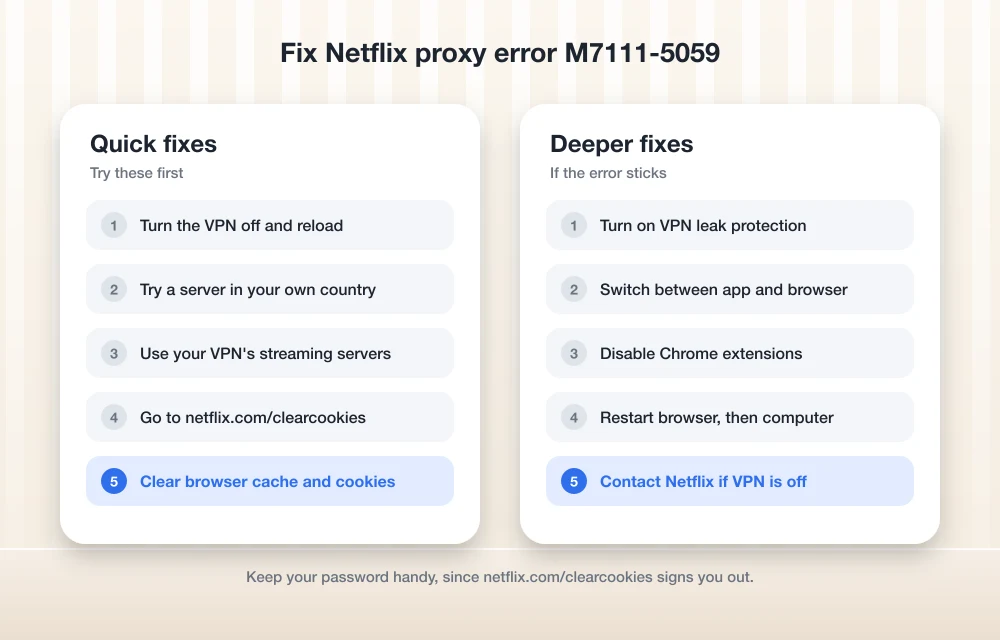
How to Fix Netflix Proxy Error M7111-5059
This is the order I’d go in. The first few take seconds, and the later ones need a bit more fiddling.
Turn the VPN off and reload
Disconnect the VPN, refresh Netflix, and see if the error’s gone.
Switch servers
Reconnect to a different server in your own country.
Try your provider’s streaming servers
If your VPN app has servers labeled for streaming, hop on one of those.
Clear Netflix’s cookie
Head to netflix.com/clearcookies, then sign back in.
Clear browser cache and cookies
Wipe cookies and site data in your browser, then open Netflix again.
Plug IPv6 and DNS leaks
Switch on leak protection in your VPN app’s settings.
Switch between app and browser
Use the Netflix app if you were in a browser, or try another browser or device.
Turn off browser extensions
Disable your Chrome extensions and test Netflix again.
Restart everything
Restart the browser, then fully shut down the computer and turn it back on.
Fix 1: Turn the VPN off
Yeah, I know. Not what you wanted to hear. But it’s the cleanest test you’ve got, because if Netflix plays the moment the VPN goes off, you know exactly where the problem is and you can stop poking at your router or reinstalling things.
Plenty of people just pause the VPN while streaming and flip it back on after. Your Netflix habits aren’t really the sensitive part of your browsing anyway, are they?
Fix 2: Switch to a different server
VPN servers share IP addresses across lots of users. So if Netflix has flagged the address you happened to land on, jumping to another server in the same country might get you a clean one. Disconnect, pick a different city or server in your own country, reconnect, try again.
It’s trial and error. I’d give it a few servers before writing this step off.
Fix 3: Use your provider’s streaming servers
Some VPN providers mark certain servers as better for streaming, so look in the server list for a label or filter that mentions it. On ExpressVPN? I didn’t get to check its current support pages before writing this, so I can’t give you the exact menu name. My ExpressVPN review covers how the app’s laid out and whether I think it’s worth paying for.
No streaming servers at all? Ask your provider’s support team which ones they’d recommend for Netflix.
Fix 4: Clear Netflix’s cookie
Netflix keeps a cookie in your browser, and an old one can hang on to stale info. Netflix even has its own reset for this, described on its sign-in troubleshooting page:
- Go to netflix.com/clearcookies. This signs you out.
- Pick Sign In.
- Type in your email and password.
- Give Netflix another go.
Have your password handy first. Getting signed out on the TV and then hunting for your password is nobody’s idea of a fun night.
Fix 5: Clear your browser’s cache and cookies
Didn’t work? Then go a bit broader. These are Google’s steps for Chrome on a computer, from its clear cache and cookies help page:
- Click More (the three dots in the top right).
- Choose Delete browsing data.
- Pick a time range, like Last hour or All time.
- Tick Cookies and other site data.
- Hit Delete data.
Heads up, this signs you out of websites in general, not just Netflix. I’d try “Last hour” first and only go to “All time” if that doesn’t do it.
Fix 6: Plug IPv6 and DNS leaks
This one needs a little background. Every device online has an address. IPv4 is the older format most of us recognize, and IPv6 is the newer, longer one. DNS works like the internet’s phone book, turning a name like netflix.com into an address your device can actually connect to.
A “leak” is when some of your traffic slips around the VPN tunnel instead of going through it. If your VPN only tunnels IPv4, your IPv6 traffic could end up outside it, and if your DNS requests go to your internet provider rather than the VPN, they can give away your real location. Either way, Netflix may be hearing two different stories about where you are. Not a great look, from its side.
You’ll see people claim Netflix specifically blocks IPv6 tunnels, or doesn’t support IPv6 at all. I couldn’t find anything official from Netflix backing that up, so I’d call it unconfirmed. Leak protection is still worth switching on.
Open your VPN app’s settings and look for things like IPv6 leak protection or DNS leak protection. The names change from app to app, and I couldn’t confirm exact menu paths for specific providers. So poke around the advanced or privacy section.
Whether your home connection even uses IPv6 depends on your internet provider and your router. If you’re shopping for a new plan anyway, my comparison of 5G home internet vs cable vs fiber covers the bigger picture.
On a Mac, I couldn’t confirm Apple’s current steps for switching off IPv6, and I’m not handing you a menu path I can’t stand behind. Your VPN app’s leak protection is the better first move there too.
Fix 7: Try the app instead of the browser (or the other way around)
When playback acts up, Netflix suggests restarting your browser and trying a different browser or another Netflix-supported device. For this error, bouncing between the browser and the Netflix app is a quick way to see whether the problem follows your network or just lives in one setup.
Works in the app but not in Chrome? It’s your browser. Fails everywhere with the VPN on? That’s the server.
Fix 8: Turn off Chrome extensions
Proxy and unblocker extensions are the obvious suspects. But even unrelated ones can get in the way sometimes. Here are Netflix’s own Chrome steps:
- Type chrome://extensions into the address bar and hit Enter.
- Switch off any extensions that are on. Chrome Apps can stay on.
- Try Netflix again.
- If it works now, turn the extensions back on one at a time until you catch the culprit.
Fix 9: Restart your browser and computer
Boring, I know. But it clears out stuck connections. Close and reopen your browser first. Still broken? Netflix recommends a full shutdown:
- Windows: Start, then Power, then Shut down.
- Mac: Apple menu, then Shut Down.
Leave it off for at least 10 seconds, power it back up, reconnect your VPN and give Netflix one more shot.
Which Fix Should You Try First?
Everything here leans on Netflix, Google and Microsoft’s own help pages. Anything I couldn’t verify there gets flagged as unconfirmed where it comes up.
| Fix | Best when | The catch |
|---|---|---|
| Turn VPN off | You just want to watch now | No VPN protection while streaming |
| Switch servers | Your current server’s IP is flagged | Can take a few tries |
| Streaming servers | Your provider offers them | Not every VPN has them |
| netflix.com/clearcookies | The error sticks in one browser | Signs you out of Netflix |
| Clear browser cookies | The Netflix cookie reset didn’t help | Signs you out of other sites too |
| Leak protection | The error appears on every server | Setting names vary by app |
| Disable IPv6 (Windows) | Last resort only | Microsoft doesn’t recommend it |
| Clear app data | The app itself seems stuck | Deletes your downloads |
When Nothing Works
Sometimes Netflix has simply flagged the IP ranges your VPN uses, and there’s not much you can do about that from your end. That’s the annoying part. You’ve basically got three options left: pause the VPN while you watch, ask your VPN provider’s support which servers they suggest for Netflix, or, if the error shows up with the VPN completely off, contact Netflix’s help center.
That last one matters. If M7111-5059 appears with no VPN, no proxy extension and no unblocker running, something else on your network might be routing your traffic. Netflix support is who you want looking at that.
Where I’d Start (and When to Just Pause the VPN)
Start with the boring stuff. Turn the VPN off to make sure it’s really the cause, then try a couple of different servers in your own country, and most of the time that’s the end of it. If the error keeps following you from server to server, clear Netflix’s cookie and turn on leak protection before you even think about touching your system’s network settings.
And keep Netflix’s terms in the back of your mind. A VPN is a great privacy tool, but Netflix is allowed to block connections it can’t place (and it does). If privacy is mostly what you’re after, pausing the VPN for movie night is a perfectly fair trade.
Frequently Asked Questions
What does Netflix error M7111-5059 mean?
Usually that Netflix has spotted you connecting through a VPN, proxy or unblocker service, so it blocked playback. The message people commonly report says you seem to be using an unblocker or proxy. I couldn’t confirm that exact wording on Netflix’s own help page, though.
Will Netflix ban my account for using a VPN?
I haven’t found anything official from Netflix saying M7111-5059 means you’re banned. The error just blocks playback on that connection. For Netflix’s exact rules on where you can watch, check its Terms of Use.
Is M7111-1331 the same as M7111-5059?
Nope. Netflix says M7111-1331 by itself is a browser error: either a browser setting is blocking playback or your plan only allows phones and tablets. Its tip is to type www.netflix.com instead of using an old bookmark.
Should I disable IPv6 to fix the Netflix proxy error?
Try your VPN app’s IPv6 and DNS leak protection first. Microsoft says IPv6 is a mandatory part of Windows and doesn’t recommend disabling it, though it does document a Prefer IPv4 over IPv6 option. And those claims that Netflix blocks IPv6 specifically? Netflix hasn’t confirmed them.
Does clearing Netflix’s cookie delete anything?
Going to netflix.com/clearcookies signs you out, so you’ll need your email and password to get back in. Clearing the Netflix app’s data is a different story. Netflix warns that it deletes your downloads and signs you out.
Featured image: Kevin Woblick on Unsplash.
Disclosure: TheTechHacker has no paid relationship with the companies in this article.
More in How-to
Easy Solution to Fix Unable to Connect to Proxy Server Error
You have faced Unable to connect to proxy server error, That’s why you are here now. We all love to browse, But we don’t love to face any errors while browsing. The error in browsing is such an ant in our food. Then, what happens when an Error occurs? You will be definitely frustrated. Especially…

Bing Chat not working on Edge or Windows? Best fixes to get it running today
Bing Chat, now powered by the latest ChatGPT-based model and integrated across Microsoft Edge and Windows, is drawing strong adoption, but users frequently report that it stops responding, fails to load, or throws generic “Something went wrong” errors. The good news is most issues are routine and fixable with a handful of browser, network, and…

How to Fix iPhone Not Showing the iOS 27.2 Update (and Other Update Errors)
iOS 27.2 not showing up, stuck on Preparing or Verifying, or failing with Unable to Install Update? Here are Apple’s own fixes, in the order I’d try them.
The week in tech, minus the noise.
New reviews, fixes and the stories that matter — once a week, straight to your inbox.
We only use your email to send the newsletter. Unsubscribe any time. See our privacy policy.
Comments