

Can AI Agents Use Your Bank Account? What Chase, Citi and Bank of America Allow
AI agents that can shop, pay bills and move money for you are arriving fast, and the biggest US banks are pushing back. Chase, Citi and Bank of America have all moved to keep outside AI agents from logging into customer accounts. If you are thinking about handing your bank login to an AI assistant,…

Image: Consumer Financial Protection Bureau
AI agents that can shop, pay bills and move money for you are arriving fast, and the biggest US banks are pushing back. Chase, Citi and Bank of America have all moved to keep outside AI agents from logging into customer accounts. If you are thinking about handing your bank login to an AI assistant, here is what each bank allows, who pays if something goes wrong, and the safer way to do it.
Quick answer: Mostly no. Chase’s terms let it block AI agents and require them to identify themselves, and Chase and Citi have said they won’t let third-party agents log in with your banking credentials, though both still allow limited read-only data sharing through approved open-banking apps, according to reports. The bigger risk is liability: under federal Regulation E, a transfer made by someone you gave your login to generally doesn’t count as “unauthorized,” so you may not get your money back if an AI agent you authorized makes a bad payment.
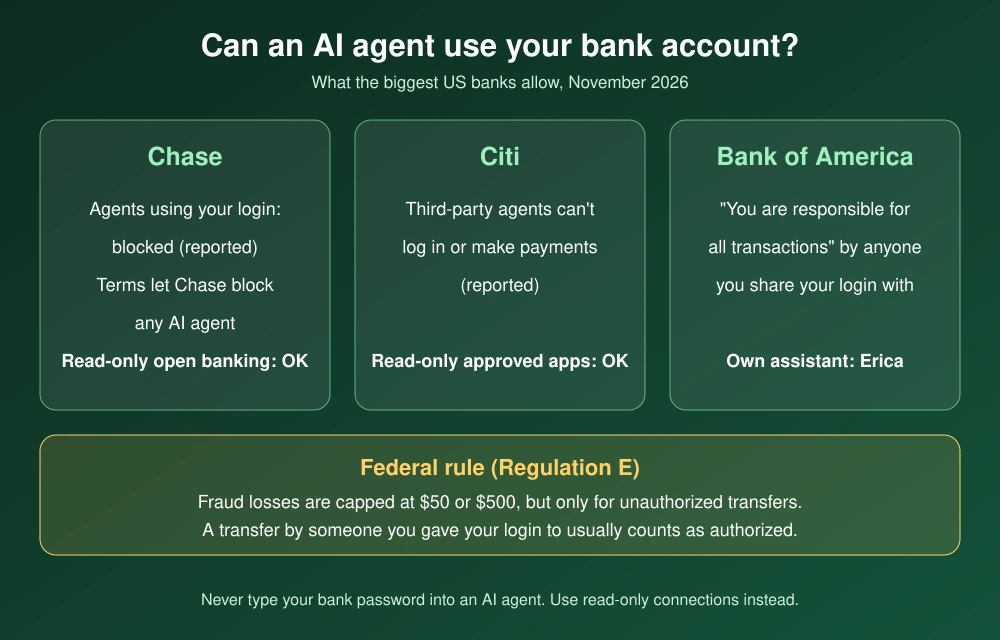
What each bank allows
| Bank | AI agents using your login | What’s still allowed |
|---|---|---|
| Chase | Blocked, per a bank spokesperson (reported); terms let Chase limit or block any AI agent | Read-only data sharing through approved open-banking providers (reported) |
| Citi | Third-party AI agents can’t log in or make transactions, per a Citi spokeswoman (reported) | Limited, read-only access through Citi-approved open-banking providers (reported) |
| Bank of America | Its agreement makes you responsible for transactions by anyone you share your login with | Its own assistant, Erica |
Chase
Chase’s website terms of use now have a section on AI agents. They list “AI agents or agentic AI” among tools that count as unauthorized entry, say Chase may “limit, prevent, suspend, or terminate” AI agent access at its sole discretion, and require agents to “clearly and deterministically label all agentic traffic.” CEO Jamie Dimon said in October that the bank would block outside agents that use customers’ credentials, reports said.
Citi
A Citi spokeswoman said the bank does not let third-party AI agents log into customer accounts or transact on its digital platforms, according to reports. Customers can still give limited, read-only access to Citi-approved open-banking providers. Citi said the restriction will stay while it works out who is liable for payments an AI authorizes, reports said.
Bank of America
Bank of America’s Online Banking Service Agreement says that if you give someone your login, “you are responsible for all transactions that person performs.” Reports say the bank has emailed customers warning that the same applies to AI agents. The agreement also says you should share your password only with authorized signers on your accounts.
Who pays if an AI agent makes a bad payment?
Federal law usually protects you from fraud on debit cards and bank transfers. Under the CFPB’s Regulation E, your loss is limited to $50 if you report an unauthorized transfer within two business days, and up to $500 if you report later but within 60 days of your statement.
The catch is the definition. Regulation E says an “unauthorized” transfer does not include one made by a person you gave your access device, such as your login, unless you told the bank that person was no longer authorized. If you hand your banking password to an AI agent and it sends money to the wrong place, the bank may treat that payment as authorized by you. That’s why banks warn that you carry the risk.
How to use AI with your money more safely
- Never type your bank password into an AI chatbot or agent. Use the bank’s own app or its built-in assistant instead.
- Use read-only connections. If a budgeting or AI app needs your transactions, connect through your bank’s approved data-sharing option, which shares data without giving the app your password.
- Prefer cards over bank transfers for agent shopping, and use a virtual card with a spending limit where possible.
- Turn on alerts for every transaction, and check your statements weekly.
- Revoke access you no longer use in your bank’s connected-apps settings, and tell the bank in writing if you no longer authorize a service.
If your login has already been shared or exposed, change your password, turn on two-factor authentication and follow our data breach checklist. You can also freeze your credit so no one can open new accounts in your name. Having trouble signing in at Chase? See our Chase app login fix.
FAQs
Can I let ChatGPT or another AI agent access my bank account?
Chase and Citi have said they won’t allow third-party AI agents to log in with your credentials, according to reports. Read-only data sharing through approved open-banking apps is still allowed at both banks.
Am I liable if an AI agent makes an unauthorized payment?
Possibly. Under Regulation E, transfers by someone you gave your login to generally aren’t treated as unauthorized, and Bank of America’s agreement says you are responsible for transactions by anyone you share your login with.
Is open banking the same as giving an AI my password?
No. Approved open-banking connections share data through the bank without handing over your password, and they can be limited to read-only access.
What’s the safest way to use AI for budgeting?
Use read-only connections, keep payments on a card with limits, turn on transaction alerts, and never type your bank password into an AI chat.
Featured image: Consumer Financial Protection Bureau.
Disclosure: TheTechHacker has no paid relationship with Chase, Citi, Bank of America or any company mentioned here. This article is general information, not legal or financial advice.
More in Guides

ChatGPT Wallet: How It Works, Who Can Use It and How to Set It Up
OpenAI wants ChatGPT to do more than recommend what to buy. On Friday, November 13, it launched ChatGPT Wallet, a way for its AI agents, called dots, to actually pay for things on your behalf. You ask your dot to find a sweater or book a hotel, review the order, approve it with Face ID…

How to Form an LLC in 2026: Step-by-Step Guide for US Small Businesses
Forming an LLC is one of the first real decisions most US small business owners make, and it’s easier than it sounds. You can usually do it online in an afternoon, often for less than $200 in state fees. Where people get into trouble is the part after filing: missing the annual report, paying a…

How to Fix Chase App Not Working: Login, Balance and Transfer Problems
On Monday, November 16, a lot of Chase customers found the app stuck, transfers slow and logins failing, and Chase later confirmed a real problem on its end. But an outage is not the only reason the Chase app stops working. Plenty of sign-in trouble comes from the phone itself, and that part you can…
The week in tech, minus the noise.
New reviews, fixes and the stories that matter — once a week, straight to your inbox.
We only use your email to send the newsletter. Unsubscribe any time. See our privacy policy.
Comments