

How-to
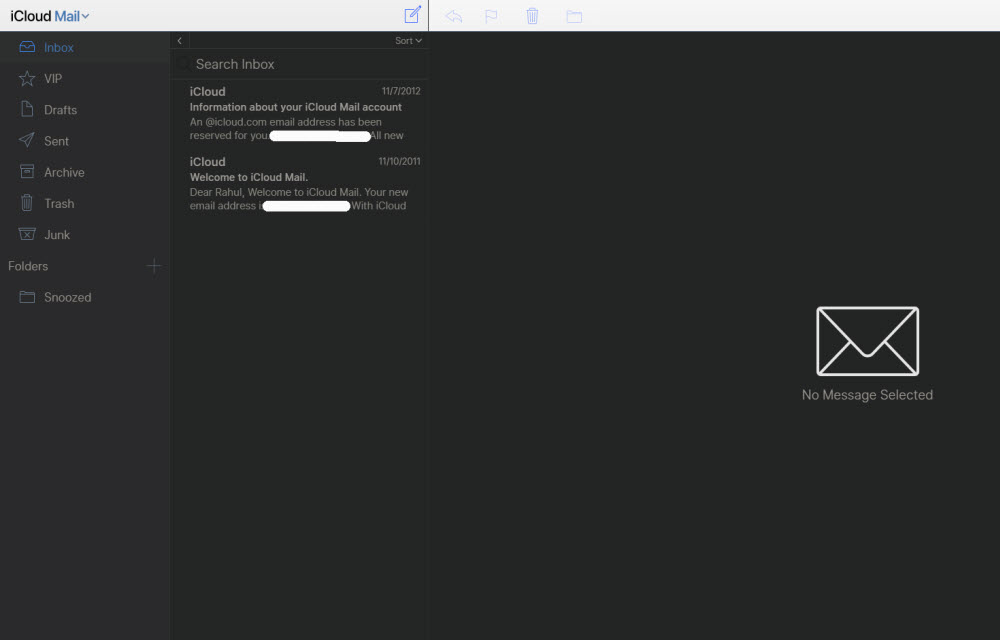
How to block emails on iCloud mail?
iCloud mail is a good emailing service from the very popular Apple. iCloud mail is one of the services comes with every Apple user. An Apple ID is essential for every Apple device user including Mac, iPhone, and iPad. The iCloud email is a feature-rich email service with a decent user-interface. No matter whether it…

How to fix Wuauserv high CPU usage error in Windows 10
Wuauserv error has encountered for many Windows 10 users. It drastically slows down the performance of the Windows 10 PC or laptop while it is running in the background. Usually, many services like svchost.exe and Windows update runs in the background and consumes a very low amount of system resources. But in the case of…

How to install a printer in Windows 10 in easy steps
The printer is must-have hardware for many users. Students, businesses, and offices printer have vast uses. Tweaking some settings in Windows 10 will let you add a new printer. Installing a printer in Windows 10 is a simple process. Microsoft made the installing and connecting printer is pretty easy and simple. To add a printer…

How to Disable File and Printer sharing in windows 10
Windows 10 has a feature to share its printer access to other devices. It is a pretty useful feature to print the documents, images from devices in the same network. However, it has some own disadvantages as well. If you don’t want other users to give access to your printer to print documents then you…

How to install AltStore on your iPhone or iPad
Usually, alternatives to the Apple App store requires jailbreak process which is not advisable to normal users. Jailbreaking needs technical knowledge to apply the process on the device and sometimes the device may brick. However, a developer Riley Testut created an alternative to the Apple App store which doesn’t require a jailbreak in order to…
What is idp.alexa.51 and how to remove it?
idp.alexa.51 is a very popular Alexa Trojan or Virus. The virus is found and identified by AVIRA, AVAST, and AVG antivirus software for the first time in 2016. How idp.alexa.51 will get infiltrate? The infiltration of idp.alexa.51 is done by installing third-party games and software comes with standard and advanced installation processes. During the installation…

How to remove malware infected by 123vidz website?
123vidz acts as a genuine video streaming service but at the end, you will find it is a fraud website works to collect your personal information, credit card details and it also infects malware into your PC. In the very first impression, 123vidz looks like a normal website offering various entertainment video clips and lets…

Here’s how to enable DNS-over-HTTPS (DoH) in Google Chrome
We have seen that there are a lot of breaches in recent times thanks to the information on the Internet being trespassed by hackers. While most of these breaches happen due to some kind of malware, there are instances where there is no fault of your own. Basically, attackers try to intercept your traffic and…

How to scrape large amounts of SERPs without being blocked
SERP stands for Search Engine Results Page. In the world of rankings and SEO, it’s a norm to keep track of the website ranking, and there’s only one way to do that, which is to scrape the search results. It doesn’t matter if you’re tracking the results or doing some cool project where you need…

How to identify real download buttons in a website
In most cases, download links and buttons are annoying and confusing. If you click on the wrong button, you end up with lots of pop-ups and advertisements windows open. The ads are used by the download providers to earn extra income from the website. Many third-party ad services use various forms of ad formats and…

How to remove or disable ads from your MIUI-based Xiaomi smartphone
We have seen Xiaomi getting a lot of flak regarding the advertisements seen on MIUI. Now, there is no way that any smartphone manufacturer should be placing ads on the UI. This is even after a consumer pays anywhere between Rs. 5000 to 15000 to purchase the smartphone. On top of that, Xiaomi even acknowledges…

How to Use Google for a Reverse Phone Lookup
To do a reverse phone lookup with Google, type the full phone number (with the area code) into the Google search box, in quotes, like “888-999-1212”. If the number belongs to a business, a public listing or a known scam, it usually shows up in the first few results. Google does not have a dedicated…